Deploying Party Microservice on Docker
This section explains how to deploy the Party Microservice on the Docker. To do so, you must perform the following tasks:
Deployment Artefacts
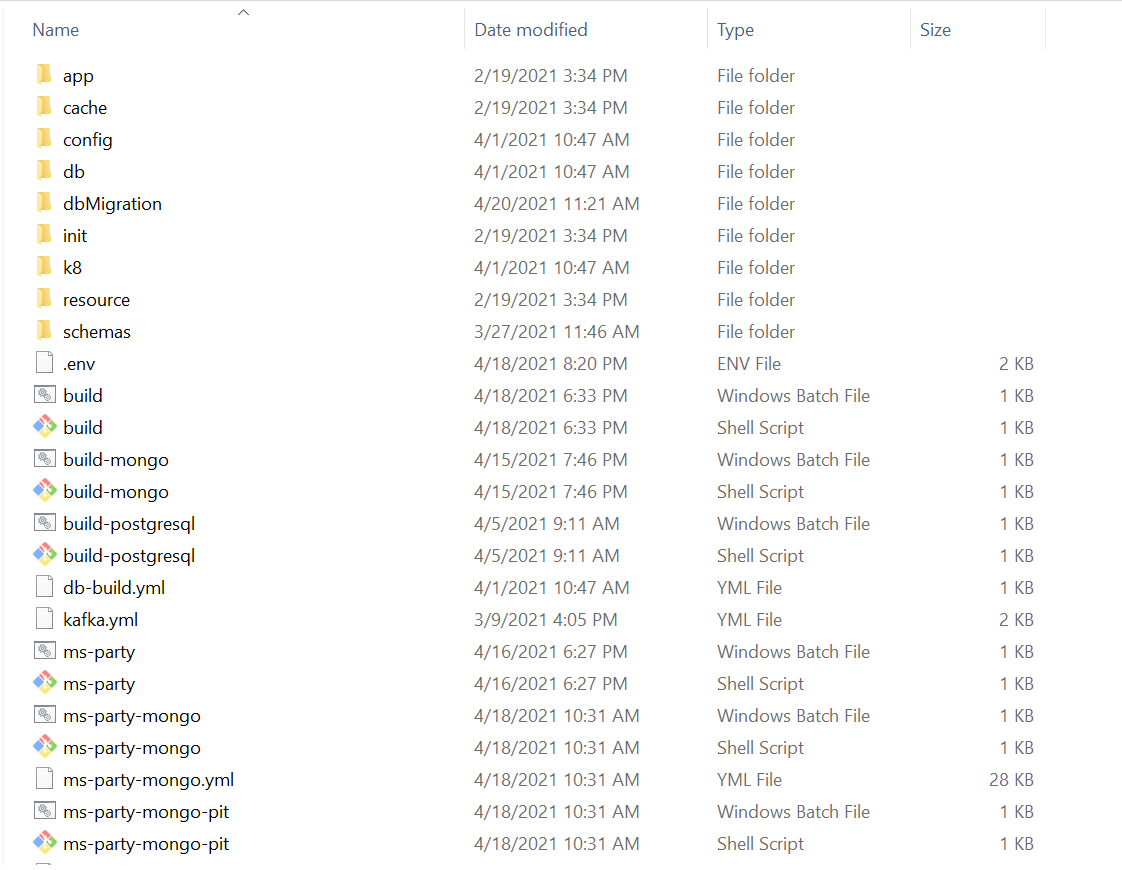
The folder structure of the Party Microservice package is available as a single release bundle. For example, ms-party-package-docker-<release_number>.zip.
Deploying Party Microservice on Docker
Prerequisite
Ensure to meet the following prerequisites before deploying Party Microservice on Docker.
- Install the Docker engine on your deployment environment. For more information about the installation, click here.
- Turn on the Linux containers in Docker.
To deploy the Party Microservice on Docker, follow these steps.
- Extract the
ms-party-package-docker-<release_number>.zipfile.
The extracted package contains the configuration files of Docker and the respective bat and sh files.
For MongoDB
Below are the installation steps for MongoDB
- To enable authorization and authentication, follow these steps:
- In addition to the API key, enable JWT Authentication ms-party-mongo.yml/ms-party-mongo-pit.yml.
- To enable security policies and access rights to the APIs, perform the XACML configurations in ms-party-mongo.yml/ms-party-mongo-pit.yml.
- Configure the events raised by Party Microservice. To do so, refer to Configuration.
- Below are the list of containers with its CPU memory limit.
Containers Memory Limit API 812M Inbox-Outbox 812M Ingester 1G MDAL Ingester 1G Scheduler 1G
- From the Command Prompt, go to the directory where the .bat and .sh files are available. Execute the following command that creates an image and a docker container for the image.
Script Description ms-party-mongo.bat/ms-party-mongo.sh The script is used to deploy the necessary components for a microservice. It includes the deployment of the streaming services to run the Microservice independently. ms-party-mongo-pit.bat/ms-party-mongo-pit.sh The script is used to deploy the necessary components for microservice. Data Event Streaming (DES) is presumed to be deployed and running already. The streaming services are not deployed. - Use the following commands for the respective platforms.
- For Windows:
ms-party-mongo.bat/ms-party-mongo-pit.bat up --build -d - For Linux:
ms-party-mongo.sh/ms-party-mongo-pit.sh up --build -d
- For Windows:
- After the successful deployment, load the database, collections, and reference data(master data) into the Mongo database for the Party Microservice.
- After the Party Microservice is up and running on Docker, check the API's in the package. To know more on BackOffice Ingestion configurations, refer to Ingestion.
- If DES and Party are running in different machine, add extra host fields with DES IP for Kafka and Schema registry in API and then Ingester container in ms-party-postgresql-pit.yml.
-
The structure of the URL of APIs is as follows:
- Base Path: http://<IP_ADDRESS>:<PORT>/<context-root>/api/<version>/
- For example, http://localhost:8000/ms-party-api/api/v3.0.0/party/parties.
- The resource path of the endpoint is available in the swagger document of the respective APIs.
- A sample endpoint of the party could be http://localhost:8000/ms-party-api/api/v3.0.0/party/parties.
Alternatively, you can use Health Check API to obtain the Microservice status.
For PostgreSQL DB
Below are the installation steps for PostgreSQL DB
- To enable authorization and authentication, follow these steps:
- In addition to the API key, enable JWT Authentication ms-party-postgresql.yml/ms-party-postgresql-pit.yml.
- To enable security policies and access rights to the APIs, perform the XACML configurations in ms-party-postgresql.yml/ms-party-postgresql-pit.yml.
- Configure the events raised by Party Microservice. To do so, refer to Configuration.
- From the Command Prompt, go to the directory where the .bat and .sh files are available. Execute the following command that creates an image and a docker container for the image.
Script Description ms-party-postgresql.bat / ms-party-postgresql.sh To deploy all the necessary components for a Microservice including streaming services will be deployed, in order to run the Microservice independently. ms-party-postgresql-pit.bat / ms-party-postgresql-pit.sh To deploy only the components necessary for microservice. Data Event Streaming (DES) is presumed to deployed and running already. The streaming services will not be deployed. - Use the following commands for the respective platforms.
- For Windows:
ms-party-postgresql.bat/ms-party-postgresql-pit.bat up --build -d - For Linux:
ms-party-postgresql.sh/ms-party-postgresql-pit.sh up --build -d
- For Windows:
- After the successful deployment, load the database, collections, and reference data(master data) into the PostgreSQL DB for the Party Microservice.
- After the Party Microservice is up and running on Docker, check the API's in the package. To know more on BackOffice Ingestion configurations, refer to Ingestion.
- If DES and Party are running in different machine, add extra host fields with DES IP for Kafka and Schema registry in API and then Ingester container in ms-party-postgresql-pit.yml.
- Base Path: http://<IP_ADDRESS>:<PORT>/<context-root>/api/<version>/
- For example, http://localhost:8000/ms-party-api/api/v3.0.0/
- The resource path of the endpoint is available in the swagger document of the respective APIs.
- A sample endpoint of the party could be http://localhost:8000/ms-party-api/api/v3.0.0/party/parties.
The structure of the URL of APIs is as follows.
Alternatively, use Health Check API to obtain the Microservice status.
Undeployment
To stop and delete the existing container, run the following command from the party docker's location.
For MongoDB
- For Windows: ms-party-mongo.bat/ms-party-mongo-pit.bat/ms-party-postgresql.bat/ms-party-postgresql-pit.bat
- For Linux:ms-party-mongo.sh/ms-party-mongo-pit.sh/ms-party-postgresql.sh/ms-party-postgresql-pit.sh down
For PostgreSQL DB
- For Windows:ms-party-mongo.bat/ms-party-mongo-pit.bat/ms-party-postgresql.bat/ms-party-postgresql-pit.bat
- For Linux:ms-party-mongo.sh/ms-party-mongo-pit.sh/ms-party-postgresql.sh/ms-party-postgresql-pit.sh down
In this topic