User Audit
An audit log is used to support customer enquiries, ensure compliance, and detect suspicious behaviour. Each audit log entry records the user's identity, actions, and business operations.
The following actions are performed in user audit:
- Audit Data Collection - The platform framework captures the audit logs of the user's transactions.
- Audit Data Report - It fetches the audit logs with an appropriate structure and store it in the Event Store Micorservice (ESMS).
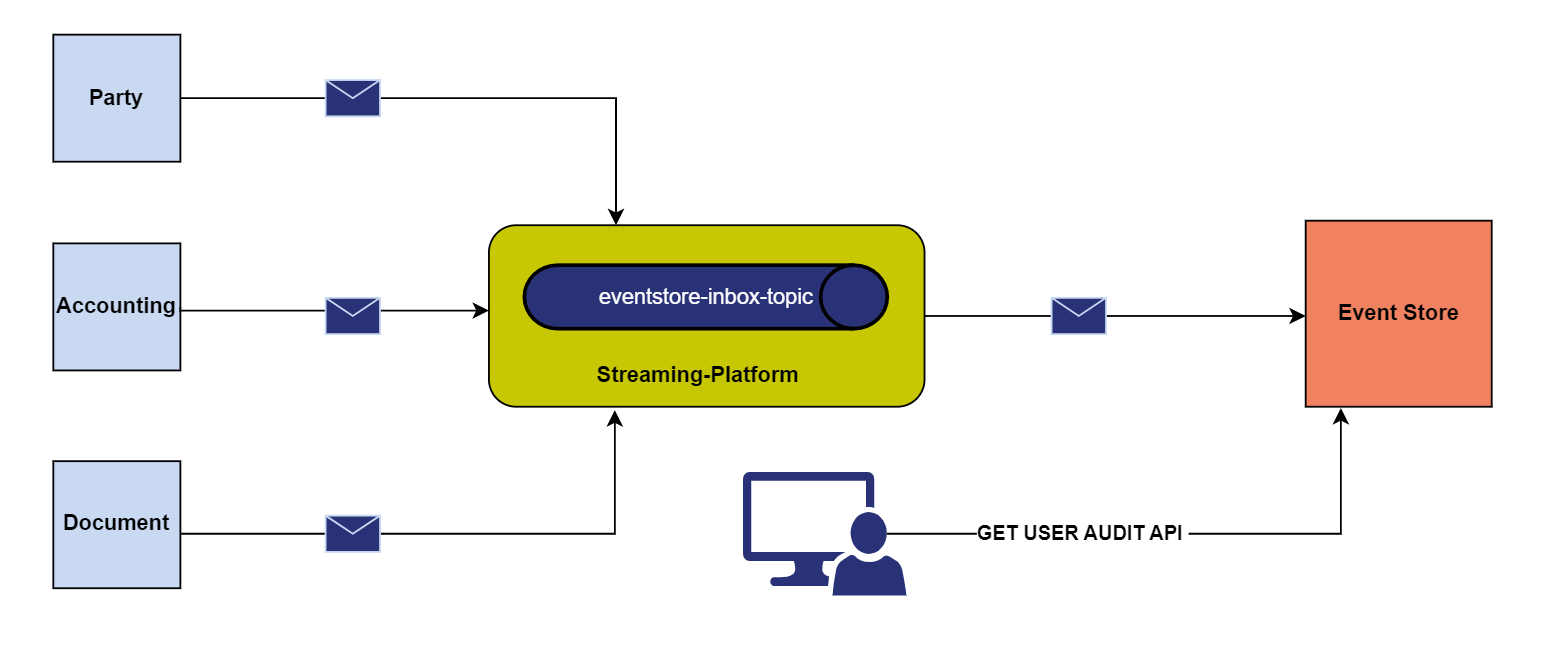
The table below defines the parameters used in audit data collection and report.
UserId and BusinessKey are the mandatory parameters in the audit data report.
| Parameters | Description |
|---|---|
| requestId | A unique id of an event |
| operationId | A unique id of the operation |
| userId | A unique identifier of the user who performed the operation |
| entityValues | The list of fields added, modified, and removed |
| businessKey | The resource ID on which the operation is performed |
| status | The status of the operation |
| auditTime | The audit time of the operation performed |
| fromDate | The date used to filter the audit logs after the given date |
| toDate | The date used to filter the audit logs before the given date |
| expand | The entity values of the statechange data (for example, expand=statechange) |
Statechange
The entity values contain the following:
- Statechange data that have old and new values
- Type of operations performed like added, modified, and deleted
The parameter expand=statechange is passed with the API URL to fetch the entity values of statechange.
Field Name
|
Application/Table name
In this topic