Framework Security Tool
The Security tool is used to encrypt the passwords which are stored as plain text in properties files or in environment variables. For encrypting the plain texts, you need some inputs, that is, a password and an algorithm which is used to either encrypt or decrypt the given input. These Passwords and Algorithm are stored in Environment Variables.
Execution of Framework Security Tool Jar
Jar is available in the infra package.
To execute the framework security tool,
- Download the security tool using the path microservice-package-m2repo-21.0.39\com\temenos\microservice\framework\ms-framework-security-tools\21.0.39\ms-framework-security-tools- xxxxxx.jar
java -jar ms-framework-security-tools-xxxxxx.jar provides necessary inputs to get the encrypted value for plain text.
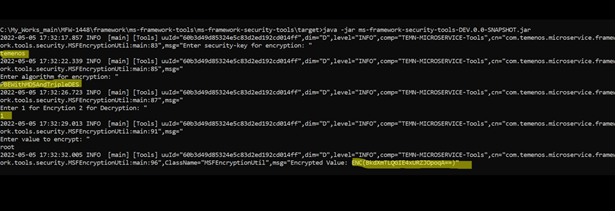
The above image shows that temenos is security key and PBEWithMD5AndTripleDES is an algorithm which are the two mandatory values to encrypt the plain text.
The encrypted value (output) for the given plain text root is ENC(BkdXmTLQGIE4xURZJOpoqA==).
Configuration properties in .yaml and .bat file
For .yaml file:
- Add the security key to the environment using temn.msf.db.pass.encryption.key.
- Add the algorithm to the environment using temn.msf.db.pass.encryption.algorithm
For .bat file:
- Add the security key to the environment using encryption_Key=temenos.
- Add the algorithm to the environment using encryption_Algorithm=PBEWithMD5AndTripleDES
Sample entry for .bat file
- Encryption Key - encryption_Key=temenos
- Encryption Algorithm - encryption_Algorithm=PBEWithMD5AndTripleDES
- DB_PASSWORD=ENC(BkdXmTLQGIE4xURZJOpoqA==) - An encrypted Password using ms-framework-security-tool.
DB secrets
A Secret is an object that contains a small amount of sensitive data such as a password, a token, or a key.
You can fetch the DB username and DB password through K8 secrets for both MySQL DB and MSSQL DB when db_Enable_Secret set to 'Y'.
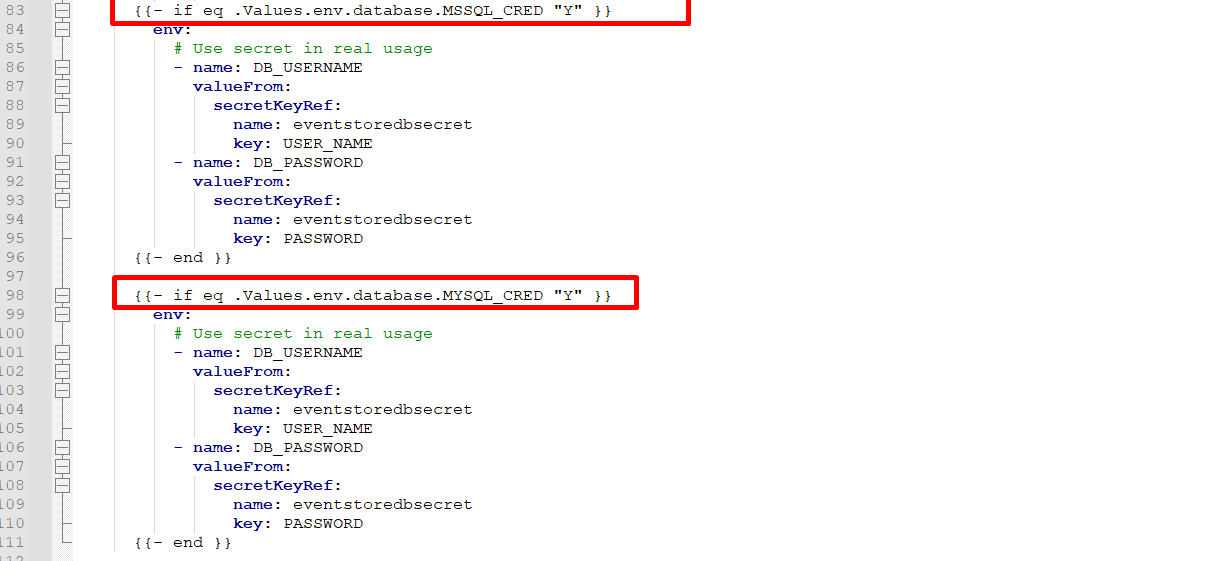
For xxsql-db-secrets.yaml, navigate to k8/on-premise/db/database/xxsql/xxsql-db-secrets.yaml
In this topic