AWS Multi-shards and Multi-streams
This section describes about enabling the processing of AWS multi-shards and multi-streams.
The EKS Ingester consumer feature supports multi-shards and multi-streams with the help of the latest Kinesis Client Library (KCL) version 2.3.4 with Ingester, which allows to consume records in the Kinesis Data Stream. The KCL is a library that simplifies the records consumption and serves as a layer of abstraction over the AWS SDK Java APIs for Kinesis Data Streams.
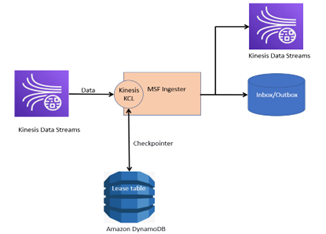
Configuring AWS Multi-shards, Multi-part and Multi-streams
The following property keys should be set to configure the consumer properties and enable the Avro Ingester.
|
Property Key |
Sample Value |
Description |
|---|---|---|
|
|
True |
If the value is set as true, it enables the Avro Ingester. The variables should be configured as:
|
|
|
false |
If the value is set as true, it enables the Reprocess Ingester. The variables should be configured as:
|
|
|
true |
If the value is set as true, it enables the Multipart Ingester. The variables configuration should be:
|
|
|
30 |
Indicates the maximum time (in seconds) to wait for a future-request from Kinesis to complete. |
|
|
10000 |
Indicates the maximum number of records to fetch from Kinesis in a single GetRecords call. |
|
|
1000 |
Indicates the sleep value for the ShardConsumer to use in between calls and getRecords. |
|
|
0 |
Indicates the wait duration before deleting the leases for this stream. This is a strategy for auto-detection of the old or former streams based on the streamConfigList and to perform deferred deletion based on leases’ deletion wait time. |
Enabling AWS Multi-shards, Multi-part and Multi-streams using KCL
The following section describes about enabling the processing of AWS multi-shards and multi-streams using KCL.
 Kinesis Client Library Framework Implementation
The EKS Ingester consumer functionality supports multi-shards, multi-part, and multi-streams with the help of KCL. The KCL is a library that simplifies the records consumption and also serves as a layer of abstraction over the AWS SDK Java APIs for Kinesis Data Streams. It handles load balancing across multiple instances by responding to instance failures, checkpointing processed records, and reacting to re-sharding.
The latest KCL version is recommended to enable multi-stream processing with the KCL consumer application.
KCL Processing Logic
The KCL acts as an intermediary between the Temenos record processing logic and the Kinesis Data Streams. It performs the following tasks:
- Connects to the data stream.
- Enumerates the shards within the data stream.
- Uses leases to coordinate shard associations with its workers.
- Instantiates a record processor for every shard it manages.
- Pulls data records from the data stream.
- Pushes the records to the corresponding record processor.
- Checkpoints processed records.
- Balances shard-worker associations (leases) when the worker instance count changes or when the data stream is re-sharded (shards are split or merged).
The stream name should be in the standard format, that is, the identifier of the data stream consumer has to be: account-id:StreamName:streamCreationTimestamp.
KCL Scheduler
The scheduler is a high-level class that a KCL consumer application instance uses to start processing data. It initialises and oversees various tasks, including syncing shard and lease information, tracking shard assignments, and processing data from the shards. It provides the KCL with the configuration information for the consumer application. The conguration information includes the name of the data stream whose data records this KCL consumer application is going to process and the AWS credentials that are needed to access this data stream. It also launches the specific KCL consumer application instance to deliver data records from the data stream to the record processors.
KCL Lease Table
KCL uses a unique lease table (stored in the Amazon DynamoDB table) to track the shards in a KDS data stream that are being leased and processed by the KCL consumer application’s scheduler.
Confluent Schema Registry for AVRO Ingester
As Kinesis represents data as bytes, it is common to use an external schema to serialise and de-serialise data into bytes according to that schema. Rather than sending a copy of that schema with each message, which is an expensive overhead, it is common to keep the schema in a registry and send just an ID with each message.
The Confluent Schema Registry provides an easy way to store, retrieve and manage schemas. It exposes several useful RESTFul APIs. The schemata are stored by subject, and by default, the registry does a compatibility check before allowing a new schema to be uploaded against a subject.
Each producer is aware of the schema it is working with, and each consumer must either consume data in any format or have a specific schema it prefers to read. The producer consults the registry to establish the correct ID for usage when sending a message. The consumer uses the registry to fetch the sender's schema. When the consumer is aware of both its preferred message format and the sender's schema, the Avro library can convert the data into the consumer's preferred format.
Dependency of KCL Library
The following dependency of the KCL library is available in the framework for processing multi-shards.
<dependency>
    <groupId>software.amazon.kinesis</groupId>
    <artifactId>amazon-kinesis-client</artifactId>
    <version>${aws.kcl.kinesis.client.verison}</version>
</dependency>
Deployment of Schema Registry
The following schema registry must only be deployed while enabling the EKS Avro Ingester. To deploy the schema registry,
- Create a repository in AWS, as mentioned below.
aws ecr create-repository --repository-name <repositoryname> --region <ecrregion>aws ecr create-repository --repository-name cp-schema-registry --region us-east-2 - Create a repository for Confluentinc images using the below commands.
Pull:
docker pull confluentinc/cp-schema-registry:5.2.2
docker pull confluentinc/cp-kafka:5.2.2
docker pull confluentinc/cp-zookeeper:5.2.2

Tag:
docker tag confluentinc/cp-schema-registry:5.2.2 <<ECRNAME>>/cp-schema-registry:5.2.2
docker tag confluentinc/cp-kafka:5.2.2 <<ECRNAME>>/cp-kafka:5.2.2
docker tag confluentinc/cp-zookeeper:5.2.2 <<ECRNAME>>/cp-zookeeper:5.2.2

Push:
docker push <<ECRNAME>>/cp-schema-registry:5.2.2
docker push <<ECRNAME>>/cp-kafka:5.2.2
docker push <<ECRNAME>>/cp-zookeeper:5.2.2
- Start the schema registry in EKS using the below command.
helm install kafka-oss cp-helm-charts --version 0.5.0 -n kafka --set cp-zookeeper.image=<<ECRNAME>>/cp-zookeeper --set cp-zookeeper.imageTag=5.2.2 --set cp-kafka.image=<<ECRNAME>>/cp-kafka --set cp-kafka.imageTag=5.2.2 --set cp-schema-registry.image=<<ECRNAME>>/cp-schema-registry --set cp-schema-registry.imageTag=5.2.2 --create-namespace
In this topic