Features
This section lists the features supported in microservice. The database upgrade can be performed in different ways based on the user requirements. All the database upgrade features are implemented in all the stacks including Docker, K8, Azure, AWS, J2EE and Knative environments.
Database upgrade as a service can be implemented in the corresponding microservices based on the requirements and environment. It supports creation of database objects (tables, indexes, and so on) in the database environment. Currently, it supports the execution of DDL scripts. The following are the different ways to implement auto upgrade database.
 Infrastructure API service
In the Microservice (MS) Framework layer, two Infrastructure API functions are created namely InitiateDbMigration and GetDbmigrationStatus, which can be used to execute the DDL scripts in the environment. These Infrastructure API functions support both SQL and NoSQL databases.
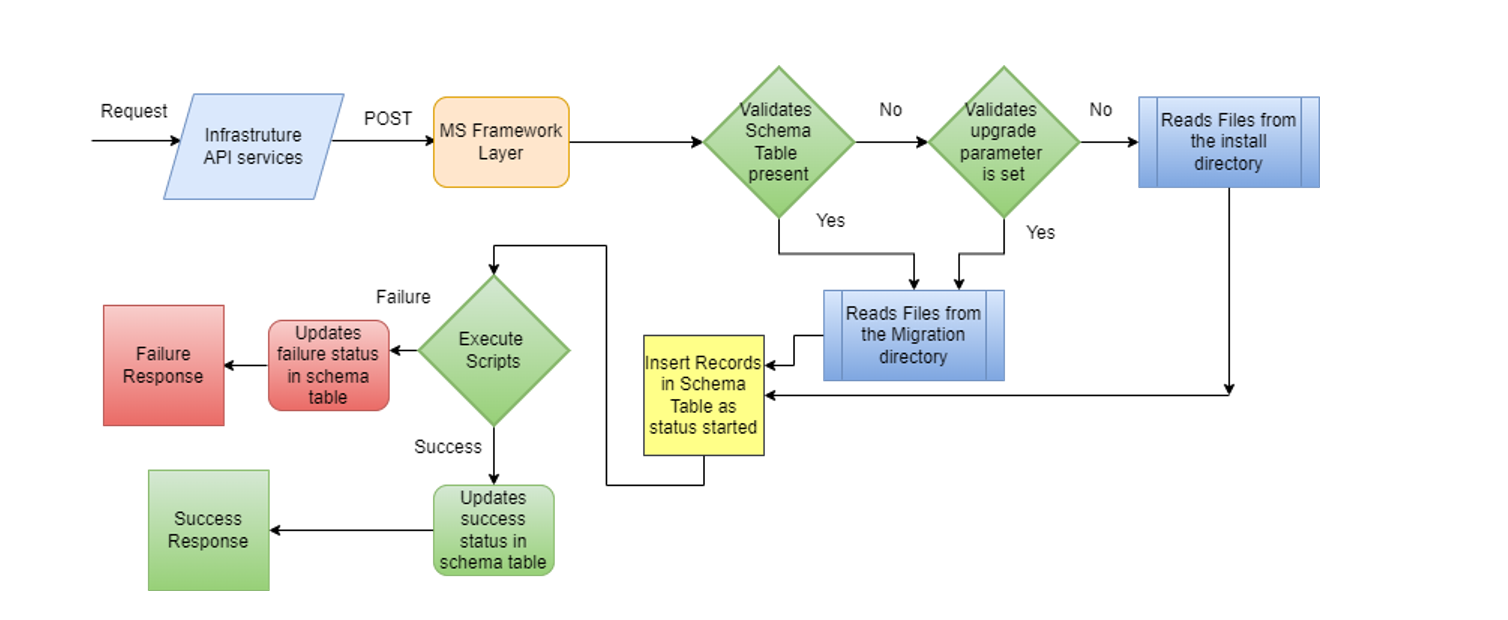
When the API request reaches the framework layer, it internally validates whether the schema history table is available.
- If the schema history table is available, it considers the request to execute the migration scripts which are available in the migration scripts directory and by updating the schema history table for the status table versioning.
- If the schema history table is not available, it checks whether the upgrade parameter is set to an environment variable. If the upgrade parameter is not set, it reads the script files from the install directory as a new installation for the microservices.
Once the scripts files are read from the directory, the API functions start executing the scripts internally in the environment. Before executing the script file, it creates an entry for the script files as status Started in the schema table. After successful execution of the script files, it updates the status as Success in the table. Thus, it acts as a versioning for the script execution. If any error occurs during the script execution, it logs the exception in the table while updating the status as Failure.
- DDL - CREATE, ALTER (Table and Index)
- DML -INSERT, UPDATE, DELETE (Records)
In SQL based MS database, the upgrade feature is useful when the JPA (Java Persistence API) feature is disabled. For SQL based MS, JPA property is enabled by default, which creates table and indexes automatically based on the JPA entity files. Scripts required for the SQL based databases are auto-generated during the Appinit enable process based on the SQL JPA files. SQL scripts are generated and stored in MS-Data\src-gen\database\scripts.
|
FILE FORMAT |
MONGO |
POSTGRESQL |
DYNAMO |
MYSQL |
MSSQL |
|---|---|---|---|---|---|
|
DDL |
Supported |
Supported |
Supported |
Supported |
Supported |
|
DML |
Not Supported |
Not Supported |
Not Supported |
Not Supported |
Not Supported |
|
INPUT FILE FORMAT |
Entity File |
Entity File |
Entity File |
SQL scripts |
SQL scripts |
|
FILE AVAILABILITY |
Existing |
Existing |
Existing |
Autogenerated |
Autogenerated |
For NoSQL based databases, the db objects are created using the entity files, which the user adds in the model project.

During execution, the API functions read the entities and scripts files available in the classpath and executes the objects in the environment where it is deployed. Once the scripts are executed, it creates an entry in the schema history table for the corresponding microservices version which is available in the version.properties file under classpath.
The Version.properties file, contains the version details of the microservices, is auto-generated during the build time and it is available in the model project as shown below:


API URL: http://localhost:<port>/<msf-name>/api/v1.0.0/dbmigration
InitiateDbmigration
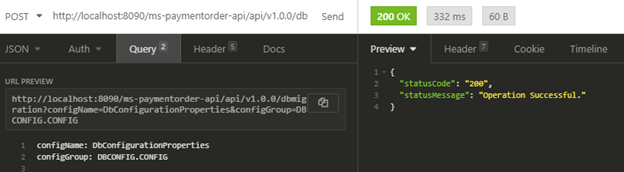
InitiateDbmigration is a POST API without body that reads the script files available in the location, based on the environment variables and executes the scripts in the corresponding environment. It also inserts a record in the schema history table. In case of failure, it writes the exception in the result column of the schema history table and updates the status as Failure with the script name, version and type entries.
The request for the InitiateDbmigration API is shown below. In this, configName and configGroup query parameters are not mandatory.
GetDbMigration
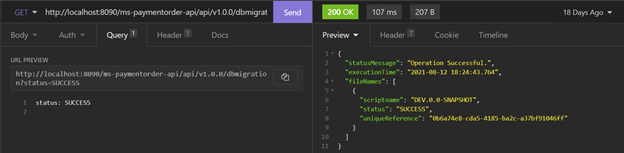
GetDbMigration is a GET API that fetches all the records from the schema history table based on the query parameter. The Status is a mandatory query parameter that the user has to pass during the run time. It is an Enum variable which holds the below values.
- SUCCESS ("1")
- FAILURE ("-1")
- ACCEPTED ("2")
- STARTED ("0")
The response contains the script name, version and status with the execution time form the table. The request and response for the API are shown below:
Class Implementation and Sample APIs
In a microservice, for each endpoint, there is a class implementation. For a particular end point, there is interface, class and a method to be invoked. When the user invokes the API, this class, interface and the method are executed to initiate the DB migration and to get the status of the DB upgrade.
InitiateDBMigration
Framework provides an interface to initiate the DB migration process.
- Interface: com.temenos.microservice.framework.dbmigration.core.InitiateDbMigration
- Class: <class.package.name>.InitiateDbMigrationImpl
- Method: public InitiateDbMigrationResponse invoke(Context ctx, InitiateDbMigrationInput input) throws FunctionException {}
The sample API is given below.
PUThttp://localhost:8090/ms-paymentorder-api/api/v1.0.0/api/v1.0.0/dbmigration?configName=DbConfigurationProperties&configGroup=DBCONFIG.CONFIG
{
       “statusMessage”: “Operation Successful.”
}
GetDbMigration
The GET method results the status of DB upgrade.
- Interface: com.temenos.microservice.framework.dbmigration.core.GetDbMigration
- Class: <class.package.name>. GetDbMigrationImpl
- Method: public GetDbMigrationResponse invoke(Context ctx, GetDbMigrationInput input) throws FunctionException {}
The sample API is given below.
GEThttp://localhost:<port>/<msf-name>/api/v1.0.0/dbmigration
http://localhost:<port>/<msf-name>/api/v1.0.0/dbmigration{
“statusMessage”: “Operation Successful.”,
“versionDetails”:[
{
“version”: “DEV.0.0-SNAPSHOT”,
“status”: “SUCCESS”
},
{
“version”: “DEV.0.0-SNAPSHOT.01”,
“status”: “SUCCESS”
}
]
}
Schema History Table
The Schema History table acts a version control of the database. It tracks:
- The list of scripts that are executed in the schema
- The upgrades applied in the schema by keeping an entry (maintain the changes) in the table
- Migration checksums
- Whether the migrations are successful
Additionally, it also acts as a complete audit trail of all the changes performed against the schema. The table structure is shown below:
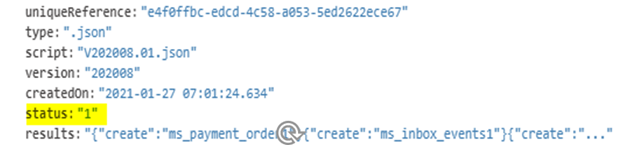
The table below shows the elements involved in the Schema History Table and their descriptions.
| Element | Description |
|---|---|
| uniqueReference | Indicates the primary key of this table which is an UUID value |
| type | Defines the script file type (.SQL, .json, and so on) |
| script | Indicates the script file name |
| version | Indicates the script version. File name of the scripts must include the version number in the V202008.01.json format. |
| createdOn | Indicates the script execution date and time |
| results | Holds the name of the objects that are successfully created |
| status |
Defines the execution status of the script in the schema. Status entries in the schema history table can be:
|
Appinit Service
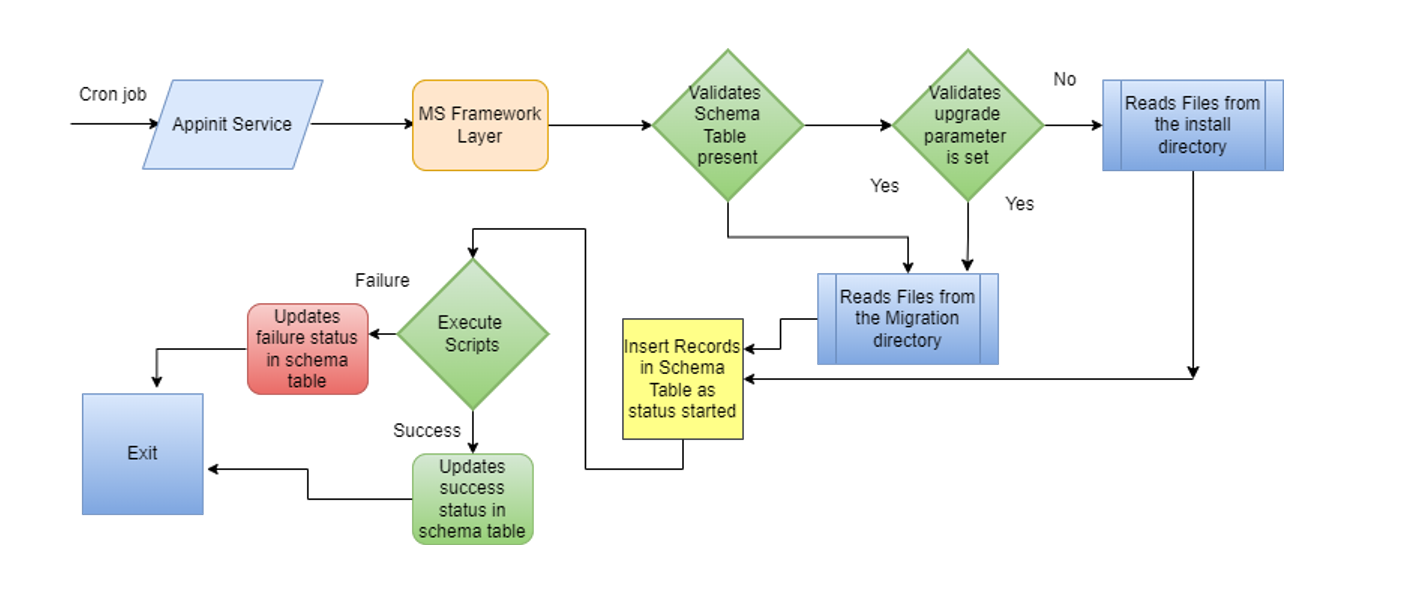
Database upgrade is implemented as an Onload Cron job for the Kubernetes stack and it is executed during the Onload instance in the environment. For Onload service, the Appinit folder is available inside the final pack, which is internally built as a docker image using the configuration specified.
Once the image is built, it can be executed as a helm package separately. The Appinit feature supports Mongo, Dynamo, PostgreSQL, MySQL, Oracle and MsSQL databases, allows to create tables and indexes and it does not support DML operations. For both SQL and NoSQL based environments, the database upgrade process helps to create tables and indexes scripts. Hence, the developer does not require to write any database specific scripts for the execution.
When the Appinit service is initialised during the Onload instance, the request reaches the framework layer and internally validates whether the schema history table is available.
- If the schema history table is available, it considers the request to execute the migration scripts which are available in the migration scripts directory by updating the schema history table for the status table versioning
- If the schema history table is not available, it checks whether the upgrade parameter is set to environment variable. If the upgrade parameter is not set, it reads the script files from the install directory as a new installation for the microservices.
Once the script files are read from the directory, the API functions starts executing the scripts internally in the environment. Before executing the script file, it creates an entry for the script files as status Started in the schema table. After successful execution of the script files, it updates the status as Success in the table. Thus, it acts like a versioning for the script execution. If any error occurs during the script execution, it logs the exception in table while updating the status as Failure.
Startup Servlet for J2EE
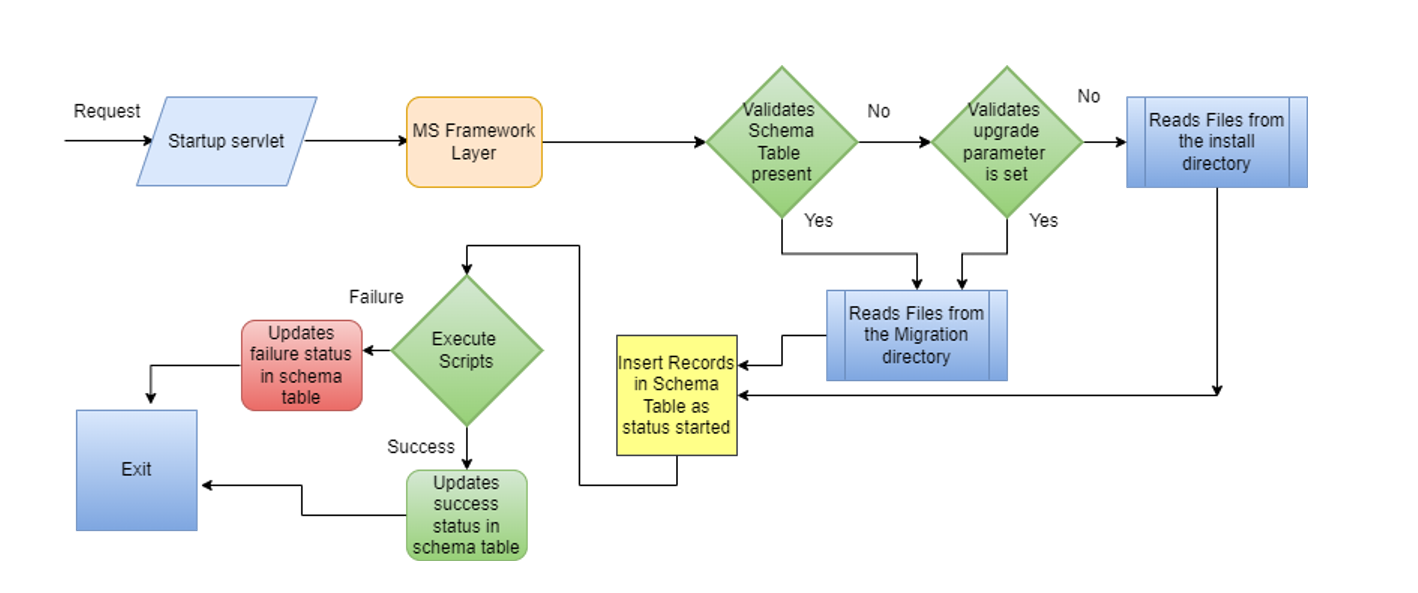
Database upgrade is implemented as a startup servlet for the J2EE stack. It is executed during the deployment of the application in the environment. Servlet entries and its configuration are specified by default in the framework, so the developer does not require to specify any additional configuration.
The startup servlet supports different databases such as Mongo, Dynamo, PostgreSQL, MySQL, Oracle and MsSQL databases, allows to create tables and indexes and does not support DML operations. For both SQL and NoSQL based environments, the database upgrade process supports the creation of table and index scripts. Hence, the developer does not require to write any database-specific scripts for the execution.
When the servlet context is initialised during the deployment, it raises a request to initiate function. Once the request reaches the framework layer, it internally validates whether the schema history table is available.
- If the schema history table is available, it considers the request to execute the migration scripts which are available in the migration scripts directory by updating the schema history table for the status table versioning
- If the schema history table is not available, it checks whether the upgrade parameter is set to environment variable. If the upgrade parameter is not set, it reads the scripts files from the install directory as a new installation for the microservices.
Once the scripts files are read from the directory, the API functions internally starts executing the scripts in the environment. Before executing the script file, it creates an entry for the script files as status Started in the schema table. After successful execution of the script files, it updates the status as Success in the table. Thus, it acts like a versioning for the script execution. If any error occurs during the script execution, it logs the exception in the table while updating the status as Failure.
DB Migration Process
Each microservice deployment has its own microservice SQL or NoSQL database to store data required for API endpoints.
The DB upgrade mechanism is available in all microservices to automatically create or update the microservice database tables using the data model defined in each microservice.
DB upgrade transforms an existing database object to a new version. It supports the following operations in microservice database.
- Adding new tables
- Adding columns to the existing tables
- Adding indexes to table columns
Script generation is a part of the DB migration process. Based on the script generated, the project build runs.
Script Generation
The database upgrade process enables the microservices to generate the DDL scripts during the build time for both install and migration phases based on the changes made in the entity model. When the entity model is altered, the corresponding changes are validated for backward compatibility using the data model validators. If the changes are backward compatible, then the install and the migration scripts for the microservices are generated.
Script generation differs for the NoSQL-based and SQL-based microservices.
Script Generation for NoSQL-Based Microservices
For NoSQL-based microservices, the database agnostic entity script files are generated inside the model project. When a model project is built during the maven life cycle, the validation and generation operations of the data model are performed automatically.
Script Generation for NoSQL-based microservices is of two phases.
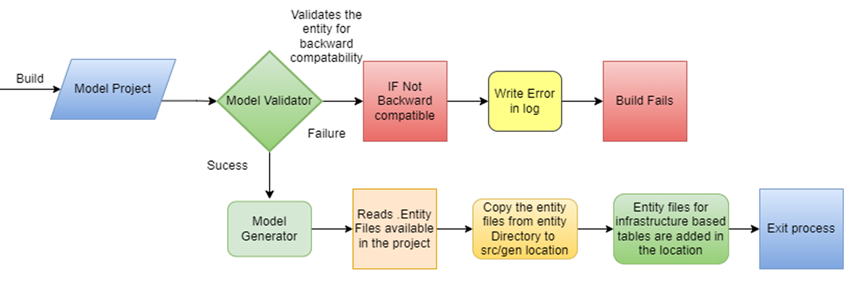
During the install phase, when the model project is built using maven plugin, the model validator validates the data model available inside the entity directory for the backward compatibility internally. If the model changes are not backward compatible, then the build fails after writing all the errors in the log files. If the changes do not affect the compatibility, then the model generator copies the entity files inside the gen folder. For the first-time installation of the microservices, there are few infrastructure tables that are mandatory for the microservices framework layer. These infrastructure-based entity files are generated inside the gen folder using the model generator.
The screenshot below shows the process of the build in the install phase.
Migration phase for the data model available in the model directory creates the entity files only for the changes added in the data model. When a table is altered or an index is added for the existing fields, the migration entities are generated only for the changes. Whereas, during the install phase, all the new changes along with the existing are considered as a fresh installation for the microservices.
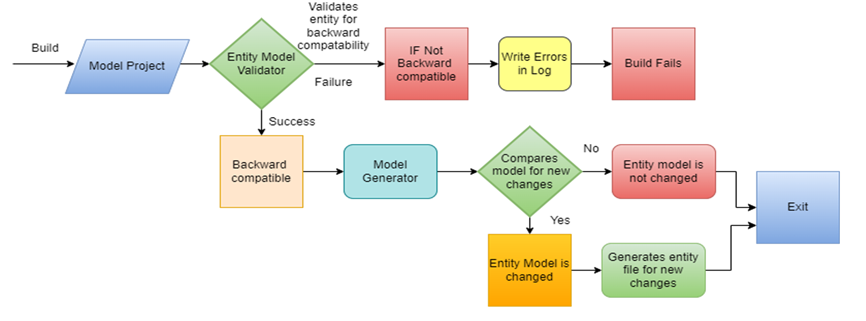
During the migration phase, when the model project is built using maven plugin, the model validator validates the data model available inside the entity directory for the backward compatibility internally. If the model changes are not backward compatible, then the build fails after writing all the errors in the log files. If the changes do not affect the backward compatibility, then the model generator performs the following:
- Compares the changes made in the data model with the previously promoted version from the artifactory.
- Generates the entity file which contains only the changes made in the data model.
The screenshot below shows the process of the build in the upgrade phase.
Script Generation for SQL-Based Microservices
For SQL-based microservices, the separate DDL scripts for the creation of the table and the indexes are created for the corresponding databases like MySQL, Oracle and MSSQL as there are certain internal data type changes prevails for different databases. or the SQL bases microservices, the data models, that is, the JPA entity files are available in the data directory. the corresponding scripts and the entity files are generated inside the data directory.
Script Generation for SQL-based microservices is of two phases.
During the install phase, when the data project is built using maven plugin, the model generator creates the entity model equivalent to the NoSQL-based microservices from the JPA entity files available inside the data directory. Once the entity files are created, the data model validator validates the created entity model for backward compatibility. If the changes are not backward compatible, the build fails after writing all the errors in the log file. If the changes do not affect the compatibility, then the model generator generates the equivalent DDL scripts for the table and index creation along with the table relationship scripts for the corresponding databases like MySQL, Oracle and MSSQL.
The screenshot below shows the process of the build in the install phase.
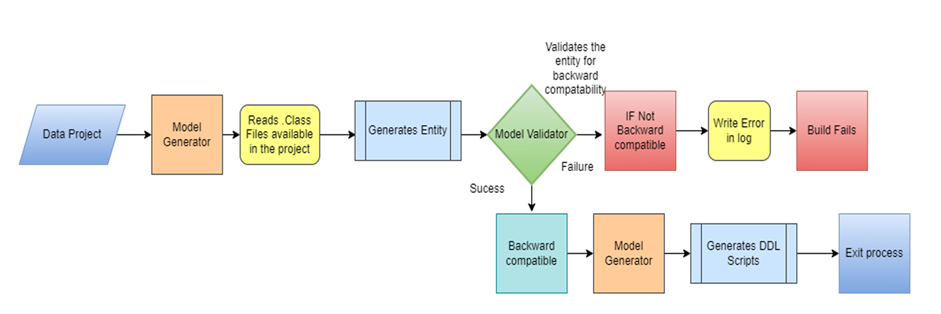
Migration phase for the data model available inside the data directory creates DDL script files only for the new changes added in the data model. When a table is altered or an index is added to the existing fields in the JPA entities, the migration scripts are generated only for the changes. Whereas, during the install phase, all the new changes along with the existing ones are considered as a fresh installation for the microservices.
During the migration phase, when the data project is built using maven plugin, the data model generator creates the entity files equivalent to the NoSQL entity files for the JPA entity available and internally validates if the data model is backward compatible. If the data model changes are not backward compatible, then the build fails after writing all the error in the log files. If the changes do not affect the backward compatibility, then the model generator performs the following:
- Compares the changes made in the data model with the previously promoted version from the artifactory.
- Generates the DDL file which contains only the local changes made in the JPA entity model.
The screenshot below shows the process of the build in the migration phase.
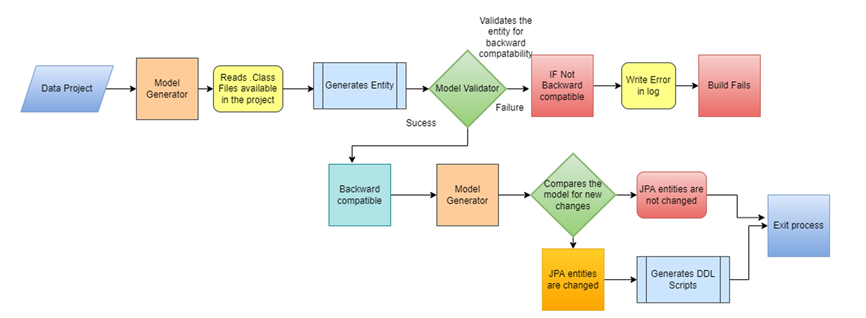
Environment Variables for DB migration
Set the below environment variables in windows command prompt or Linux shell prompt from where the microservices are started.
| Property Key | Sample Value | Description |
|---|---|---|
| DB.AUTO.UPGRADE | Y or N |
|
| DB.UPGRADE.START.VERSION | 202204.0.0 | Refers to the version string of the currently deployed version |
Microservice Platforms
DB upgrade is available for the following deployment platforms.
- K8-Onprem deployment
- Azure Serverless
- AWS serverless
- AKS
- EKS
APIs for Upgrade
Refer to the Infrastructure API service section for more information on the APIs involved in the DB Upgrade.
In this topic