Configuration API Rendering
Workbench dynamically generates an editor from the profile defined in the configuration API. This section explains how to render an editor dynamically from the configuration API.
The following steps guide you to render an editor and its contents dynamically:
- Define the endpoints in the configuration API.
-
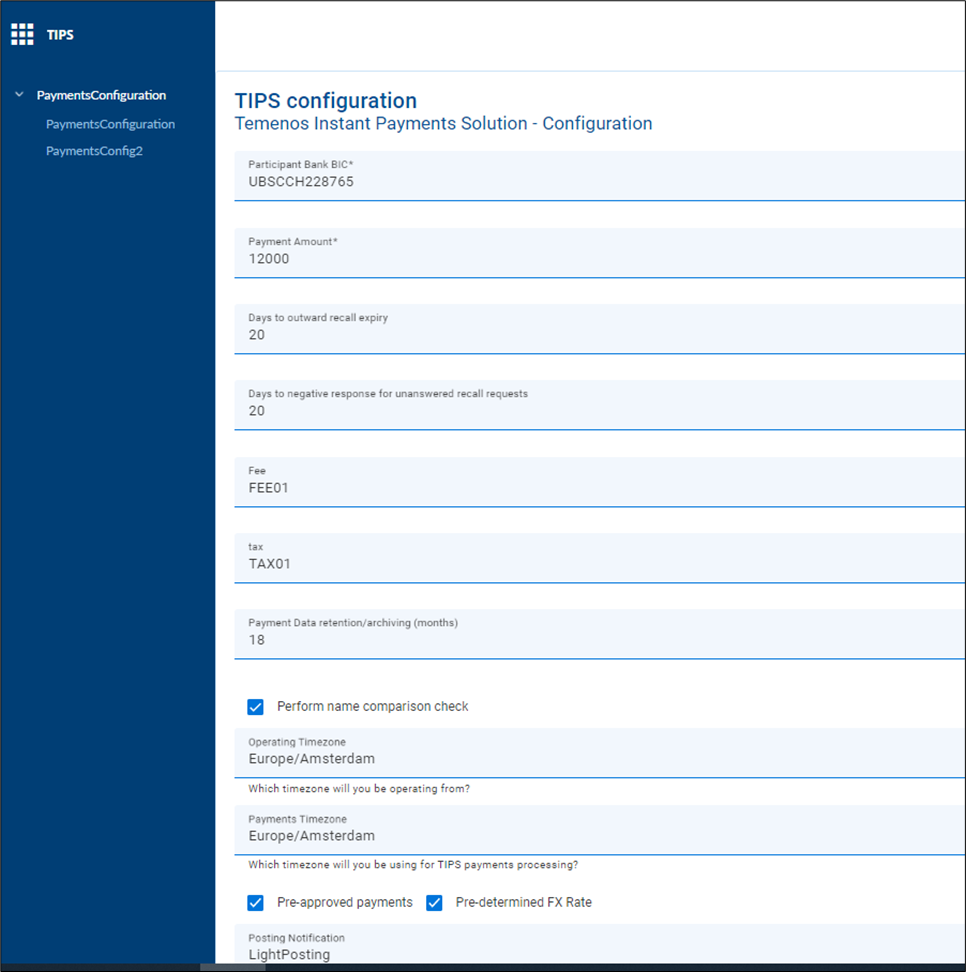
Configure the API to render the editor and its content dynamically, which creates an editable screen based on the properties in the API’s Open API definition.
The system retrieves the current configuration settings (GET) and populates the input from the editable screen with these values.
While editing the values, each control applies built-in validations and available constraints supplied in the API’s Open API parameter definition and indicates any errors, if encountered.
-
Make the required changes and save them. The system posts the updated settings (POST) to the API server.
The following is a sample code for API configuration, where the rootMenu name, menus and form along with the default content that must be displayed in the editor is configured.
"rootMenu": {
    "id": "rootMenu",
    "name": "TIPS",
    "defaultMenu": "paymentsConfiguration",
    "menus": [
      {
        "id": "paymentsConfiguration",
        "name": "PaymentsConfiguration",
        "target": "viz:uuxSwaggerRenderer"
        "targetInput" : {
            "metaDataApi" : {
                "url”: "https://locahost:9089/v1.0.0/api/swaggerDefinition",
                "swaggerId": "com.temenos.t365.tips.PaymentConfiguration-1.2.0",
                "operationId": "getConfig"
            },
            "dataApiEndpoint": {
                "url”: "https://locahost:9089/tips"
            }
        }
      },
      {
        "id": "paymentsConfig2",
        "name": "PaymentsConfig2",
        "target": "viz:uuxSwaggerRenderer"
        "targetInput" : {
            "metaDataApi" : {
                "url”: "https://locahost:9089/v1.0.0/api/swaggerDefinition",
                "swaggerId": "com.temenos.t365.tips.PaymentConfiguration-1.2.0",
                "operationId": "getConfig"
            },
            "dataApiEndpoint": {
                "url”: "https://locahost:9089/tips"
            }
        }
      }
    ]
}
The following screen capture shows the editor, which is rendered dynamically based on the sample API configured:
In this topic