Adding Embedded Rules
An embedded rule is when you reuse part of the logic for different rules. Instead of writing new rules, you can embed existing rules in them. You nest (embed) a rule within a new rule that has the same context.
Before you begin
Ensure that you have first added the context before you add an embedded rule.
Follow the steps below to add embedded rules.
- On the Rule Editor screen, click the Embedded Rules tab and then click the
 icon (Add Embedded Rule).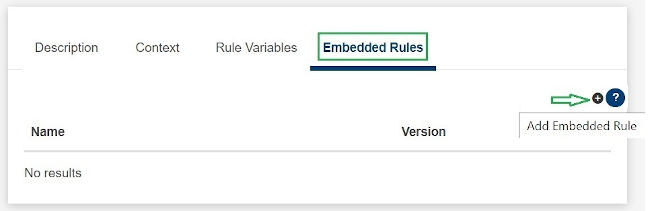
The Add Embedded Rule pop-up window is displayed with Name, Version and Context preselected. If the rule has more than one context, the Context drop-down list will contain all those contexts. All the rules matching the chosen context are listed.
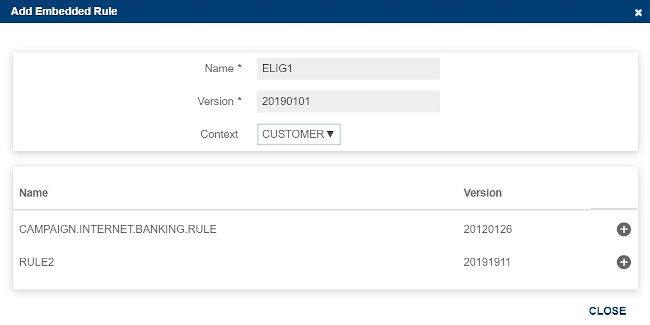
- Select a rule and click the icon to add the rule.
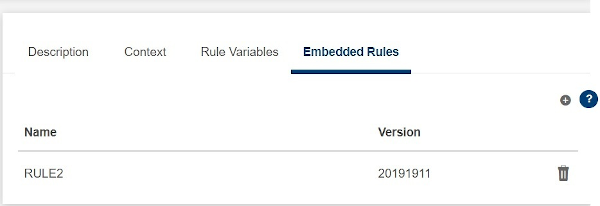
- Click CLOSE to close the pop-up window. The embedded rule is added. Alternatively, you can also press CTRL+space to add the rule.
After an embedded rule is added to the rule, you can use the system and context variables of the embedded rule in the rule script as well.
Field Name
|
Application/Table name
In this topic