Prerequisites
This section lists the software components required to install Design Studio Framework (DSF) Packager. You must configure the following software components in your system before installing Design Studio Framework (DSF) Packager.
- DSF Packager artefacts from the Distribution team
- IRF Catalog service in Temenos Transact environment
- License file from Product License team
- OFS Source in Database
- JMS Queue
DSF Packager Artefacts
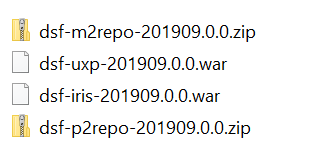
Distribution team provides WAR and JAR files as shown below. All the four files are available as a package.
IRF Catalog Service in Temenos Transact
Using IRISR18 service, Temenos Packager connects to Temenos Transact .The following files are available in Temenos Transact:
- By default, irf-t24catalog-services.war and t24-EB_CatalogueService-ejb.jar are available from R19.
- Ensure that irf-t24catalog-services.war and t24-EB_CatalogueService-ejb.jar are deployed in Temenos Transact environment and are up and running.
- Ensure the naming of t24-EB_CatalogueService-ejb.jar is t24-EB_CatalogueService-ejb.jar as configured in IRF services.
License
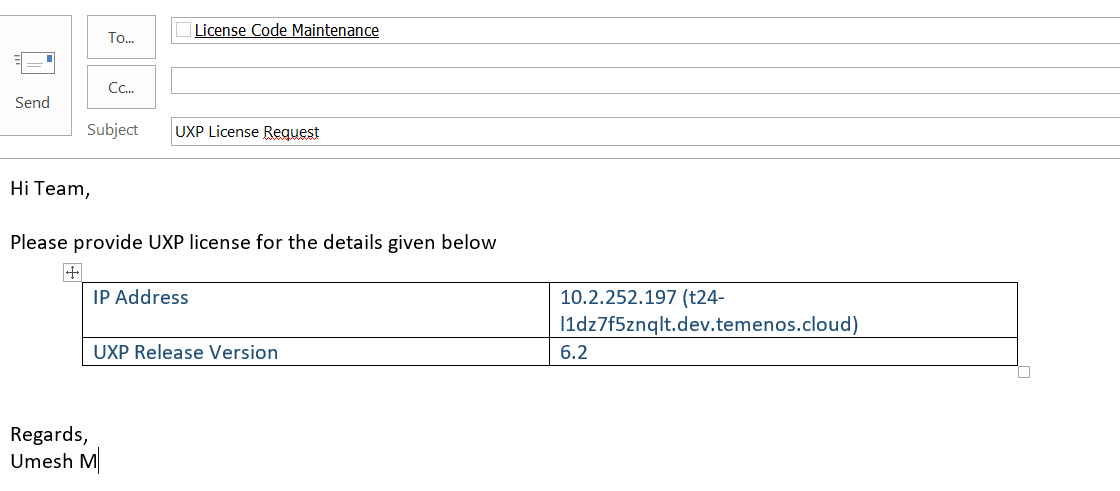
Temenos Workbench is bundled with Temenos UXP license. However, you need a valid license for the User Interface (UXP). Contact License Code Maintenance team to get a valid license for a particular UXP version and domain name (hostname or IP) with the details as shown in the following screen capture.
OFS Source in Database
This section explains the OFS Source configurations required in Temenos Transact and TAFJ.
Configuring Temenos Transact for OFS Source
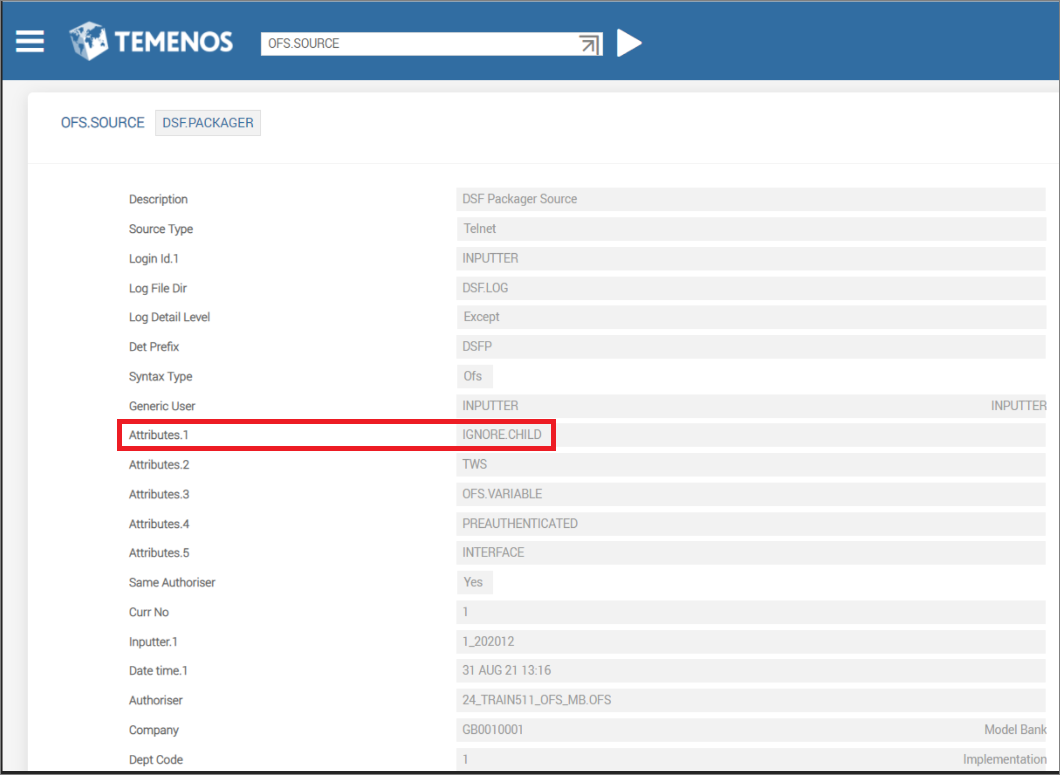
DSF.PACKAGER is the OFS source used for DSF Packager transactions. By default, it is available in Temenos Transact environment from 201910 release.
The following screen shows the record. Ensure you have the IGNORE.CHILD attribute in the record.
Configuring TAFJ for OFS Source
By default from 201908 release, TAFJJEE_EAR.ear contains DSF.PACKAGER as OFS Source for all Temenos Transact transactions from DSF Packager.
For releases from R19 to 201907, you must perform the following steps:
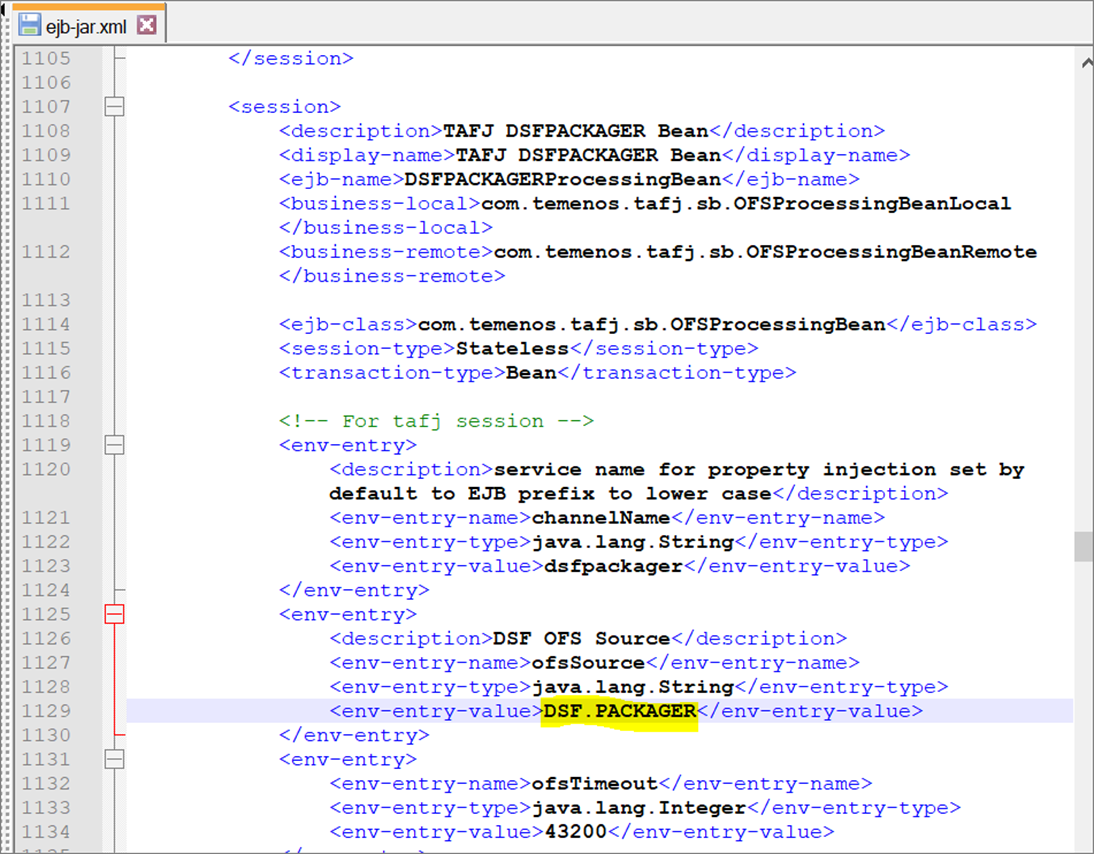
- In \TAFJJEE_EAR.ear\TAFJJEE_EJB.jar\META-INF\ejb-jar.xml, check for the <session> entry with display name as TAFJ DSFPACKGER Bean.
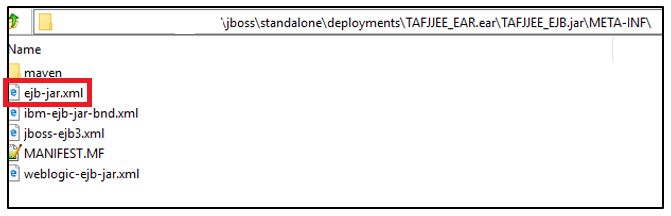
- Ensure that the OFS Source is DSF.PACKAGER as highlighted in the following screen.
Configuring TAFJ for JMS Queue
By default from the 201908 release, TAFJJEE_EAR.ear contains separate JMS queue for DSF Packager.
From R19 to 201907 release, configure the following:
- In the application server config XML (for example, standalone-utp.xml) available in Temenos\jboss\standalone\configuration, add the following entries:
- Configure MBD and EJB for the new JMS queue.
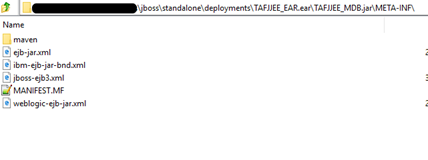
- In \TAFJJEE_EAR.ear\TAFJJEE_MDB.jar\META-INF\jboss-ejb3.xml, add a new <message-driven> entry for DSF Packager inside the <assembly-descriptor> tag. Also, ensure to have the <message-driven> entry for IRIS metadata.
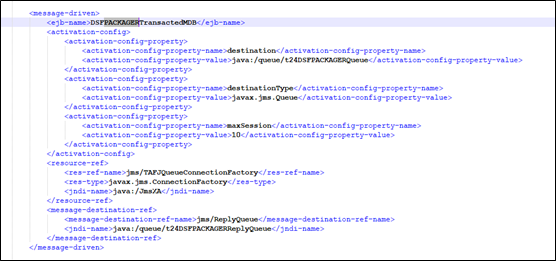
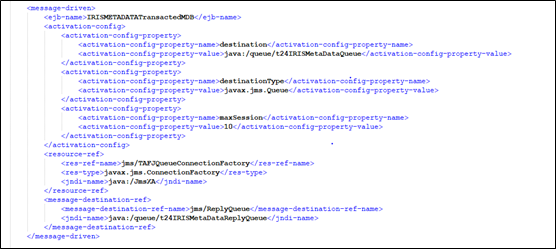
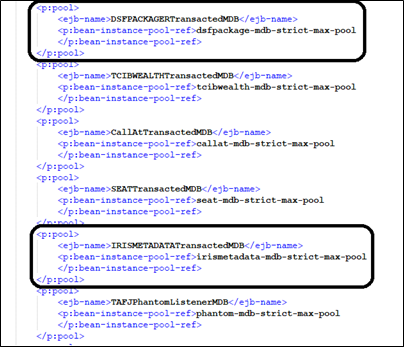
- Add the <p:pool> entry for DSF Packager and IRIS metadata in the <assembly-descriptor> tag.
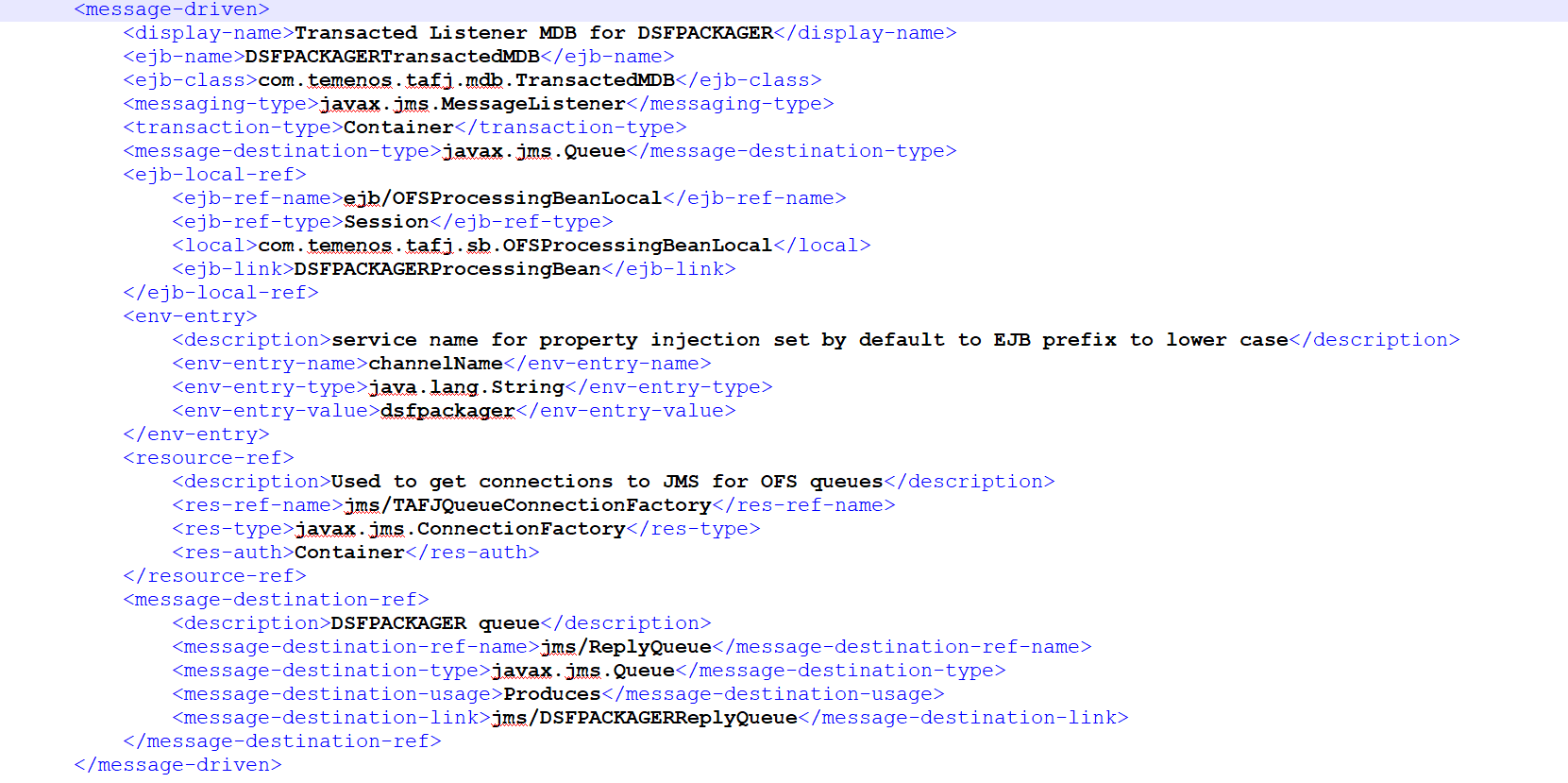
- In \TAFJJEE_EAR.ear\TAFJJEE_MDB.jar\META-INF\ejb-jar.xml, add the <message-driven> entry in the <enterprise-beans>.
- In \TAFJJEE_EAR.ear\TAFJJEE_EJB.jar\META-INF\ejb-jar.xml, add the <session> entry in the <enterprise-beans> tag as shown in the following screen.
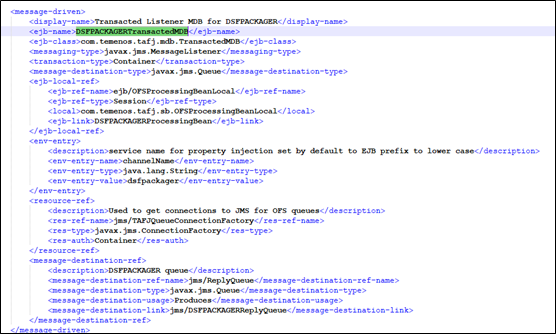
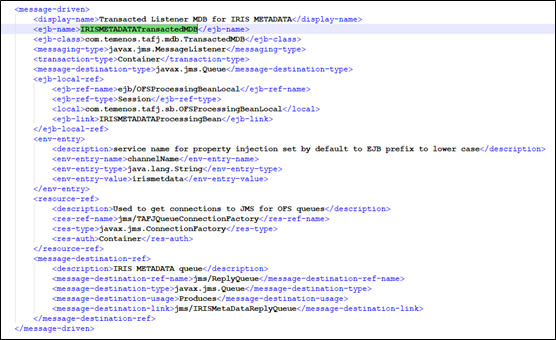
- In \TAFJJEE_EAR.ear\TAFJJEE_EJB.jar\META-INF\jboss-ejb3.xml, add the <session> entries in the <enterprise-beans> tag as shown in the following screen.
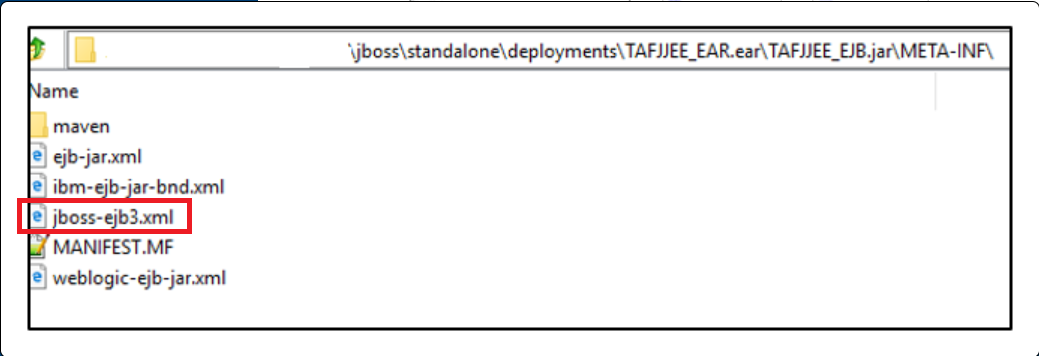
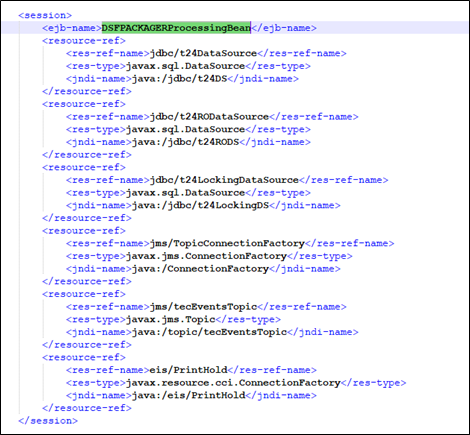
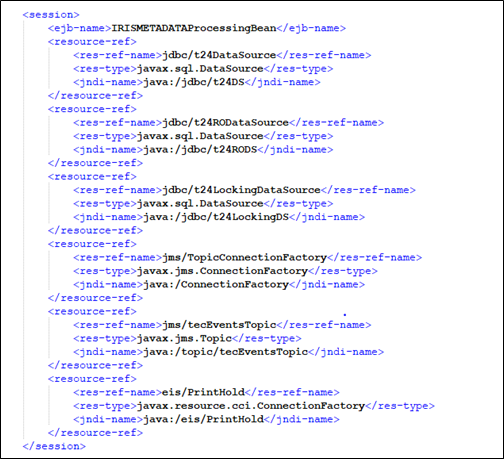
- In \TAFJJEE_EAR.ear\TAFJJEE_MDB.jar\META-INF\jboss-ejb3.xml, add a new <message-driven> entry for DSF Packager inside the <assembly-descriptor> tag. Also, ensure to have the <message-driven> entry for IRIS metadata.
For Queues:
<jms-queue name="t24DSFPACKAGERQueue" entries="queue/t24DSFPACKAGERQueue java:jboss/exported/jms/queue/t24DSFPACKAGERQueue"/>
<jms-queue name="t24DSFPACKAGERReplyQueue" entries="queue/t24DSFPACKAGERReplyQueue java:jboss/exported/jms/queue/t24DSFPACKAGERReplyQueue"/>
<jms-queue name="t24IRISMetaDataQueue" entries="queue/t24IRISMetaDataQueue java:jboss/exported/jms/queue/t24IRISMetaDataQueue"/>
<jms-queue name="t24IRISMetaDataReplyQueue"        entries="queue/t24IRISMetaDataReplyQueue java:jboss/exported/jms/queue/t24IRISMetaDataReplyQueue"/>
For MDB:
<strict-max-pool name="dsfpackage-mdb-strict-max-pool" max-pool-size="10" instance-acquisition-timeout="5" instance-acquisition-timeout-unit="MINUTES"/>
<strict-max-pool name="irismetadata-mdb-strict-max-pool" max-pool-size="20" instance-acquisition-timeout="5" instance-acquisition-timeout-unit="MINUTES"/>
In this topic