Configuring DSF Packager in Cloud
This section explains how to configure DSF Packager in a cloud environment such as Azure.
As a prerequisite, it is assumed that you have a Azure infrastructure setup that starts from transact_Azure_scripts_v5.zip release onward. The below steps guide you to configure DSF packager in Azure cloud environment.
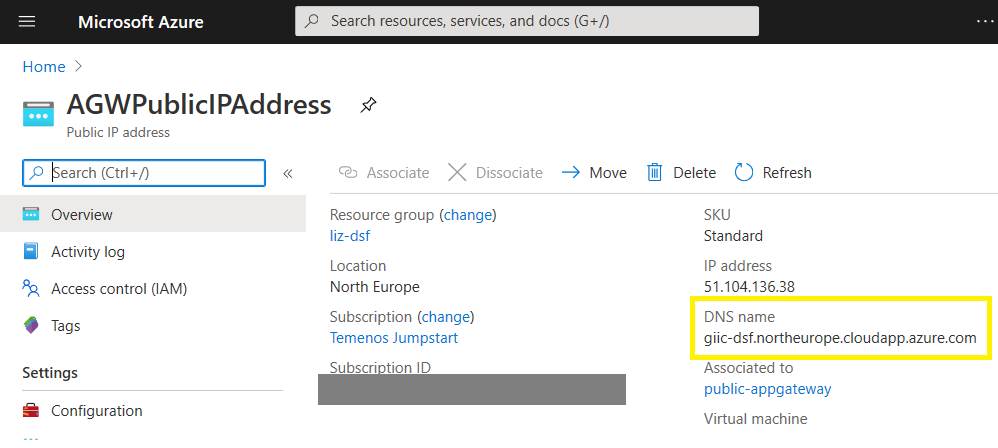
- Copy the FQDN from AGWPublicIPAddress in your resource group as shown below.
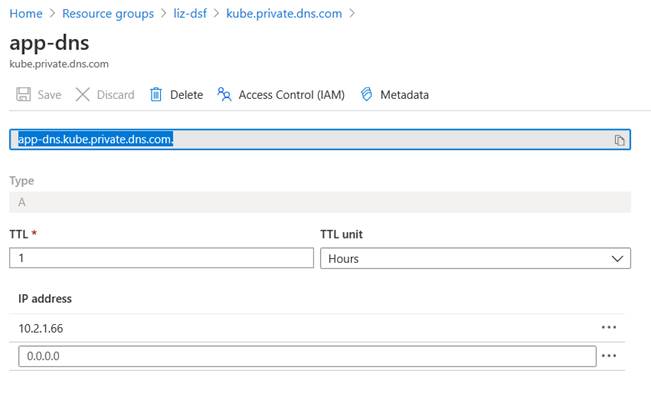
- To obtain this value, refer the FQDN of the record set called app-dns in the kube.private.dns.com Private DNS Zone in your resource group as shown below.
- Modify the irf-t24catalog-services.war file that you received from the Distribution team.
- For a Temenos Transact user that is added to the t24user role, you must authenticate the services using a WildFly application user.
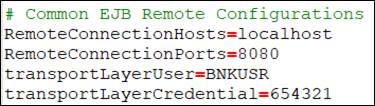
The WildFly application user creation is done automatically by passing the user credentials as secrets to kubernetes. Navigate to WEB-INF/classes and open connection.properties to know the transportLayerUser and transportLayerCredential. - Modify the RemoteConnectionPorts to point to the WildFly port 8080. If you want to change the default transportLayerUser and transportLayerCredential, then follow Temenos Transact guidelines to create a new user such as BNKUSR similar to SSOUSER1 and update the connection.properties file.
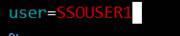
- Pass this JBoss application user name (BNKUSR) required for Catalog services in the jndi-config.properties file and create the configmap using the below command.
$ vi k8s/jndi-config.properties
- Pass the JBoss application user password required for Catalog services in the secrets.yml file in the base64-encoded format and reapply.
$ echo -n 123456 | base64
MTIzNDU2
$ vi k8s/secrets.yml
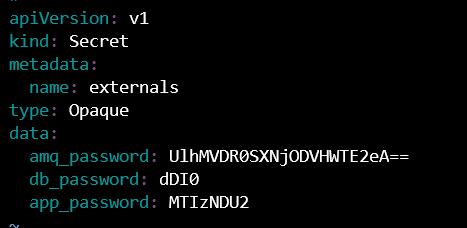
$ kubectl apply -f k8s/secrets.yml
Refer the Configuring Application Server section, for more information.
$ kubectl --kubeconfig=appconfig create configmap jndi-config --from-env-file=k8s/jndi-config.properties
In this topic