Reference Information
This section contains reference information such as Data Packager APIs and commands.
Packager APIs
Design Framework provides a set of APIs that can be used to control the life cycle of package validation and deployment. You can also use command-line interface utilities.
| Feature | URL | Path parameters | formData | Query parameters |
|---|---|---|---|---|
|
Validate a package from a zip or jar file |
https://10.11.12.13:9080/api/v1.0.0/meta/dsfpackages/validate?retry=true&incremental=hash |
retry (true or false) incremental (hash) |
||
|
Deploy a package from a zip or jar file using incremental hash |
http://10.11.12.13:9080/dsf-iris/api/v1.0.0/meta/dsfpackages/deploy?transactionMode=without&retry=true&incremental=hash |
package (file) |
transactionMode (single or without) retry (true or false) incremental (hash) |
|
|
Download a package |
https://10.11.12.13:9080/api/v1.0.0//meta/dsfpackages/packageId/download |
packageId |
Swagger document for Design Framework packager APIs:
openapi: 3.0.1
info:
description: API to generate a package from json
version: v1.0.0
title: DSFPackagerAPI
servers:
  - url: api/v1.0.0
  - url: api/v1.0.0
paths:
  /meta/dsfpackages/deploy:
    post:
      tags:
        - DSF Packager
      summary: Deploy (and validate) a DSF package
      operationId: deployPackageFromZip
      parameters:
        - name: retry
          in: header
          description: Retry or not on a packager
          schema:
            type: boolean
            default: true
        - name: transactionMode
          in: query
          description: |
            Transaction Mode:
               * 'single' - One transaction per company for the package
               * 'without' - No transaction
          schema:
            type: string
            default: single
            enum:
              - single
              - without
        - name: incremental
          in: query
          description: Indicates the incremental algorithm to use
          schema:
            type: string
            default: hash
            enum:
              - hash
        - name: tenant_Id
          in: query
          description: Indicates the tenant to get connected
          schema:
            type: string
      requestBody:
        content:
          application/zip:
            schema:
              required:
                - package
              properties:
                package:
                  type: string
                  description: The DSF Package Zip
                  format: binary
        required: true
      responses:
        '200':
          description: successful operation
          content: {}
        '400':
          description: operation failed
          content: {}
 '/meta/dsfpackages/validate':
    post:
      tags:
        - DSF Packager
      summary: Validate a DSF package
      operationId: validatePackageFromZip
      parameters:
        - name: retry
          in: header
          description: Retry or not on a packager
          schema:
            type: boolean
            default: true
        - name: transactionMode
          in: query
          description: |
            Transaction Mode:
               * 'single' - One transaction per company for the package
               * 'without' - No transaction
          schema:
            type: string
            default: single
            enum:
              - single
              - without
        - name: incremental
          in: query
          description: Indicates the incremental algorithm to use
          schema:
            type: string
            default: hash
            enum:
              - hash
        - name: tenant_Id
          in: query
          description: Indicates the tenant to get connected
          schema:
            type: string
      requestBody:
        content:
          application/zip:
            schema:
              required:
                - package
              properties:
                package:
                  type: string
                  description: The DSF Package Zip
                  format: binary
        required: true
      responses:
        '200':
          description: successful operation
          content: {}
        '400':
          description: operation failed
          content: {}
Packager CLIs
You can use command-line utilities to manage packages through Maven.
| Feature | Maven pom.xml |
|---|---|
|
Deploy a package from a zip or jar file |
Adapt the pom.xml file of your package (either downloaded or created through the Maven archetype) <configuration>
<mainClass>com.temenos.dsf.packager.T24PackageInstaller</mainClass>
.....
<arguments>
<argument>${project.build.directory}/${project.build.finalName}.${project.packaging}</argument>
</arguments>
</configuration>
Then you need to set a system property to specify the dsf-iris server: dsf.iris18.host=http://localhost:9089/dsf-iris |
|
Validate a package from a zip or jar file |
Adapt the pom.xml file of your package (either downloaded or created through the Maven archetype) <configuration>
<mainClass>com.temenos.dsf.packager.T24PackageInstaller</mainClass>
.....
<arguments>
<argument>${project.build.directory}/${project.build.finalName}.${project.packaging}</argument>
<argument>validateOnly</argument>
</arguments>
</configuration>
Then you need to set a system property to specify the dsf-iris server: dsf.iris18.host=http://localhost:9089/dsf-iris |
Sample Maven Command
mvn clean install -Ddsf.iris18.host=http://localhost:9089/dsf-iris -Dmaven.repo.local=m2repo_from_PR_build
Additional Parameters with Default Values
| Parameter | Default value |
|---|---|
|
-Ddsf.command=deploy/validate |
validate |
|
-Ddsf.retry=true/false |
true |
|
-Ddsf.transactionMode=single/without |
single |
|
-Ddsf.incremental=hash |
No such parameter hence no incremental deployment |
We cannot use multiple incremental modes for API or either CLI.
JSON Editor
JSON (JavaScript Object Notation) is a syntax for storing and exchanging data. This section provides brief information about the JSON editor.
In JSON editor, the data is in name or value pairs and separated by commas. The curly braces and square brackets hold objects and arrays, respectively.
The sample of a data record in JSON editor is as follows:
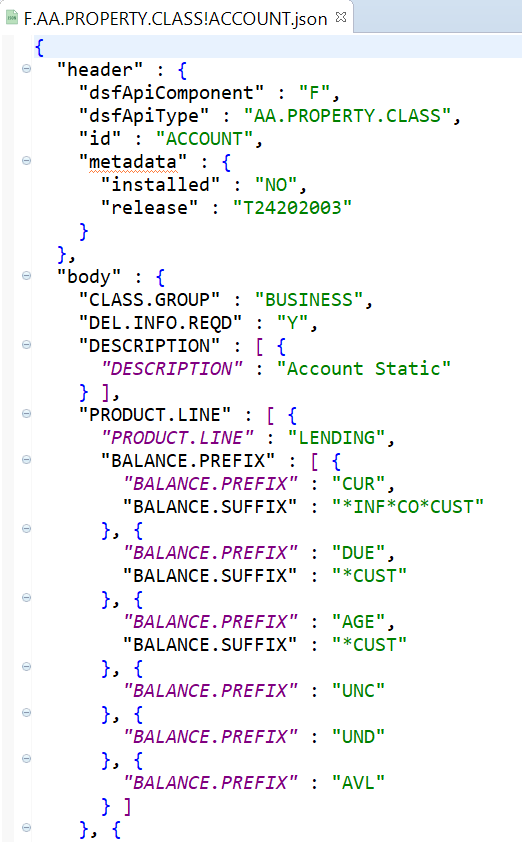
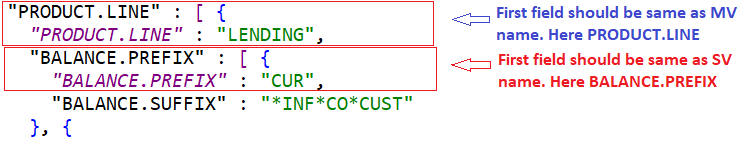
The multi-value and sub-value groups are represented as arrays inside curly and square brackets. The first element of a multi-value or sub-value group is always ordered with the ID of the multi-value or sub-value group and differentiated using colours for better readability.
In this topic