Working with Migration of Account Details
The following section describes the validations and the steps involved during a takeover process.
Validations during Takeover Process
The following validations or restrictions have been put in place during this AC-AA Retail Accounts (AR) takeover process.
- Original Contract Date must match with AC Opening Date
- Account should not have been
- Marked for Pending Closure/Closed
- Suspended (Int No Booking in ACCOUNT is not left blank)
- Account should not have
- Unauthorised movements
- Forward Exposure Dated entries
- Account should not have
- Another account as Interest Liquidation / Charge Liquidation Account
- Interest Compensation Account field updated (should be blank)
- Auto Pay Acct The Link Ac Number attribute in ACCOUNT Property can be used to capture this attribute (this attribute in turn, maps to Auto Pay Acct in ACCOUNT record)
- Account should not be attached to an Interest Compensation Pool (meaning an account that is part of ICA hierarchy).
- HVT Account cannot be taken over. (Read the Takeover from AC to AR section to know about Handling HVT during Takeover from AC to AR)
- The accounts still under an AZ Contract (All-In-One module = YES) cannot be taken over.
Takeover of Account Balance from AC to AR
DM Tool can be used for bulk takeover of account from AC to AR. Accounts Takeover Arrangement Activity Class is used for the Takeover Account.
 Illustration
For easier understanding, the illustration below is given based on a user taking over an AC account (2000003282) into an AR Arrangement through the standard user interface.
Account to be Taken-over
The Account (2000003282) balance is seen in the below screenshot.
- Accrued Debit Interest (51000): 205.48
- Principal Balance (CREDIT): 1,500,000.00
- Accrued Credit Interest (50000): 1,130.14

Capturing the Details
- To retain the AC account number, the user captures the following:
- Customer
Existing Customer in ACCOUNT record must be registered as the first owner and their Role set with Beneficial Owner as Yes and GL Customer as Yes.
- This is to ensure that the same customer number remains as the GL Customer on the ACCOUNT record.
- Joint Holders in the ACCOUNT record need to be registered as Joint Owners in AA.
- Currency of the AC Account
- AR Product
- Accounts Takeover Activity as Activity
- AC Opening Date as Orig Contract Date
- AC Account number through the Property, Field name and Field Value multi-value set.The Original Contract Date field must match with AC Opening Date. The system raises an error in case of any mismatches here.
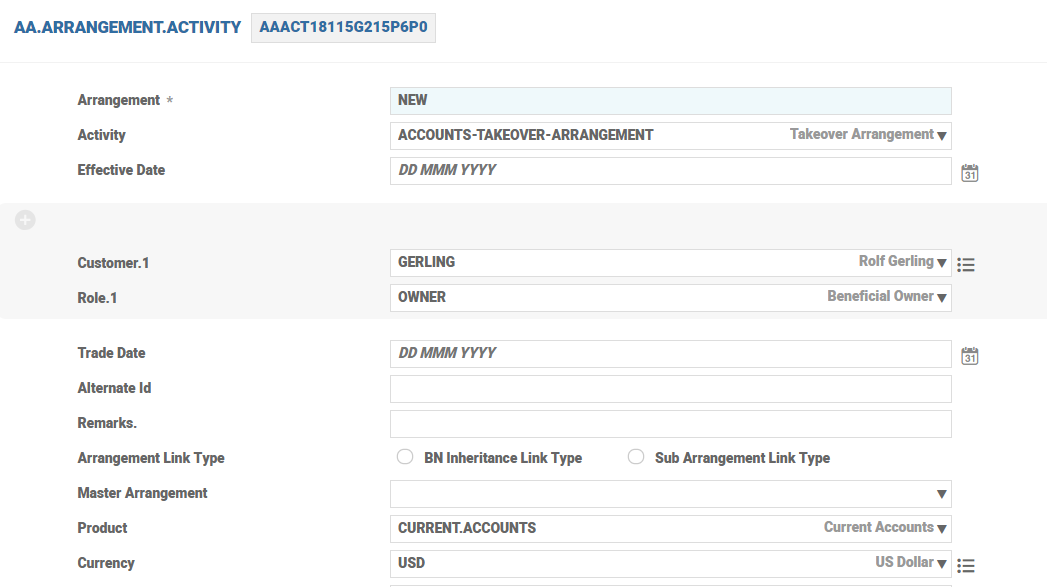 Since the AC Account had a balance, the accounting is raised by the system to park it in an internal account and then bring it back into AR account.
- Customer
- The Property field is updated with Account Property of the Product and the Field Name is Account Reference with Field Value as the AC Account number itself.
In the sample screenshot below,
- ACCOUNT property name : BALANCE
- Field Name to update : ACCOUNT.REFERENCE
- Field value to be supplied : 2000003282

- After validating the Activity, Properties of Arrangement Account open up. Attribute values are defaulted from the Product Condition and are negotiable based on the Product setup.
- AC Account is taken-over into an AR Arrangement along with its Principal Balance when this Activity is committed or authorised.
Account after Takeover
The Condition Group in Account is cleared and Arrangement ID is updated in the ACCOUNT record.


Takeover of Interest Accruals from AC to AR
The Balance Maintenance Property Class allows the users to capture or adjust bills and capture or adjust the balances of the bill.
The ACCOUNTS-CAPTURE.BALANCE-BALANCE.MAINTENANCE Activity is used to move the interest accruals from AC Account to AR Account. DM Tool can be used for bulk takeovers.
Illustration
For easier understanding, the illustration below is given based on a user taking over the AC account Interest Accruals into AR.
- Given below is the balances of the account taken over earlier.
- Accrued Debit Interest (51000): 205.48
- Principal Balance (CREDIT): 1,500,000.00
Based on the Takeover Activity in the previous step, the system generated a debit and credit movement on the Principal balance (CREDIT) to bring the balance into AR (ACCT.BALANCE.ACTIVITY).
- Accrued Credit Interest (50000): 1,130.14

- To take-over the Accrued Interest, the user captures the following
- New Balance Amount – Accrued Interest Amount
- Adjust Property – Name of the Interest Property
- Adj Bal Type – The AC Balance Type of the Interest Property to store the accruals namely ACC<PROPERTY>
- In the screenshot below,
- The Debit Interest Accrual ‘205.48’ is captured as New Balance Amount corresponding to Adjust Property DRINTEREST Adjust Balance Type ACCDRINTEREST
- The Credit Interest Accrual ‘1,130.14’ is captured as New Balance Amount corresponding Adjust Property CRINTEREST and Adjust Balance Type ACCCRINTEREST

- Given below is the balances of the account after the Interest accruals are taken over from AC to AR.
- Credit Movement on ACCCRINTEREST against Debit Movement on 50000
- Debit Movement on ACCDRINTEREST against Credit Movement on 51000

- From this point on, the AC account is fully operational as an AR arrangement.
Notification of Customers on Base Rate Change
When the client either upgrades or takes over a contract from the legacy system to the AA framework, it is possible to have a configuration to notify customers, in advance, about the future dated floating rate change. During a take over from a legacy system, if the rate change is triggered:
- Before the takeover- The Apply Rate Activity and the Change Interest scheduled Activity are triggered as secondary activities. Thus, an advance notification is generated along with takeover or is scheduled for a future date as per the Activity Messaging configuration.
- After the takeover - The regular process of Change Interest and Apply Rate activity are triggered. The customer gets notified based on the Activity Messaging configuration.
During an upgrade, if the rate change is triggered:
- Before the upgrade - The opportunity for triggering secondary activity does not arise. Hence no notifications are triggered for the rate fixing completed.
- After the upgrade - The regular process of Change Interest and Apply Rate activity are triggered. The customer gets notified based on the Activity Messaging configuration.
Processing of Back Dated Schedules
Banks are recommended to complete account migration using the following activity sequence.
- Takeover of the account
- The effective date of the takeover activity is the oldest date until which the back-valued transactions have to be accepted.
- The interest rates should be defined as fixed rates for the periods that the account has been in the legacy system using the Amend History activity.
- The system updates the interest accrual records for all interest properties based on the payment schedule definition.
- Capture the historical bills and balances
- When a limit is not attached to the account,
- Capture the historical interest bills along with corresponding tax amount using the Capture Historic Bill activity.
- This updates the HIS<ACCOUNT> ladder as of the respective bill dates.
- The From Date and To Date fields of the respective accrual period is updated.
- The interest accrual amount is updated in the Tot Due Amt field for the corresponding periods in AA.INTEREST.ACCRUALS.
- Capture the net balance movement under HIS<ACCOUNT> balance, using the Capture Historic Balance activity.
- Based on the net movement for a given day, the HIS<ACCOUNT> ladder is updated by considering the interest capitalised in the previous step.
- When a limit is attached to the account,
- Capture the historical opening balances (HIS<ACCOUNT> and HIS<LIMIT>*<Balance Prefix>) as on the effective date of the Takeover activity using the Capture Historic Balance activity.
- Capture the historical interest bills along with corresponding tax amount using the Capture Historic Bill activity.
- This updates the HIS<ACCOUNT> and the HIS<LIMIT>*<Balance Prefix> ladder as of the respective bill dates.
- The From Date and To Date of the respective accrual period is updated.
- The interest accrual amount is updated in the Tot Due Amt field for the corresponding periods in AA.INTEREST.ACCRUALS.
- Capture the net balance movement under HIS<ACCOUNT> balance, using the Capture Historic Balance activity.
- Based on the net movement for a given day, the HIS<ACCOUNT> and HIS<LIMIT>*<Balance Prefix> ladder are updated by taking into consideration the interest capitalised in the previous step.
- Capture the account balances as on the migration date
- Capture the accruals (ACC<INTEREST>) and account (CUR<ACCOUNT>) balances as of current date.
The following events must be configured in AC.EVENTS to process back dated schedules.
- ACCOUNT-CREDIT-PAY-HIS
- ACCOUNT-DEBIT-DUE-HIS
- INTEREST-CAPTURE.BILL-DUE-HIS
- INTEREST-CAPTURE.BILL-PAY-HIS
When a limit is attached to the account, the following events must be configured in addition to the ones mentioned above:
- LIMIT-UPDATE.HIS.BALANCE-DUE-CUR
- LIMIT-UPDATE.HIS.BALANCE-DUE-UTL
- LIMIT-UPDATE.HIS.BALANCE-DUE-TOT
- LIMIT-UPDATE.HIS.BALANCE-DUE-OVD
- LIMIT-UPDATE.HIS.BALANCE-PAY-CUR
- LIMIT-UPDATE.HIS.BALANCE-PAY-UTL
- LIMIT-UPDATE.HIS.BALANCE-PAY-TOT
- LIMIT-UPDATE.HIS.BALANCE-PAY-OVD
Read AC.EVENTS for more details.
Interest Source Balance for Back Dated Process Schedules
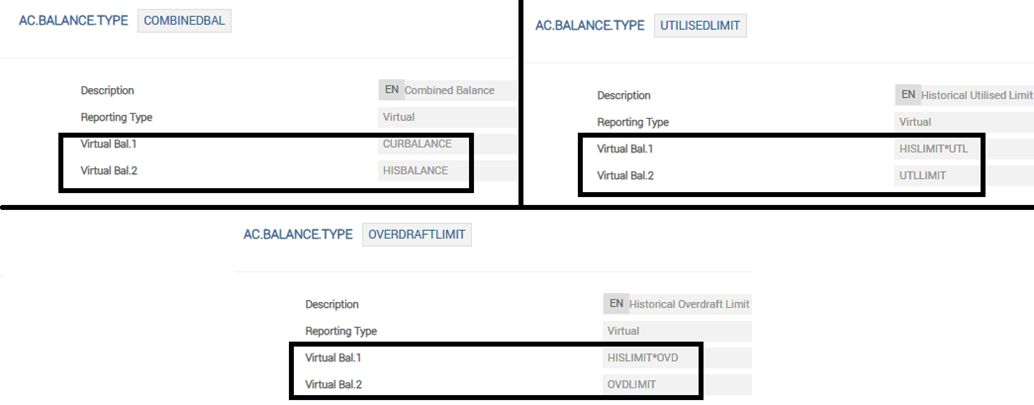
It is recommended to include the historical balances as part of the interest calculation source to calculate the interest adjustment amount because of a back-value dated movement. That is, the interest calculation source is a virtual balance that contains both the historical balance and the current balance.
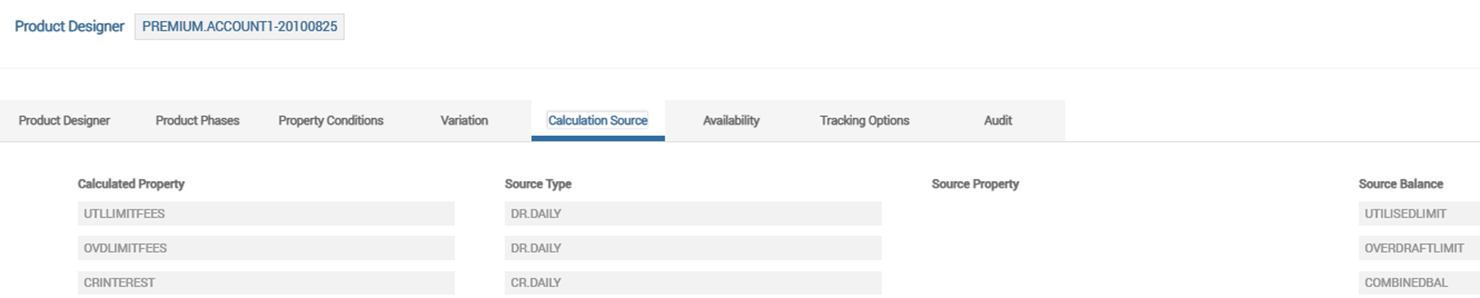
In the screenshots given below, the credit interest is calculated on the virtual balance that contains the historical account balance (HIS<ACCOUNT>) and current account balance (CUR<ACCOUNT>). Similarly, the virtual balance used as calculation source for the interests on the utilised limit and overdraft limit also contains both the historical balances along with the current balances.
Back-dated Schedule Processing based on Next cap
Any backdated change beyond the system's take over date recalculates the interest and adjusts the historical bill for the corresponding period. During a back value dated change before the migration date, the interest adjustments due to the backdated changes are effected based on the Interest Adjustments due to back dated txns field in the accounting condition.
- When the Interest Adjustments due to back dated txns field is set to Next.cap, a credit bill for the delta portion, which is USD 5 (USD 15 – USD 10), is generated on the next capitalisation date.
- When the Interest Adjustments due to back dated txns field is not set to Next.cap, the previous bill for USD 10 is reversed and a new credit bill for USD 15 is generated. This reverse and replay process takes place either when the Retrospect Arrangement activity is triggered or when the BNK/AA.RR.SERVICE service is run or during COB.
- After the takeover, when the user performs a back-value dated transaction, the interest accruals on the modified balances are based on the system's calculation from that period onwards till the takeover date. That is, the interest accruals on the modified balances do not follow the legacy system calculation.
- When the back-value date is prior to the takeover date, the system maintains the balances continuously before and after the takeover. The user need not trigger any additional activity for the closing HIS balance or an Adjust Balance to update the takeover. The system also performs recalculation of interest and capitalises the bills before and after the takeover date, based on the accounting setup. No additional actions are required by the user for cascading action from the legacy system taken over.
Illustration 1 – Account with No Limit Attached during Takeover
Consider the following example to know about how account migration and update is processed for the below mentioned arrangement.
- The migration effective date is 01 Jan, 2021 which is the oldest date until which the back valued transactions have to be accepted.
- The interest capitalisation dates till current date (15 Apr, 2021) are: 01 Feb, 01 Mar and 01 Apr
- The account balance movement dates before 15 Apr are as follows:
- 05 Jan
- 10 Feb
- 15 Mar
- 06 Apr
From 15 Apr, the account is migrated to the system by performing the ACCOUNTS-TAKEOVER-ARRANGEMENT activity, and the bills and balances are captured as of this date.
The user performs the Capture Historical Bill activity to capture the bills which were capitalised on 1 Feb, 2021, 1 Mar, 2021 and 1 Apr, 2021.
| Historical Bill Date | Historical Bill Balance Movement | Closing Balance |
|---|---|---|
| 01-Feb-21 | 100 | 100 |
| 01-Mar-21 | 200 | 300 |
| 01-Apr -21 | 300 | 600 |
The below screenshot shows the ACCOUNTS-CAPTURE.HISTORIC.BILL-BALANCE.MAINTENANCE activity which the user has triggered on 15 Apr to capture the historic bill details mentioned above.

The account balances after the Capture Historical Bill Activity is shown below with the HISBALANCE balance type updated.

The user performs the Capture Historical Balance activity to capture the account balance movements till 15 Apr, 2021.
| Historical Balance Date | New Prop Movement | Adjust movement |
|---|---|---|
| 5-Jan-21 | 2000 | |
| 10-Feb-21 | 2000 | |
| 15-Mar-21 | -1000 | |
| 6-Apr-21 | -1000 | |
| 15-Apr-21 | 0 |
The below screenshot shows the ACCOUNTS-CAPTURE.HISTORIC.BAL-BALANCE.MAINTENANCE activity triggered by the user to capture the historic account balance movements as mentioned above.
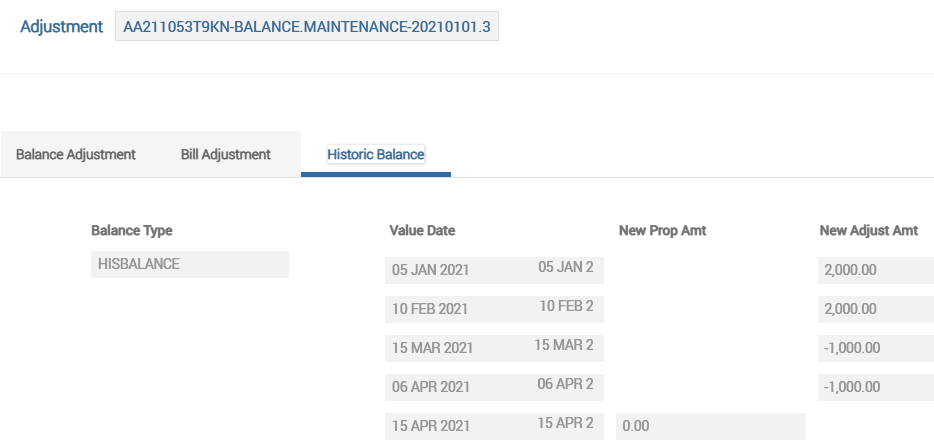
The below screenshot shows that the net movement (captured in the Capture Historical Balance activity )for a given day is updated under the HISBALANCE balance.

The accounting movements during the period from 1 Jan, 21 to 15 Apr, 21 are as follows:
| Historical Balance Date | New Prop Movement | Adjust movement | Opening Balance | CR Movement | Dr Movement | Closing Balance |
|---|---|---|---|---|---|---|
| 5-Jan-21 | 2000 | 2000 | 2000 | |||
| 1-Feb-21 | 2000 | 100 | 2100 | |||
| 10-Feb-21 | 2000 | 2100 | 2000 | 4100 | ||
| 1-Mar-21 | 4100 | 200 | 4300 | |||
| 15-Mar-21 | -1000 | 4300 | 1000 | 3300 | ||
| 1-Apr-21 | 3300 | 300 | 3600 | |||
| 6-Apr-21 | -1000 | 3600 | 1000 | 2600 | ||
| 15-Apr-21 | 0 | 2600 | 0 |
The balances (account balance, accrual balance, etc.,) from the legacy system as of 15 Apr are captured by triggering the Capture Balance Activity:
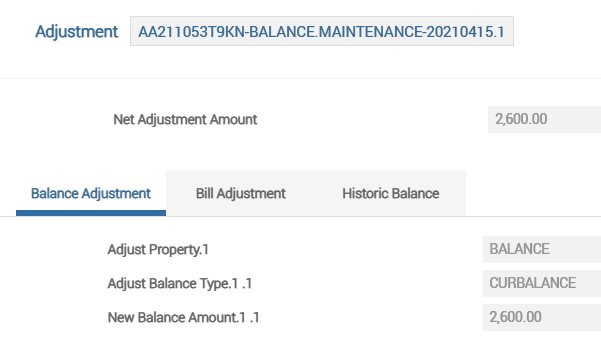
The system's account balance after the Capture Balance Activity is triggered is shown below.

After this, the user can perform a credit transaction of USD 10,000 to the migrated account with a back value date of 18 Mar, 2021. As a result of this, the system performs reverse-replay by updating the AA.RR.SERVICE.LIST application with the account arrangement ID.
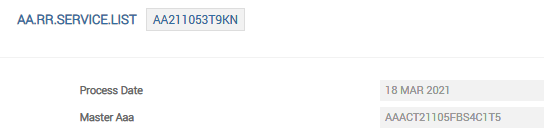
On triggering the Retrospect Arrangement Activity (ACCOUNTS-RETROSPECT-ARRANGEMENT) either online or as a service (BNK/AA.RR.SERVICE) or during COB, the system processes the reverse-replay. Thus, the arrangement record in AA.RR.SERVICE.LIST is cleared and the adjustments in the interest accruals due to the back value dated credit are reflected in the AA.INTEREST.ACCRUALS table. The screenshot given below shows the interest accrual adjustment that happened due to the back value dated transaction.

Due to the reverse-replay, the system generates a new bill to capitalise the new amount and this is available in the Arrangement Overview page under the Bills tab.

In this scenario,
- The increase in accrued interest (in USD) from the period 18 Mar to 1 Apr: 250.02 + 17.32 = 267.34.
The already capitalised interest as on 1 Apr for USD 300 is reversed and a new bill is generated.
- The new bill amount (in USD): 300 +267.34 = 567.34
Out of this, the tax component (in USD) : 155.75
- The final bill amount (in USD): 567.34 – 155.75 = 411.59.
The system also modifies the arrangement account balance based on the increase in the capitalised interest on 1 Apr.
| Balance Movements | Amount (in USD) |
|---|---|
| Opening account balance | 2600 |
| Back value dated credit of USD 10,000 | 10,000 |
| Increase in accrued interest for the period 18 Mar to 1 Apr | 267.34 |
| Deduct tax on the capitalised interest | 155.75 |
| Closing account balance | 12,711.59 |
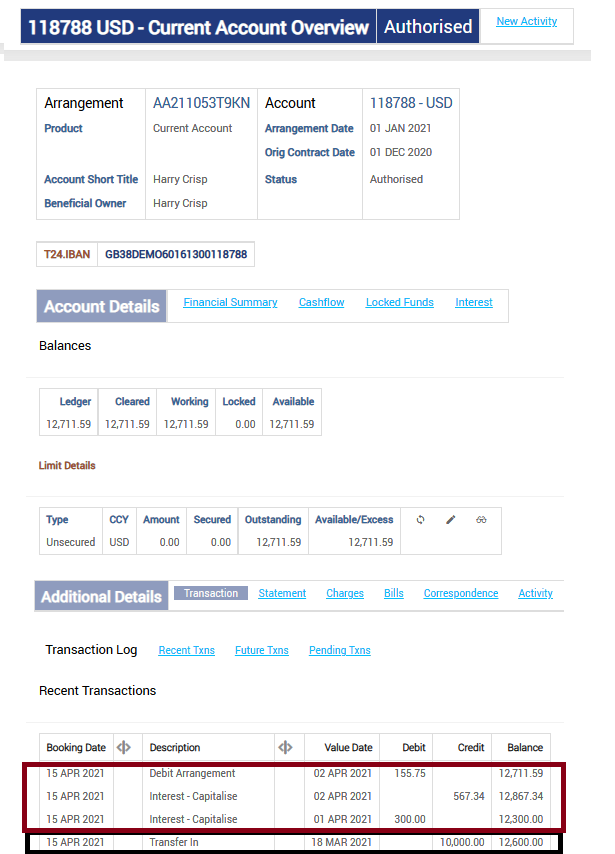
Illustration 2 – Account with Limit Attached during Takeover
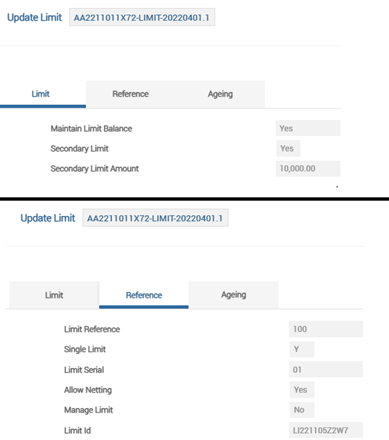
Consider an account is migrated to the system on Apr 20, 2022 by performing the ACCOUNTS-TAKEOVER-ARRANGEMENT activity. The migration effective date is Apr 1, 2022, which is the oldest date until which the back valued transactions have to be accepted.
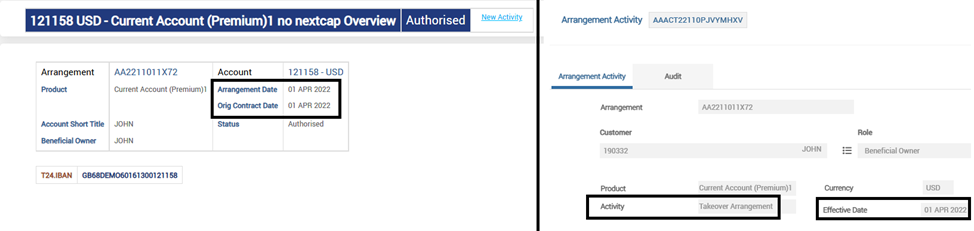
During the Takeover activity, a limit for USD 10,000 is attached to the account arrangement.
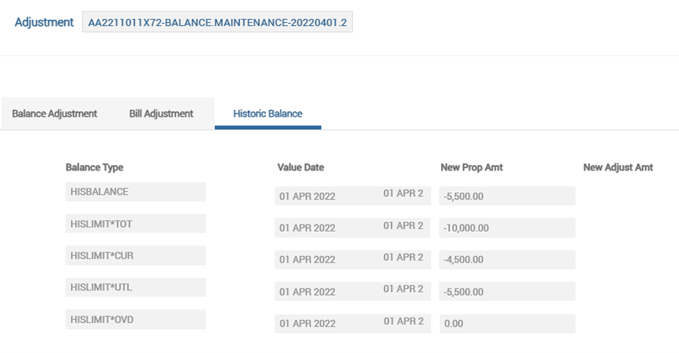
The historical account and limit balances as on Apr 1, 2022 are captured using the ACCOUNTS-CAPTURE.HISTORIC.BAL-BALANCE.MAINTENANCE activity.
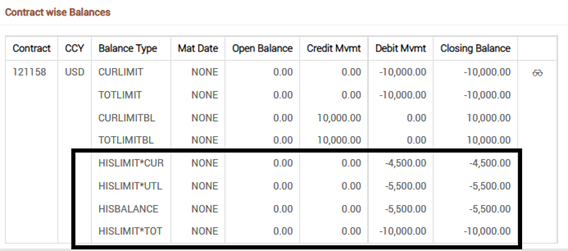
The screenshot below shows that the corresponding historical balances are updated with the captured amount.
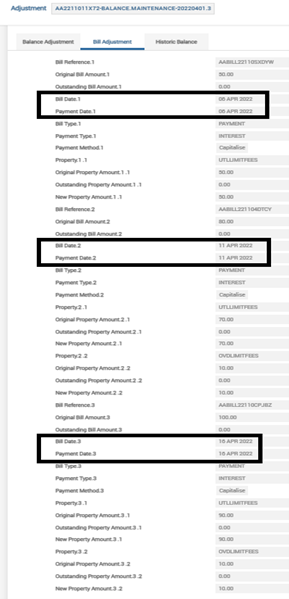
The user triggers the ACCOUNTS-CAPTURE.HISTORIC.BILL-BALANCE.MAINTENANCE activity to capture the historical capitalised bills. The interest capitalisation dates till current date (Apr 20, 2022) are Apr 6, Apr 11 and Apr 16.
The HIS<ACCOUNT> and HIS<LIMIT>*<Balance Prefix> balances that are updated after the Capture Historical Bill Activity are shown below.
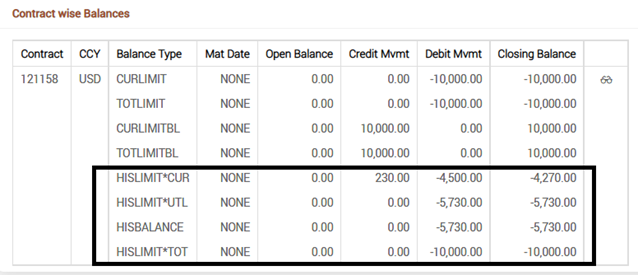
The user performs the ACCOUNTS-CAPTURE.HISTORIC.BAL-BALANCE.MAINTENANCE activity to capture the net account movements for a given day. The account balance movement dates before Apr 20 are as follows: Apr 3, Apr 5, Apr 9, Apr 14 and Apr 18.
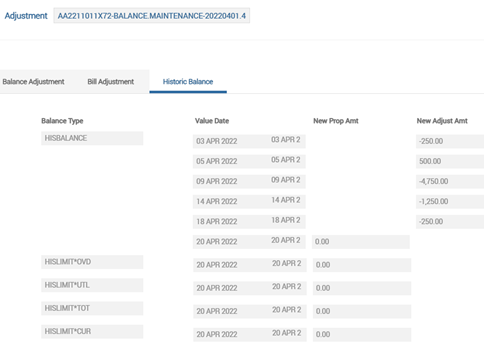
The net movement for a given day which is captured in the Capture Historical Balance activity has updated the balance ladder for both historical account and limit balances.
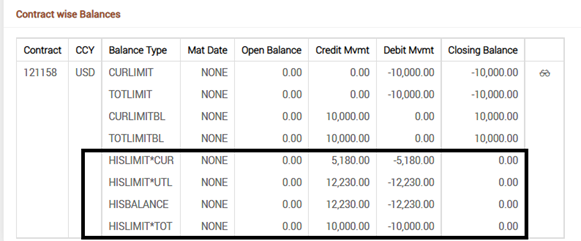
The accounting for the period between Apr 1, 2022 and Apr 20, 2022 is as follows:
| Dates | Transaction Movements | Capitalised interest bills | Updates in historical account and limit balances | |||||
|---|---|---|---|---|---|---|---|---|
| UTLLIMITFEES | CRINTEREST | OVDLIMITFEES | BALANCE | UTLLIMIT | CURLIMIT | OVDLIMIT | ||
| 1-Apr | -5500 | -5500 | -4500 | 0 | ||||
| 3-Apr | -250 | -5750 | -5750 | -4250 | 0 | |||
| 5-Apr | 500 | -5250 | -5250 | -4750 | 0 | |||
| 6-Apr | -50 | -5300 | -5300 | -4700 | 0 | |||
| 9-Apr | -4750 | -10050 | -10000 | 0 | -50 | |||
| 11-Apr | -70 | -10 | -10130 | -10000 | 0 | -130 | ||
| 14-Apr | -1250 | -11380 | -10000 | 0 | -1380 | |||
| 16-Apr | -90 | -10 | -11480 | -10000 | 0 | -1480 | ||
| 18-Apr | -250 | -11730 | -10000 | 0 | -1730 | |||
| 20-Apr | 0 | 0 | 0 | 0 | ||||
The balances (account balance, accrual balance, and so on) from the legacy system as of Apr 20 are captured by triggering the Capture Balance Activity.
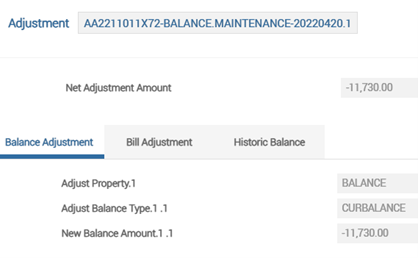
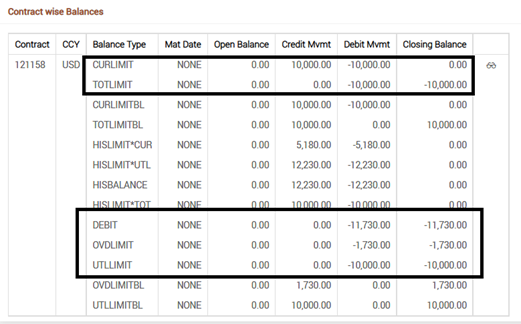
After the Capture Balance Activity is triggered, the system's balances for account and limit properties are updated.
Later, the user performs a back value dated credit of USD 100,000 with value date as Apr 13, 2022. Since the Interest Adjustments due to back dated txns field is not set to Next.cap, the system performs reverse-replay by updating the AA.RR.SERVICE.LIST application with the account arrangement ID.
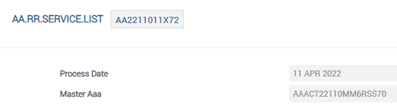
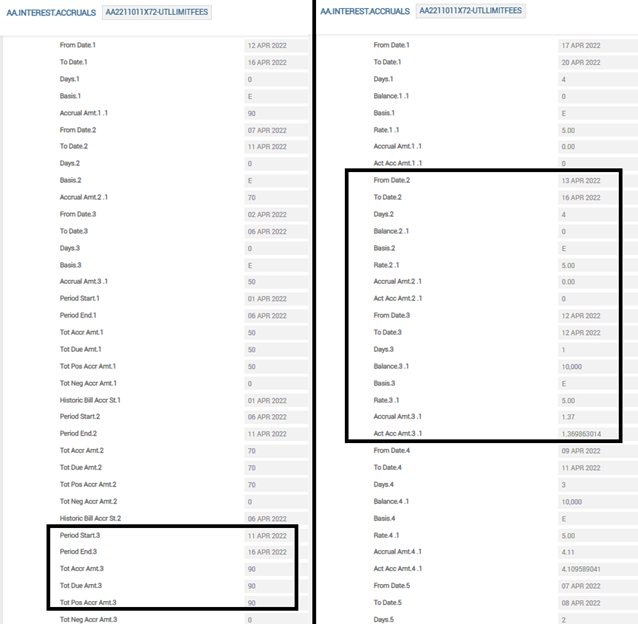
On running COB, the Retrospect Arrangement Activity (ACCOUNTS-RETROSPECT-ARRANGEMENT) is triggered, and the system performs the reverse-replay process. The record for the arrangement in AA.RR.SERVICE.LIST is removed and the following changes are processed in the system:
- The interest accruals for the credit interest, interest on utilised limit and interest on overdraft limit are adjusted for the period Apr 12 to Apr 16, based on the back-value dated credit.


- The system's balances for the current account, accrued credit interest, utilised limit, overdraft limit and current limit are updated as per the backdated change. Since the account is moved to a credit balance, the entire limit amount of USD 10,000 is available (that is, the CURLIMIT balance is -10,000). The accruals for the credit interest property are marked in the ACCCRINTEREST balance type.

- Due to the reverse-replay, the system generates a new bill with the recalculated amount for the period and this is made available in the Arrangement Overview page under the Bills tab.
- The previous bills for UTLLIMITFEES and OVDLIMITFEES that are capitalised on the Apr 16 are reversed. The recalculated capitalise bills for CRINTEREST, UTLLIMITFEES and OVDLIMITFEES are generated for Apr 16.
- Since the account balance moves to a credit on the Apr 13, the CRINTEREST is calculated from Apr 13 to Apr 16.
- The UTLLIMITFEES and OVDLIMITFEES are calculated for only one day – Apr 12 during which the account was overdrawn.

The following section deals with the migration of accounts in TBC.
General Approach During Migration of Accounts
When the user migrates an account, the system triggers the corresponding activity in the TBC to complete the migration process. During migration, the user is recommended to follow the below mentioned sequence of steps:
- The live account is migrated from the existing system to the TBC using the Takeover arrangement activity.
- The bills in the live account are captured using the Capture Bill activity.
- The account balances are captured using the Capture Balance activity
- Any captured bills or balance can be adjusted using the Adjust Bill or Adjust Balance activity respectively.
The general approach recommended during migration of accounts in TBC is as follows:
- Analyse existing products and create equivalent products in the TBC.
- Determine requirements for capturing historic account data in the TBC.
- Prepare extract of legacy account data and balances.
- Based on the legacy account data, create new accounts in the TBC using the corresponding API.
- Capture the account balances and bills based on the legacy account data.
- It is to be noted that during the takeover of overdraft accounts in the TBC, it is possible to capture the limit balances using secondary limits only.
- Update the balances to accommodate for any penalty balances.
Migration of Historical Bills and Balances
Banks are recommended to complete account migration using the following activity sequence.
- Takeover of the account
- The effective date of the takeover activity is the oldest date until which the back-valued transactions have to be accepted.
- The interest rates should be defined as fixed rates for the periods that the account has been in the legacy system using the Amend History activity.
- The system updates the interest accrual records for all interest properties based on the payment schedule definition.
- Capture the historical bills and balances
- When a limit is not attached to the account,
- Capture the historical interest bills along with corresponding tax amount using the Capture Historic Bill activity.
- This updates the HIS<ACCOUNT> ladder as of the respective bill dates.
- The From Date and To Date of the respective accrual period is updated.
- The interest accrual amount is updated in the Tot Due Amt field for the corresponding periods in AA.INTEREST.ACCRUALS.
- Capture the net balance movement under HIS<ACCOUNT> balance, using the Capture Historic Balance activity.
- Based on the net movement for a given day, the HIS<ACCOUNT> ladder is updated by considering the interest capitalised in the previous step.
- Capture the historical interest bills along with corresponding tax amount using the Capture Historic Bill activity.
- When a limit is attached to the account,
- Capture the historical opening balances (HIS<ACCOUNT> and HIS<LIMIT>*<Balance Prefix>) as on the effective date of the Takeover activity using the Capture Historic Balance activity.
- Capture the historical interest bills along with corresponding tax amount using the Capture Historic Bill activity.
- This updates the HIS<ACCOUNT> and the HIS<LIMIT>*<Balance Prefix> ladder as of the respective bill dates.
- The From Date and To Date of the respective accrual period is updated.
- The interest accrual amount is updated in the Tot Due Amt field for the corresponding periods in AA.INTEREST.ACCRUALS.
- Capture the net balance movement under HIS<ACCOUNT> balance, using the Capture Historic Balance activity.
- Based on the net movement for a given day, the HIS<ACCOUNT> and HIS<LIMIT>*<Balance Prefix> ladder are updated by taking into consideration the interest capitalised in the previous step.
- When a limit is not attached to the account,
- Capture the account balances as on the migration date
- Capture the accruals (ACC<INTEREST>) and account (CUR<ACCOUNT>) balances as of current date.
During the takeover of accounts in the TBC, it is possible to capture both the historical and the current (live) balances of the account. In case of overdraft accounts, any limit balance (both historical and current) can be updated during migration using secondary limits only.
Back-dated Schedule Processing based on Next Cap
Any backdated change beyond the system's take over date recalculates the interest and adjusts the historical bill for the corresponding period. During a back value dated change before the migration date, the interest adjustments due to the backdated changes are effected based on the Interest Adjustments due to back dated txns field in the accounting condition.
Consider that a historical credit interest bill for an amount of USD 10 is captured for Mar 31, 2022. Due to a back-dated credit on Mar 25, the credit interest bill for the period is recalculated as USD 15.
- When the Interest Adjustments due to back dated txns field is set to Next.cap, a credit bill for the delta portion, which is USD 5 (USD 15 – USD 10), is generated on the next capitalization date.
- When the Interest Adjustments due to back dated txns field is not set to Next.cap, the previous bill for USD 10 is reversed and a new credit bill for USD 15 is generated. This reverse and replay process takes place either when the Retrospect Arrangement activity is triggered or when the BNK/AA.RR.SERVICE service is run or during COB.
After the takeover, when the user performs a back-value dated transaction, the interest accruals on the modified balances are based on the system's calculation from that period onwards till the takeover date. That is, the interest accruals on the modified balances does not follow the legacy system calculation.
When the back-value date is prior to the takeover date, the system maintains the balances continuously before and after the takeover. The user need not trigger any additional activity for the closing HIS balance or an Adjust Balance to update the takeover. The system also performs recalculation of interest and capitalises the bills before and after the takeover date, based on the accounting setup. No additional actions are required by the user for cascading action from the legacy system taken over.
In this topic