Working with Transactions In Account
Retail accounts accept credit and debit transactions through channels such as branch, ATM, internet/mobile, international payments network and local clearing. Some examples of the transaction type include,
- Depositing or withdrawal of cash
- Transferring from account to account
- Transferring using internet or mobile
- Incoming or outgoing SWIFT or other payments
- Depositing cheques
- Local clearing
There are various applications, such as FUNDS.TRANSFER, TELLER, Direct Debit Instruction), within Temenos' solutions that are used to perform a transaction in a new arrangement account. For example, using the Funds Transfer (FT) module, the new arrangement account is credited by an account transfer. Before it effects the initial transfer, the balance in the arrangement is made zero.
In the example below, in order to perform a transaction in an account,
Provide inputs and authorise an FT that credits the arrangement with the requisite amount (for example, USD 10000).
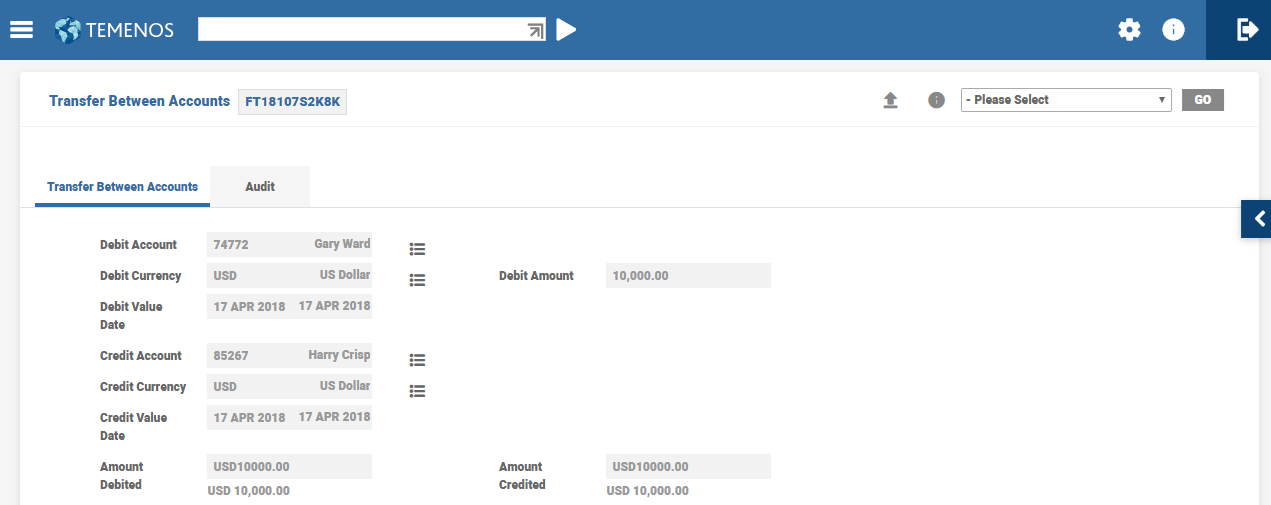
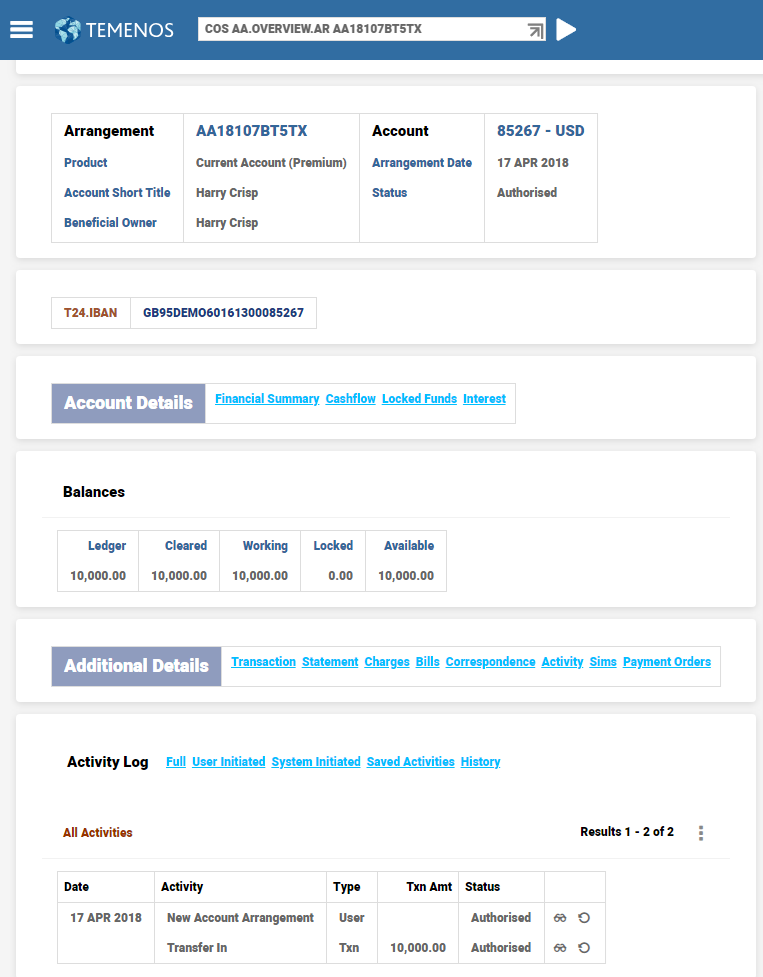
Once the FT is authorised, the arrangement that is linked to account number 84581 appears with an amount of USD10000 credited to it. Hence, the ledger and available balance is updated, which includes limit amount (of 10,000).
The current Account Overview page displays the history of the recent transactions.
 Differences in TBC
When a transaction is posted in an account in the TBC, the request is passed through the Generic Accounting Interface (GAI). The GAI,
- Validates the details of the transaction such as account status, availability of funds in the account, blocked funds, currency and so on, before processing the transaction.
- Processes the transaction using the Activity Mapping configuration to trigger the corresponding debit or credit activity in the system. This enables the system to accept the named activities which in-turn triggers the Debit or Credit Arrangement Activity.
In addition to this, the TBC also emits an event, which can be captured by the connected external GL system for the balance updates/accounting to be completed.
Nominated Counter Accounts
The incoming and outgoing payments in an account can be limited to/from pre-defined counter accounts or nominated counter accounts only using the Counterparty Type and Counterparty fields in the account condition.
Based on the scenario, the counter account can be set only for Payin or for Payout or Both.
- When the system is set to evaluate the Payin transactions using the option Payin in Counterparty Type - only the incoming payments with Validate Counter Party as Yes in TRANSACTION are monitored, and outgoing payment are not monitored.
- The system raises an override when the incoming payments are not received from one of the beneficiaries mentioned in the associated Counterparty field.
- When the system is set to evaluate the Payout transactions using the option Payout in Counterparty Type, only the outgoing payments with Validate Counter Party as Yes in TRANSACTION are monitored, and incoming payment are not monitored.
- The system raises an override when the payment is not made to one of the beneficiaries mentioned in the associated Counterparty field.
- When both incoming and outgoing payments should be evaluated, it is recommended to setup the Counterparty Type as Both and set Validate Counter Party as Yes in TRANSACTION code used.
- The system raises an override when the incoming payment is not received from or outgoing made is made to one of the beneficiaries mentioned in the associated Counterparty field.
- When the user prefers to ensure that Payin transactions must have a specific Beneficiary and Payout transaction must have a different Beneficiary, the Counterparty Type must be multivalued to take the Payin and Payout values and define their respective Beneficiary alongside them as Counterparty.
Once a beneficiary is defined as a nominated counter account for an arrangement, the system creates a record in the BENEFICIARY.LINKS application to maintain the link between the beneficiary and the arrangement. To indicate that the beneficiary is a nominated counter account to the arrangement, the BENEFICIARY.LINKS application has the Counterparty Type field set to Yes. The BENEFICIARY.LINKS application is also updated with records of those beneficiaries that are not nominated counter accounts for the arrangement but are defined in the Settlement condition.
When a transaction is posted the system evaluates the IBAN number. In its absence, the system evaluates the account number with BIC/banks sort code to validate if the corresponding account is a nominated counterparty.
Read here to see an illustration of nominated counter accounts.
- When the Counterparty Type field is set, but no counter accounts are defined in Counterparty, the system raises an override to indicate the same.
- When the user adds or removes beneficiaries as nominated counter accounts for an arrangement, the system raises an override to intimate the user that the nominated counter account details are amended.
-
The Nominated Counter Accounts feature is supported only for the payments initiated through the Payment Order Application and payments processed through the Temenos Payments Hub
Differences in TBC
In TBC, it is not possible to define, and process nominated counter party restrictions in accounts.
Non-Sufficient Funds
Non-sufficient Funds (NSF) is the status of an account that does not have enough money to cover debit transactions. If a bank receives a debit item on an account with insufficient funds, the bank can pay or refuse payment and may charge the account holder an appropriate fee.
Credit Facilities for Customer Accounts
The credit facilities for an account are classified as:
- Grace limit
- A mere amount, which is used to cover debit items without any charge
- Indicated using Tolerance Amount and Currency in Balance Availability Class
- Overdraft protection
- Funds available in other accounts
- Indicated using Sweep funds
- Courtesy limit
- For certain accounts, the banks can pre-approve an overdraft limit, up to which the account can be overdrawn. This is called a courtesy limit.
- The courtesy limit for an account can be provided using the Limit Property Class. Read Limit property class for more information on the fields available in the limit condition and how to configure the same.
Options in Credit Facilities
Credit Check for debits posted to accounts is based on the system-defined account balances or user-defined components.
- Activity Class or Activity level Credit Check is defined to consider the usable components of the accounts like, Working Balance + Floats + sweeps
- Limit Check can be opted in for using the limit facility of the customer.
- IDL options and blocking the usage of limits are also possible.
- The resultant transaction can be posted, settled or rejected.
- Some Activity Class or Activity can be settled right away based on regulations.
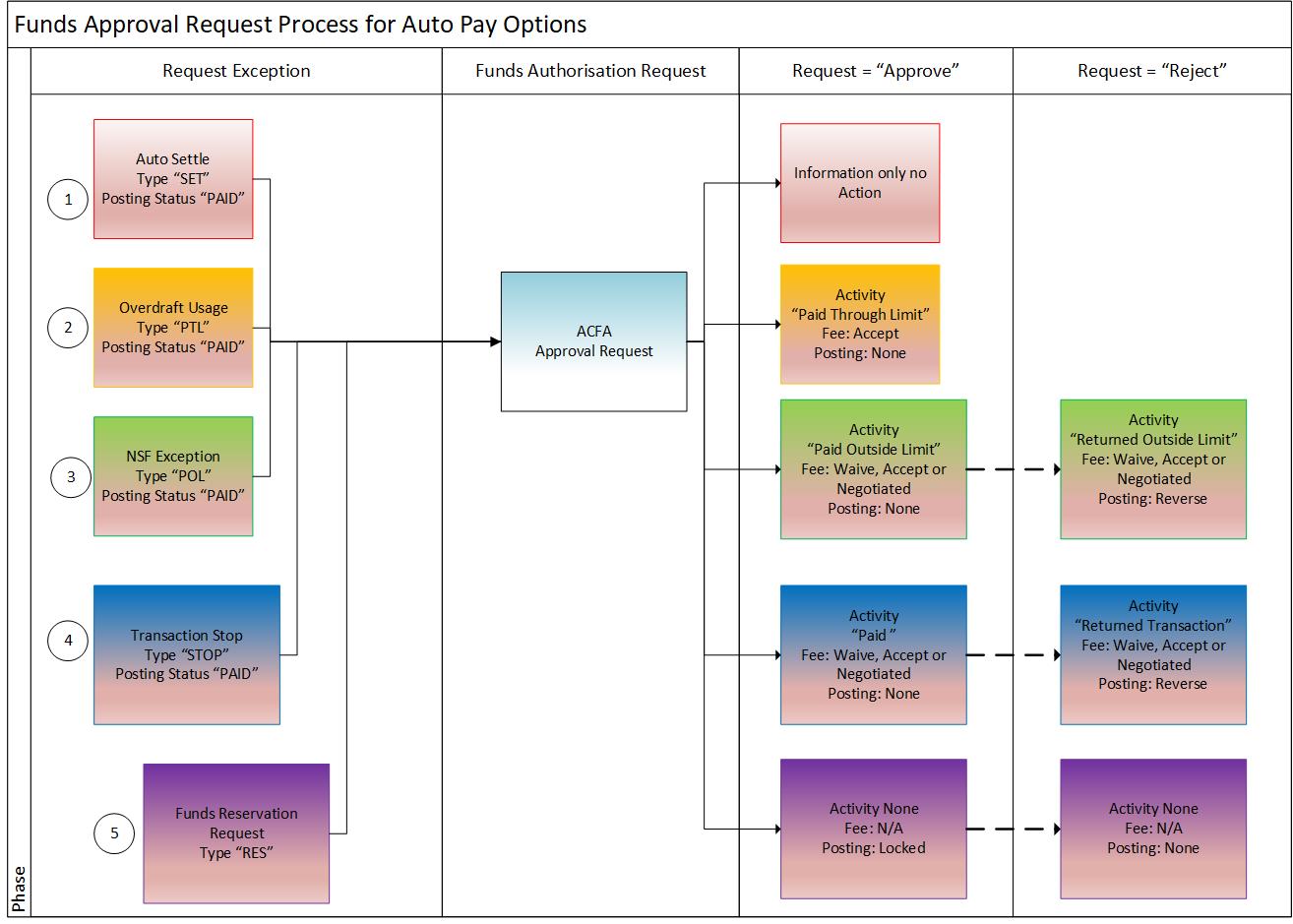
- In all cases, Post or Reject the transaction is posted to AC.FUNDS.AUTHORISATION for manual intervention if there are no sufficient funds to process the transaction. (record is in IHLD status)
- Override raised indicates the amount of overdraft in the account.
- Charges can be posted or waived at this level.
NSF Exception Processing
- NSF exceptions are created during the COB process for the transactions. NSF exception and NSF fee are assessed during the end of day if the account balance remains negative beyond the grace limit. AC.FUNDS.AUTHORISATION are generated at IHLD (hold) status.
- The ACFA application tracks all the NSF exceptions and the user is allowed to take action with any one of the following options:
- Approved - Pay NSF items
- Rejected - Reject NSF items and this triggers reversal of original transaction that was processed on batch mode using clearing.
- Pre-Authorized - This option is used when a balance check request is approved in interfaces. (for example, a debit card transaction)
- The user has to address these exceptions within the stipulated time defined in NSF.PARAMETER as Expiry Days. If not, the system executes the default decision as defined in NSF.PARAMETER -> Def Fund Decision on T + Expiry Day COB process. Manual interventions are restricted thereafter.
- The expiry days are inclusive of the transaction day.
- The system decisions are defaulted on the Expiry date if the exception is not actioned.
Any exception that is approved or rejected either manually or by the system is executed by the Activity indicated in NSF.PARAMETER
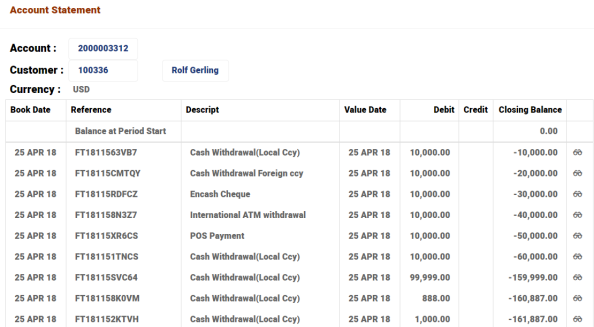
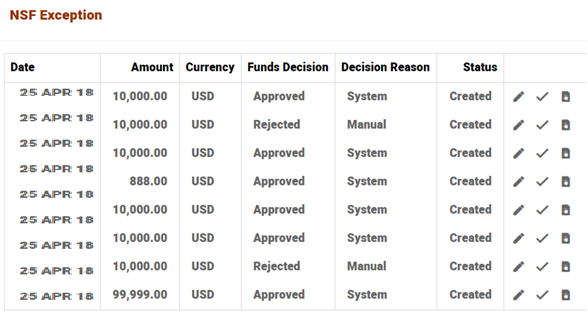
In this illustration, an account with a number of debits is considered through various channels.
The below table shows the list of decisions and activities initiated for the combination of settlement type and decision during NSF exception processing in NSF.PARAMETER.
| Type | Decision | Decision by | Activity |
|---|---|---|---|
| Paid using Limit | Approve | System | ACCOUNTS-UTILISE-LIMIT |
| Paid using Limit | Reverse | System | ACCOUNTS-UTILISE-LIMIT*REVERSE |
| Paid outside Limit | Approve | Manual | ACCOUNTS-APPROVE-EXCEPTION |
| Paid outside Limit | Reject | Manual | ACCOUNTS-REJECT-EXCEPTION |
| Paid outside Limit | Reverse Approved | Manual | ACCOUNTS-APPROVE-EXCEPTION*REVERSE |
| Paid outside Limit | Reverse Rejected | Manual | ACCOUNTS-REJECT-EXCEPTION*REVERSE |
| Force Settlement | Settle | System | ACCOUNTS-FORCE.SETTLE-EXCEPTION |
| Force Settlement | Reverse | System | ACCOUNTS-FORCE.SETTLE-EXCEPTION*REVERSE |
These transactions are recorded as exceptions in ACFA and available in the Account overview for further decisioning.
In the absence of manual decisioning, the system decisioning is performed based on the NSF.PARAMETER depicted in the above table format and NSF processing is completed
Charge Evaluation Process
Activity Charges are triggered based on Fund decision or Rejection Activity, either by the system or manually by the user in the ACFA records
In this illustration, Activity Charges are configured for the Activities,
- ACCOUNTS-UTILISE-LIMIT
- ACCOUNTS-UTILISE-LIMIT*REVERSE
- ACCOUNTS-APPROVE-EXCEPTION
- ACCOUNTS-REJECT-EXCEPTION
- ACCOUNTS-APPROVE-EXCEPTION*REVERSE
- ACCOUNTS-REJECT-EXCEPTION*REVERSE
- ACCOUNTS-FORCE.SETTLE-EXCEPTION
- ACCOUNTS-FORCE.SETTLE-EXCEPTION*REVERSE
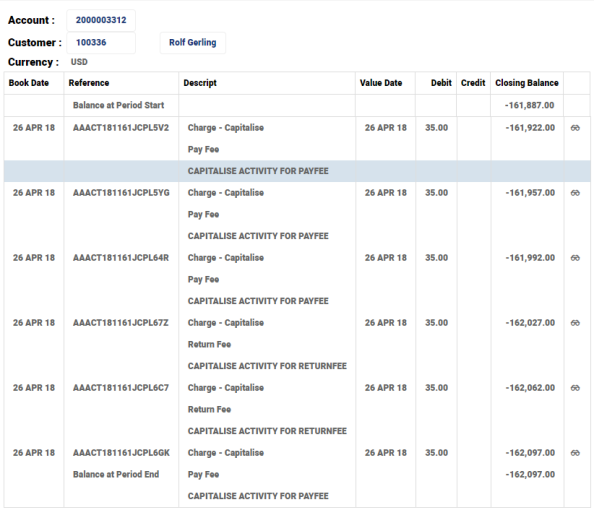
Charges assessed are posted or capped at the values based on the configuration in Pricing Rules which in turn using the periodic attributes for capping the charges
There are nine NSF Processing and Decisioning done in this illustration but there are charges posted for the six transactions complying with the cap of charge amount being 210.
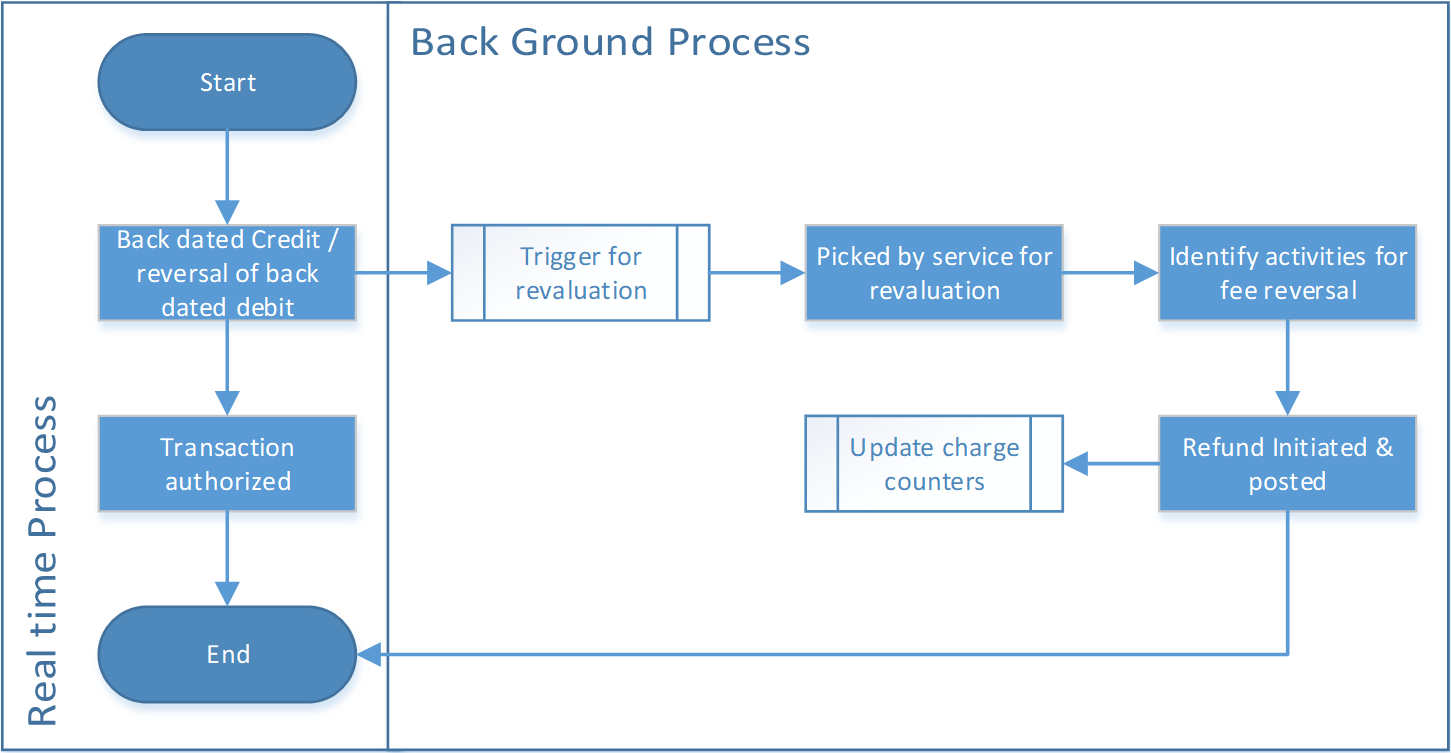
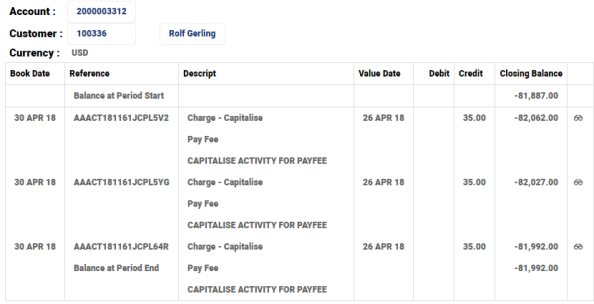
In the event of backdated transactions in an account, the NSF fees are revalued and refunded based on the predefined rules. The process of charge revaluation is depicted below.
In this illustration, consider that there is a back-value dated credit of 30,000 posted to the account.
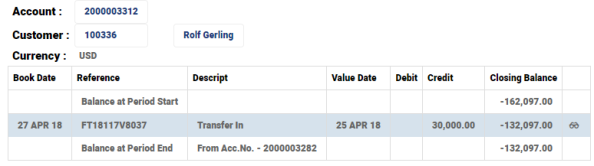
The NSF Processing is reassessed and charges are reversed for the first three transactions.
Differences in TBC
During a debit transaction, the TBC processes non-sufficient funds in the account by using secondary limits along with the account balance for the balance check. During NSF processing, the component-based credit-check options namely Shadow, Float, TDGL, Sweep are not available in AC.CREDIT.CHECK of the TBC.
In this topic