Stopping channels and services
You need to identify the channels of production system and stop it. This ensures that no new messages flows through these channels and all Temenos Transact services are stopped.
Procedure
- Login to Temenos Transact.
- Open TSM and specify Server Status as INACTIVE.
- In cloud architecture, configure the TSM record in TSA.SERVICE table by setting the ATTRIBUTE.TYPE field to INACTIVE.IMAGE and the ATTRIBUTE.VALUE field to [T24_Release_of_Production_System]. This inactivates the other Temenos Transact service agents that are running in the production system. This will help the specified attribute value to recognize inactive image.
This ensures that all the services running in production server are stopped and all the pending transactions are processed.
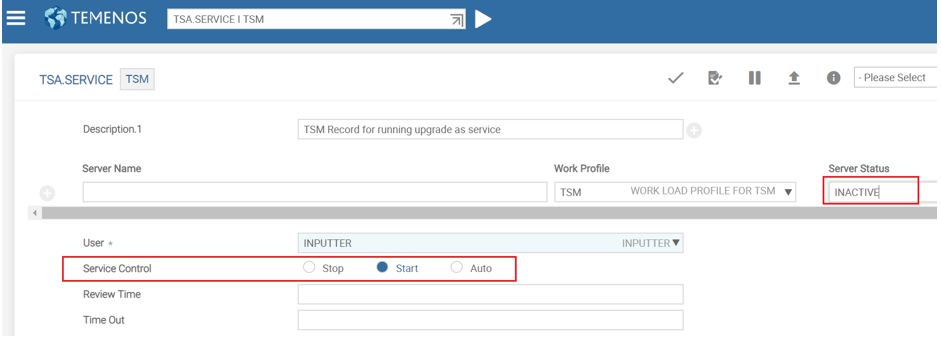
You should not shutdown TSM by changing the Service Control field value to Stop because TSM should be active in the online upgrade server.
Field Name
|
Application/Table name
In this topic