Export Letter of Credits - Amendments
The Web Channel user with access to Trade Finance has capabilities to view the Export Amendments dashboard. The dashboard displays the list of Amendments available. If no Amendments are available, the system throws an appropriate message to the user. Do any of the following in the Export Amendments:
- View all the available Amendments for the user.
- Approve or reject an Amendment.
- View all the Amendments for an LC.
- Search or filter for an Amendment.
- Download the list of available Amendments.
- Download or print an individual Amendment.
Web Channel navigation path: Side Menu > Trade Finance > Export LC > Amendments.
UX Overview
Export Letter of Credits - Amendments
This section displays all the Amendments details available for the user.
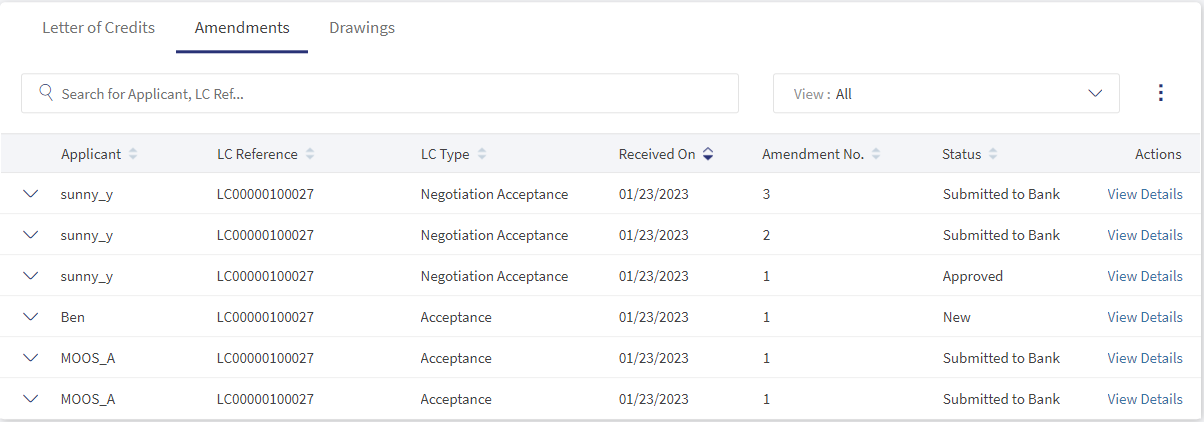
- Search: Helps the user find the records using the keywords.
- View: This is a filtering option that allows the user to filter further the search based on the criteria.
 Click here to find information on all available filtering options.
- LC Type
- Select All: Selects all types of LCs.
- Sight: LC is payable immediately.
- Acceptance: LC that is paid by a time draft authorizing payment on or after a specific date, if the terms of the letter of credit have been complied with.
- Deferred: LC in which the bank takes a conditional undertaking to pay the seller on behalf of the buyer on a specified future date after completion of the transaction.
- Negotiation Sight: Negotiation means the purchase by the nominated bank of drafts (drawn on a bank other than the nominated bank) and or documents under a complying presentation, by advancing or agreeing to advance funds to the beneficiary on or before the banking day on which reimbursement is due to the nominated bank.
- Negotiation Acceptance: Regarding LC, when the documents are presented and reviewed by the bank, the process is referred to as negotiation of the documents. In accordance with UCP 600, a bank authorized to negotiate documents or drafts is authorized to give value for the draft(s) and or document(s), which means the LC can stipulate that payment be made by the advising, issuing or confirming bank.
- Status
- New: The amendment is newly received.
- Submitted to Bank: The amendment is submitted for approval.
- Processing by Bank: The amendment is in process to approve from bank.
- Approved: The amendment request is approved by the bank and issued successfully.
- Rejected: The amendment is rejected by bank.
- Time Period
- Today: Considers only the record created on the same day.
- Last one Month: Considers the record created in the last 30 days.
- Last Six Months: Considers only the record created in the last 180 days.
- Last one Year: Considers the record created in the last 365 days.
- YTD: Considers the record from first day of the calendar year to current date.
- LC Type
- Applicant: Name of the Applicant.
- LC Reference: Specifies the LC reference number.
- LC Type: Specifies the type of LC.
- LC Type
- Sight: LC is payable immediately.
- Deferred: LC in which a conditional undertaking is taken by the bank to pay the seller on behalf of the buyer on a specified future date after completion of the transaction.
- Acceptance: LC that is paid by a time draft authorizing payment on or after a specific date, if the terms of the letter of credit have been complied with.
- Negotiation Sight: Negotiation means the purchase by the nominated bank of drafts (drawn on a bank other than the nominated bank) and or documents under a complying presentation, by advancing or agreeing to advance funds to the beneficiary on or before the banking day on which reimbursement is due to the nominated bank.
- Negotiation Acceptance: Regarding LC, when the documents are presented and reviewed by the bank, the process is referred to as negotiation of the documents. In accordance with UCP 600, a bank authorized to negotiate documents or drafts is authorized to give value for the draft(s) and or document(s), which means the LC can stipulate that payment be made by advising, issuing or confirming bank.
- Received On: The date on which the amendment is received.
- Amendment No: Specifies the sequence number of Amendments made for a particular LC.
- Status: This shows the current status of the record.Click here to find information on different types of status options.
- Status
- New: The amendment is newly received.
- Submitted to Bank: The amendment is submitted for approval.
- Processing by Bank: The amendment is in process to approve from bank.
- Approved: The amendment request is approved by the bank and issued successfully.
- Rejected: The amendment is rejected by bank.
- Status
- Action: The types of action the user has. The user can View Details, Download, and Print and Amendment LC.
Click here to find information about different LC Types.
Amendments - Record Expanded
The Expanded section displays a summary of Amendment LC details. The user can use this option to view the summary details or perform the quick action like Download and Print and Amendment LC. To see the summary, the user have click the arrow for the desired Amendment.

- Issue Date: Specifies the date on which the Amendment is approved.
- Expiry Date: Specifies the date on which the Amendment is going to expire.
- Amendment Reference: Specifies the Amendment LC reference number.
View Export Amendments
The bank users can see the details of the individual Amendment from the list of the Amendments available in the Amendments dashboard. The users can narrow down their desired Amendment by using the filter or search options. In the detailed Export Amendments page, the user can do any of the following:
- Download and Print the Amendment LC.
- View LC Details for current Amendments.
- If the status of the Amendment is New, the bank user can self-approve or reject the Amendment.
View Detailed Amendment LC
Following are the steps to see the detailed view of Amendment LCs.
- In the Search bar use Applicant name, or Amendment Reference for further filter options to narrow the Amendments.
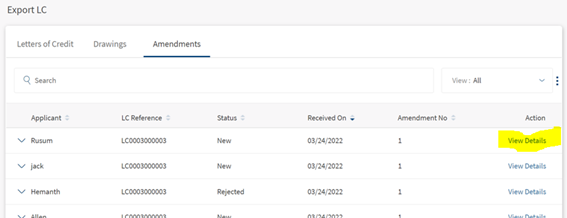
- On the desired Export Amendment record, click View Details. This will navigate to the Export Amendments records page to view the details.

Self-Approve Amendments
The user can self-approve or reject Amendment LCs only if the status is New. Following are the steps to approve or reject the Amendment.
- In the Search bar use Applicant name, Amendment Reference and further filter options to narrow the Amendments.
- On the desired Export Amendment record, click View Details. This will navigate to Export Amendments records page viewing the details.
- Review the details and select Accept or Reject and click submit.
If the user selects Reject, there will be an additional field Enter reason for self rejection.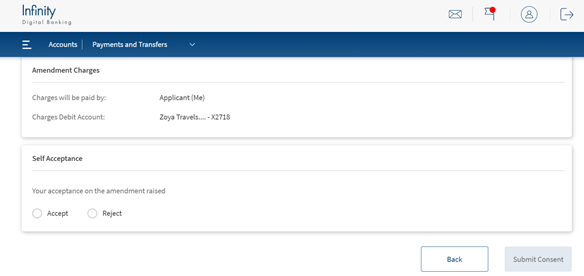
View All Export Amendments for an Individual LC
There might be one or more than one Amendments for a Export LC. The user has option to view all Amendments for a single Collection. Following is the procedure to view all Amendments.
- In Export LC dashboard, click on View Details. This navigates the Export LC detailed view.
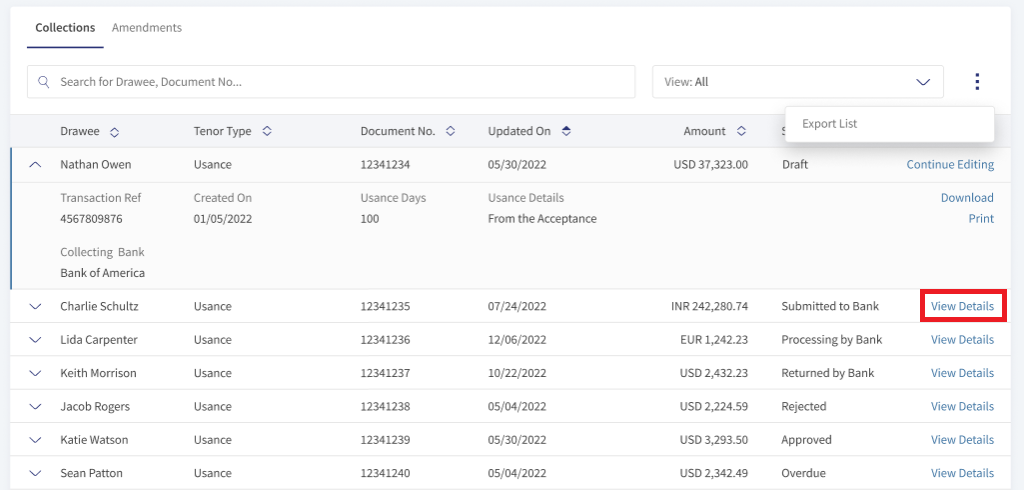
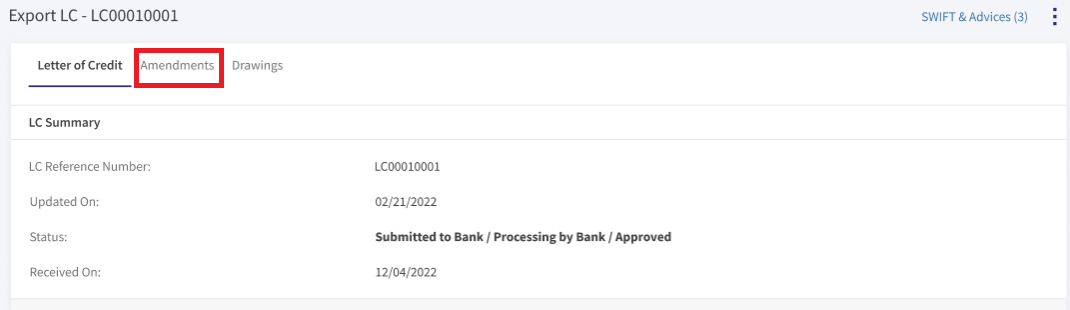
- Click Amendments tab at the top. The page displays the latest Amendment at the top.
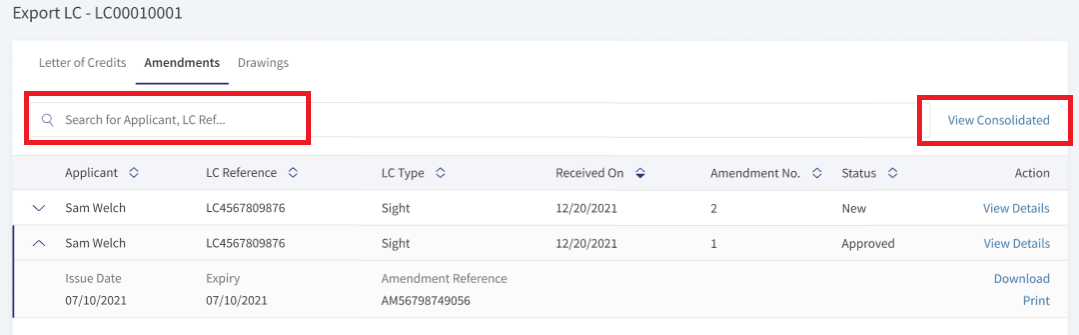
- The user can click View Consolidated to view the details of all Amendments current record. This navigates to Amendments - Consolidated View page.
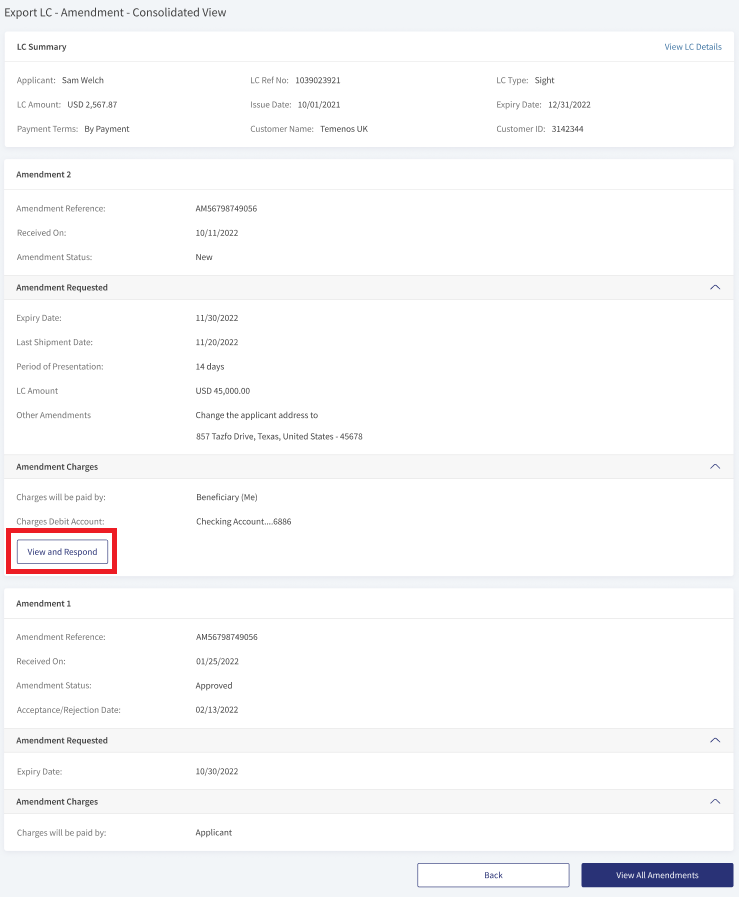
The Amendments - Consolidated View has LC Summary at the top followed by the amendments made for the LC. The latest Amendment is at the top. The latest amendment have View and Respond action. This display fields depends upon the status of the each amendment.
LC Summary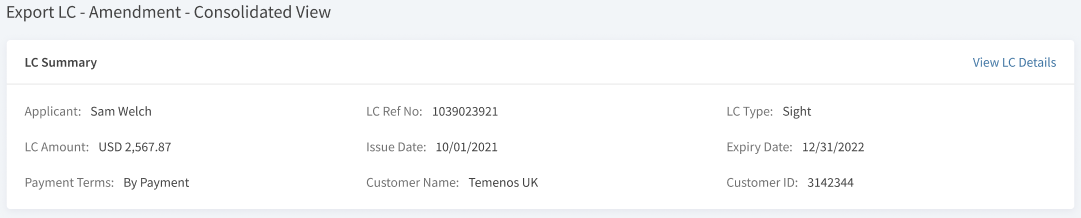
Amendment status New with View and Respond action.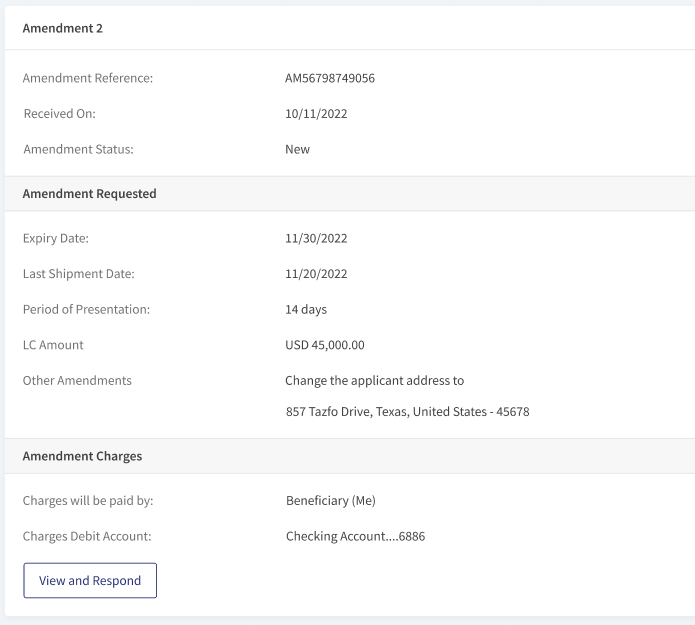
Amendment status as Approved.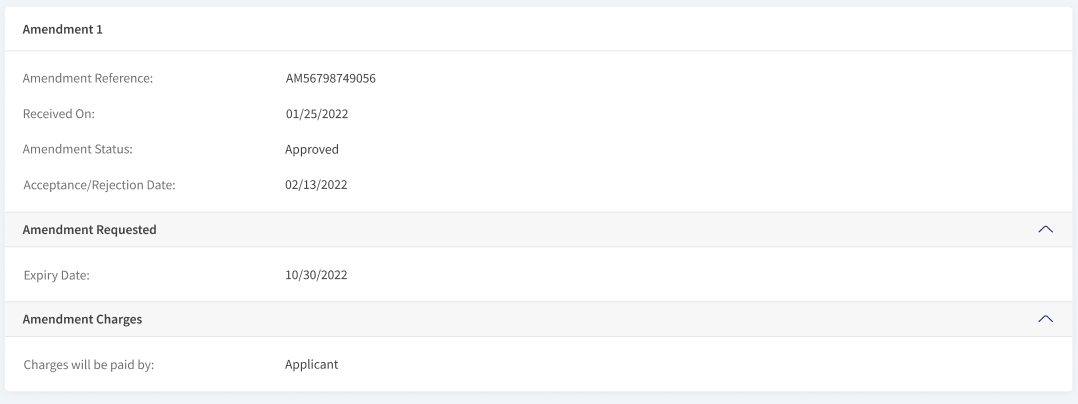
Download or Print Amendment LC
The user has two options to download Export Amendment LC records. Either they can download the complete list displayed on the Amendment LC dashboard page and download or print individual LCs.
Download Export Amendment LC list
Following are the steps to download Export Amendment list into excel (.xlsx).
- Click the Ellipses.
- Select the option Export List. This downloads the list of Export Amendments records into an excel file.

Download or Print individual Export Amendments
The following are thesteps to download or print individual LCs.
- Click the arrow to see the summary of the Export Amendments record.
- Click Download or Print to download or print LC.
The download options downloads LC in a PDF format. The print option opens a print dialogue box for printing the Export Amendment Details.
SWIFT MT 700
SWIFT is an acronym for Society for Worldwide Interbank Financial Telecommunication. SWIFT provides a secure, highly encrypted, and reliable messaging service to all financial institutions.
This is an additional feature provided to the Trade Finance Micro App to implement the SWIFT MT700 codes to the fields available in LCs. If there is no SWIFT code, then NA will display adjacent to the field. The same SWIFT MT700 codes will also display in the download and print LCs.
Enable the Spotlight configurations to display the SWIFT tags. Individual configurations are available for Web Channel, download, and print LCs.
Web Channel SWIFT MT700 codes: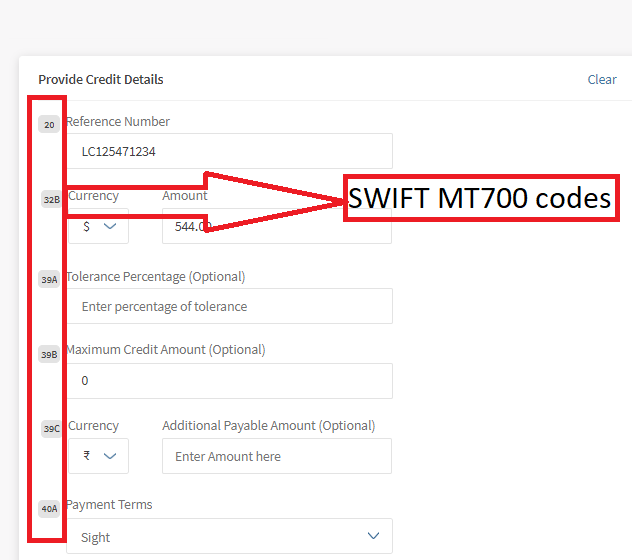
Download and Print SWIFT MT700 codes: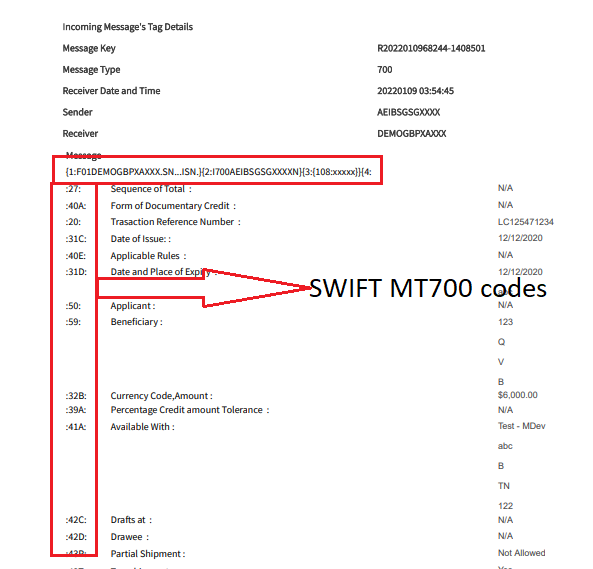
Swift and Advices
The bank user with required permissions can see the Swift MT messages and Payment Advices for a particular record. The following is the procedure to view Swift and Advices for a particular record.
- In the dashboard, search or filter for the record.
- Click View Details on the record to view Swift and Advices. The navigates to the detailed page view.
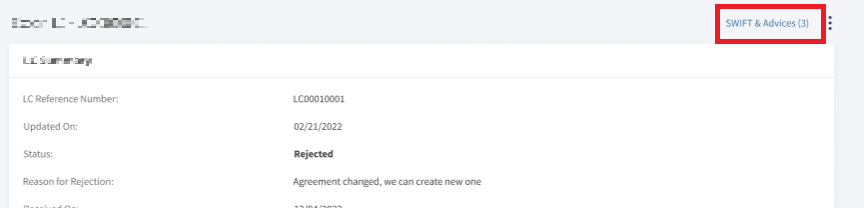
- Click SWIFT & Advices.
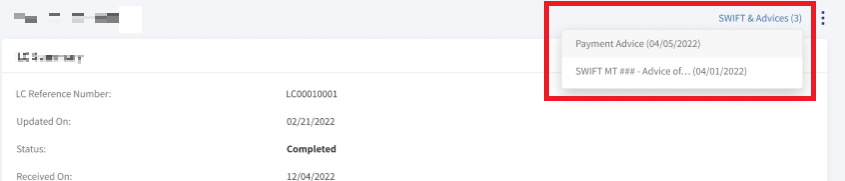
- In the pop-up,
- Select Payment Advices to view payment advices for a particular record.
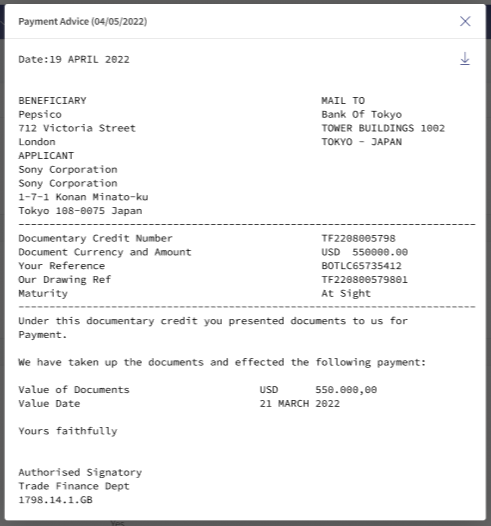
- Select SWIFT MT to view in advices in SWIFT MT mode.
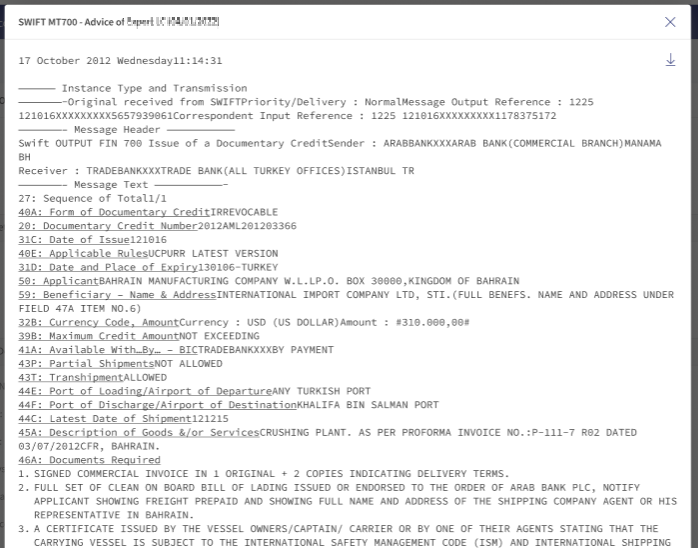
- Select Payment Advices to view payment advices for a particular record.
SRMS Configuration
The SRMS configurations are shipped as a part of this feature. For more information, see SRMS Configurations.
Experience APIs
The following are theexperience APIs for Export Amendment LCs.
| Name | Description | Introduced In |
|---|---|---|
| createExportLetterOfCreditAmendment | This API creates the Export LC Amendment record. | 2022.07 |
| getExportLCAmmendments | This API retrieves the Export LC Amendment records. | 2022.07 |
| getExportLCAmendmentById | This API retrieves the Export LC Amendment record by ID. | 2022.07 |
| updateExportLCAmendment | This API updates an Export LC Amendments record. | 2022.07 |
| generateExportLetterOfCreditAmendment | This API downloads the list of Export LC Amendments records. | 2022.07 |
| generateExportAmendmentList | This API exports the list of Export LC Amendments records. | 2022.07 |
In this topic