Azure Stack
This section explains the features that are implemented in Azure Stack:
APP Init feature is implemented in Azure package as a separate function app and this new function app is packed automatically during build time.
Directory:
ms-marketingcatalog-package-azure\target\ms-marketingcatlog-package-azure-postgresql-DEV.0.0-SNAPSHOT\marketingcatalog-Azure\target\azure-functions

- We need to implement some additional script changes to deploy the newly generated function app in the Azure resource group.
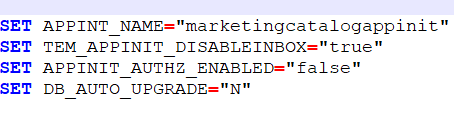
- These are the additional required environment variables that needed to be added for APP Init function app.
- For this new APP Init function app, disable the inbox feature is defaulted as True. Security auth enabled property is also enabled as False by default.
- SET APPINT_NAME=APP Init
- SET TEM_APPINIT_DISABLEINBOX=True
- SET APPINIT_AUTHZ_ENABLED=False
-
To deploy APP Init function app, add the below command:
call mvn -Pdeploy azure-functions:deploy -Dazure.region=%LOCATION% -Dazure.resourceGroup=%RESOURCE_GROUP_NAME% -DappName=%APPINT_NAME% -f pom-azure-deploy.xml -X

-
To initiate the API present in this function app from the script file, we need to extract the master key from the function app.
call az functionapp keys list -g %RESOURCE_GROUP_NAME% -n %APPINT_NAME% --query masterKey>>out1.txt
SET /p MASTER_KEY=<out1.txt
del out1.txt
- Post deployment of the function app, set the environment variables for the deployed APP Init function app.
call az functionapp config appsettings set --name %APPINT_NAME% --resource-group %RESOURCE_GROUP_NAME% --settings
POSTGRESQL_CONNECTIONURL=%DATABASE_CONNECTIONURL% POSTGRESQL_USERNAME=%DATABASE_USERNAME%
POSTGRESQL_PASSWORD=%DATABASE_PASSWORD% DATABASE_KEY=%DATABASE_KEY% temn_msf_name=%MSF_NAME%
EXECUTION_ENV=%EXECUTION_ENV% DATABASE_NAME=%DATABASE_NAME% class_package_name=%PACKAGE%
tem_msf_disableInbox=%TEM_APPINIT_DISABLEINBOX% temn_msf_security_authz_enabled=%APPINIT_AUTHZ_ENABLED%
temn_msf_database_auto_upgrade=%DB_AUTO_UPGRADE%

- Initiate the API function from the curl command which will create database objects in the database
timeout /t 10 /nobreak
curl -H "Content-Type: application/json" -X POST https://%APPINT_NAME%.azurewebsites.net/api/v1.0.0/dbmigration?code=%MASTER_KEY%

In this topic