AWS Stack
This section explains the features that are implemented in AWS Stack:
APP Init feature is executed in the AWS package as a lambda function. Since all the existing services like api, ingester, scheduler is executed as a lambda function, all the class file related to this appinit service will get packed automatically during the build time in the final pack in the form of a Jar file.
Directory: The developer has to add only the entries required to create the lambda function alone in the execution scripts alone.
ms-marketingcatalog-package\ms-marketingcatalog-package-aws\target\ms-marketingcatalog-AWS\app
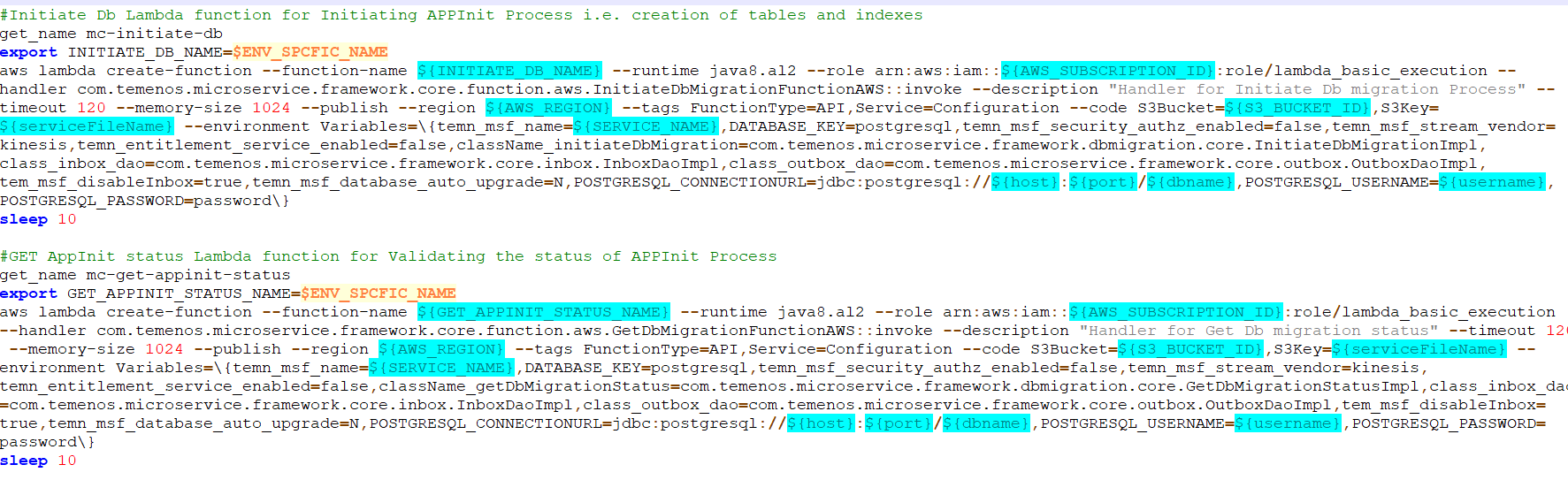
Initiate DB migration: Initiate DB Lambda function required to initiate APP Init Process i.e., creation of tables and indexes.
get_name mc-initiate-db
export INITIATE_DB_NAME=$ENV_SPCFIC_NAME
aws lambda create-function --function-name ${INITIATE_DB_NAME} --runtime java11 --role arn:aws:iam::${AWS_SUBSCRIPTION_ID}:role/lambda_basic_execution --handler com.temenos.microservice.framework.core.function.aws.InitiateDbMigrationFunctionAWS::invoke --description "Handler for Initiate Db migration Process" --timeout 120 --memory-size 1024 --publish --region ${AWS_REGION} --tags FunctionType=API,Service=Configuration --code S3Bucket=${S3_BUCKET_ID},S3Key=${serviceFileName} --environment Variables=\{temn_msf_name=${SERVICE_NAME},DATABASE_KEY=postgresql,temn_msf_security_authz_enabled=false,temn_msf_stream_vendor=kinesis,temn_entitlement_service_enabled=false,className_initiateDbMigration=com.temenos.microservice.framework.dbmigration.core.InitiateDbMigrationImpl,class_inbox_dao=com.temenos.microservice.framework.core.inbox.InboxDaoImpl,class_outbox_dao=com.temenos.microservice.framework.core.outbox.OutboxDaoImpl,tem_msf_disableInbox=true,temn_msf_database_auto_upgrade=N,POSTGRESQL_CONNECTIONURL=jdbc:postgresql://${host}:${port}/${dbname},POSTGRESQL_USERNAME=${username},POSTGRESQL_PASSWORD=password\}
sleep 10
Get App Init Status: GET AppInit status Lambda function for Validating the status of APP Init Process.
get_name mc-get-appinit-status
export GET_APPINIT_STATUS_NAME=$ENV_SPCFIC_NAME
aws lambda create-function --function-name ${GET_APPINIT_STATUS_NAME} --runtime java11 --role arn:aws:iam::${AWS_SUBSCRIPTION_ID}:role/lambda_basic_execution --handler com.temenos.microservice.framework.core.function.aws.GetDbMigrationFunctionAWS::invoke --description "Handler for Get Db migration status" --timeout 120 --memory-size 1024 --publish --region ${AWS_REGION} --tags FunctionType=API,Service=Configuration --code S3Bucket=${S3_BUCKET_ID},S3Key=${serviceFileName} --environment Variables=\{temn_msf_name=${SERVICE_NAME},DATABASE_KEY=postgresql,temn_msf_security_authz_enabled=false,temn_msf_stream_vendor=kinesis,temn_entitlement_service_enabled=false,className_getDbMigrationStatus=com.temenos.microservice.framework.dbmigration.core.GetDbMigrationStatusImpl,class_inbox_dao=com.temenos.microservice.framework.core.inbox.InboxDaoImpl,class_outbox_dao=com.temenos.microservice.framework.core.outbox.OutboxDaoImpl,tem_msf_disableInbox=true,temn_msf_database_auto_upgrade=N,POSTGRESQL_CONNECTIONURL=jdbc:postgresql://${host}:${port}/${dbname},POSTGRESQL_USERNAME=${username},POSTGRESQL_PASSWORD=password\}
sleep 10
Add the scripts to create API gateway for the following two lambda functions:
- Create POST method and link it with the function installed above.
create_api_gateway_resource v1.0.0/migration mc-initiate-db POST
- Create GET method and link it with the function installed above.
create_api_gateway_resource v1.0.0/migration mc-get-appinit-status GET

Post creation of Lambda function and API gateway for the functions, we are implementing a curl command for executing the initiate function which will create database objects.
- Execute APP Init API internally creates tables and indexes for first time and also executes scripts for DB upgrade.

In this topic