Functional Highlights
Vendor-Agnostic Document Storing Policy
As this microservice needs to support storing documents in different DMS/object stores, a unified, vendor-agnostic document storing policy needs to be defined to host documents for multiple owner systems in multiple channels across Temenos. This ensures the Temenos documents are well organised and avoid potential documents conflicts and security breach.
This policy needs to satisfy:
- Organize documents for different channels
- Organize documents with multiple owner systems
- Unique document name across DMS/file system to avoid override documents by accident. (Can't use the real file name for obvious reason)
- Maximum the file store capabilities under even strict situation where you are limited to store certain files under the same folder
Proposal
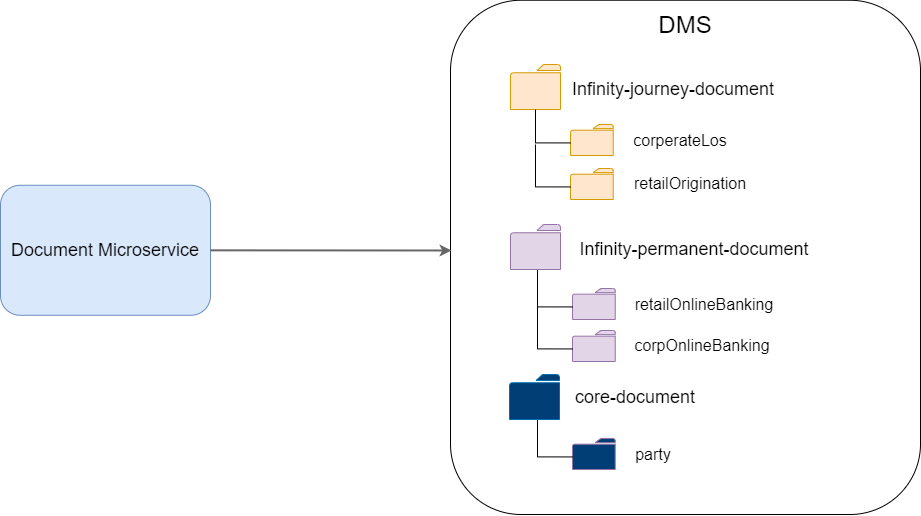
We Propose
- To use Channel base directory as the first level directory
- To use the owner system name as the second level directory
- Within a particular channel and owner system, to use first four bits (two bits a time) of the SHA-1 HEX hash code of the documentID (UUID) to construct two-level deep subfolders so that we can ensure files are evenly distributed across the folders. This is how git repo works. Below is the proposed structure.
channelBaseDirectory/ownerSystemName/firstTwoBits/followingTwoBits/remainingBits
Example of a typical corporation LOS document path stored in DMS looks like below.
temenos-infinity-journey-document/corperateLos/fc/b5/5a760f400ea5adf64fa80b2ff04845261880
For example, if a document with documentID (uuid) is 00f7cc90-da88-4b9e-80bb-eff198dbe5da
The SHA-1 hash code base on that would be fcb55a760f400ea5adf64fa80b2ff04845261880
Then we used the first two bits of fc to be the first level subfolder, then b5 to be the second level subfolder, the real filename gets stored would be the 5a760f400ea5adf64fa80b2ff04845261880
Since hash code itself is generated evenly across 0-f for every bit, from a statistic perspective, files would be distributed evenly into those two-level subfolders to maximum the file storing capability to ensure our solution work nicely on even some of the very restricted operation systems.
For example, if you decide to use a DMS/file system/object-store which has a limitation of storing maximum 512 files in a folder, with this policy, it's guaranteed to support a maximum of 33 million files.
Categorizing Temenos documents with this structure also enables us to perform access control at channel/owner system level easily in DMS.
Virus Protection
We've provided a standard anti-virus module interface in the Document Microservice to protect all documents in Temenos from the virus.
ClamAV as an open-source anti-virus solution is build-in as the default Anti-virus module out-of-the-box but can be switched to other anti-virus services if needed.
Document Content Detection
Based on the security team requirement, we are adding the document content type scanning capability in the Document Microservice to ensure the file content gets uploaded is matching the file extension name as an extra layer of the protection from the malicious file.
Apache Tika
As an open-source solution, the Apache Tika™ toolkit detects and extracts metadata from over a thousand different file types (such as PPT, XLS, and PDF). All of these file types can be parsed through a single interface, making Tika useful for search engine indexing, content analysis, translation, and much more.
We use Apache Tika to perform the content detection, to make sure the real detected mime type based on file content matches the mime type when uploading and also make sure the file extension name belongs to the detected mime-type.
For more information, see https://tika.apache.org/
Business Operations
Upload a Document
Request to upload a document, it goes through an antivirus scanning process and hosts the document either on-premises or in Amazon S3/Microsoft Azure. It returns the document unique id to the owner system.
- Document (file) can be uploaded and associated with the owner system.
- Upload document will have a file size limit.
- All files uploaded will be virus checked before they are persisted into the environment.
- Provides ClamAV as antivirus module but should be switchable to another virus service.
- Once virus scanning is complete, store the file in the DMS.
- A unique identifier will be returned to the owner system to identify the document.
Download a Document
Request to download a document through the document unique id.
- Anyone who wants to download the document must provide the document unique id.
- Only the document owner system can download the document.
Search Document Info
Search for document ID(s) using search metadata.
Delete a Document
Request to delete a document through the document unique ID.
- Anyone who wants to delete the document must provide the document unique ID.
- Only the document owner system can delete the document.
Deliver a Document
To promote Infinity documents to core banking documents.
- Document moved from infinity channel to core channel in DMS
- Remove all the old metadata
- Update with the new metadata in the request
- Update with the new document group
- A new document ID will be generated and returned.
Update Search Metadata for a document
To update the existing document search metadata.
- Remove all the old metadata
- Update with the new metadata in the request
- Document ID and its channel and owner system ID remains unchanged.
Add Search Metadata for a Document
To add new metadata to the existing document search metadata.
- Add new metadata to the existing document
- Old metadata will remain
- Reject the request if new metadata key already exists. (case sensitive)
- Document ID and its channel and owner system ID remains unchanged.
Documents Uploaded to or Downloaded from Workspace App
To upload or download the document from Workspace App the mentioned configurations and run-time parameters are required.
- Configure the document upload with the Retail and SME flow in Workspace App Configurations > Infinity Retail Origination > Kony (atlassian.net). For more information, see here.
- Configure the following runtime parameters:
AX_DOCUMENT_UPLOAD_COUNT - 20 (Configured as per customization)
ONBOARDING_DMS_OWNER_SYSTEM_ID - retail
SME_ONBOARDING_DMS_OWNER_SYSTEM_ID - sme
ONBOARDING_DMS_RETAIL_OWNER_SYSTEM_ID- retail
ENTITLEMENT_MS_BASE_URL -(URL of the corresponding environment)
DOCUMENT_MS_BASE_URL -(URL of the corresponding environment)
Evidence Definition API's
The banking staff defines a good set of evidence categories and types through the design time APIs before runtime APIs are used.
Evidence Category Definition (Design Time API's)
- Banking staff define categories first before creating any evidence types.
- Deleting category is only possible if there is no evidences types link to it.
- Since it's the first step to setup evidence category, we don't offer update operation. Banking staff can delete and recreate evidence category at the beginning stage.
POST: /evidences/categories
- Create a new evidence category
GET: /evidences/categories
- Get all the evidence categories info
DELETE: /evidences/categories/{categoryId}
- Delete an evidence category if it's not used by any evidence types yet. (throw an error if it's already referenced by any evidence types)
Example:
{
"id": "address",
"name": "Proof of Address",
"description": "This is an evidence category for a group of evidence types that can be
used for proof of address"
}
Evidence Category Definition (Design Time API's)
- According to business requirement, the evidence type properties are relatively less and stable (passport information like name, date of birth, issue date are not part of evidence properties since there is no application usage), hence, we don't provide versioning to evidence types to simplify the application logic as a start.
- Banking staff should really consider setup a good set of evidence types before system can be used by the real applications. Since deleting evidence types that are being used by application is not possible.
- Since evidence type definition contains many attributes and should be done first before application usage, we don't offer update operation. Banking staff can delete and recreate evidence type at the beginning stage.
POST: /evidences/types/{typesId} -> passport, dl-au-nsw
- Create a new evidence type, throw an error if id already exists.
GET: /evidences/types/{typesId}
- Get the latest evidence type definition based on id.
DELETE: /evidences/types/{typesId}
- Delete the evidence type definition if it's not used by any evidences yet. Throw an error if current evidence type is already in use (referenced by any existing evidences)
Example:
{
"id": "driver-license-au-nsw",
"description": "Australian NSW driver license",
"defaultValidPeriod": "12M", // Support Y: Years, M: Months, D: Days
"allowMultiple": true  // whether this type allows multiple valid evidence at the same time. For example, passport should be false whereas payslip could be true.
"categories": [   // Evidence category id list, can be used for Proof of Address, Proof of ID.
   "address",
   "id"
 ]
"properties": [ // properties that revelent to this evidence type, mandatory mean is required to be provided on evidenceProcessed business event (2021.10 don't consider extracted data yet).
  {
    "key": "dob",
    "description": "Date of birth"
    "isMandatory": true
   },
   {
    "key": "issueAuthority",
    "description": "Issue Authority"
    "isMandatory": false
  },
   {
    "key": "expiryDate",
    "description": "Expiry Date on passport"
    "isMandatory": true
   }
 ]
}
Application Fulfillment API's
This request generates an evidence fulfillment checklist for the current application.
POST: /evidences/fulfillments
- Request must provide the current application ID (journey ID).
- Request must provide the owner ID (temp ID for new applicant, party ID for the existing customer or productId for product) to reuse the previous evidence (submitted or accepted) and owner type.
- Request must contain the suitable requirement list for the current applicant (owner).
- Creates an Application Fulfillment instance based on evidence requirement.
- Returns the Application Fulfillment ID for later query.
- Should revert back all the previously valid reusable non-product evidence (newProspect, verifiedProspect and party) with the same owner as status: "acceptedBefore", if the evidence category and evidence types matches the requirements.
- Product evidences are not reusable.
- End users can trigger this fulfillment creation API multiple times on the same application based on different owner. In that case, evidence management system treat them as separate fulfillment’s and you can query them individually.
Request:
{
"applicationId": HL49BWG,
"ownerId": 435663,
"ownerType": "nonParty",
"description": "Lending application for individual requires 2 proof of ID and 1 proof of address from primary applicant, 3 proof of tax statement from the secondary applicant ",
"requirements": [
{
"key": "id-for-primary",
"name": "Proof of ID for the primary applicant",
"description": "Requires 2 evidences from proof of ID category. Types are either passport or Medicare card",
"evidenceCategory": "id",
"validEvidenceTypes": [
"passport", "taxId"
],
"properties": {
"numberRequired": 2
}
},
{
"key": "address-for-primary",
"name": "Proof of address for the primary applicant",
"description": "Any evidences that belongs to passport or NSW driver license, only one is needed.",
"evidenceCategory": "address",
"validEvidenceTypes": [
"passport", "driver-license-au-nsw"
],
"properties": {
"numberRequired": 2
}
},
{
"key": "tax-statement-for-secondary",
"name": "Proof of income for the secondary applicant",
"description": "Only tax statement type is allowed in this case.",
"evidenceCategory": "income",
"validEvidenceTypes": [
"tax-statement"
],
"properties": {
"numberRequired": 2
}
}
]
}
Response:
{
"appFulfilmentId": "42343243243",
"applicationId": "HL49BWG",
"ownerId": "5543543",
"ownerType": "nonParty"
}
Application Evidence Fulfillment API's
This request queries evidence requirement checklist (Fulfillment)
GET: /evidences/fulfilments/{appFulfilmentId} -> 42343243243
GET: /evidences/fulfilments?applicationId=543436
- Get the latest list of current application fulfillments if appFulfillmentId is provided, if ownerId provided is not matching the application fulfillment recorded owner, throw a validation error.
- If applicationId is provided, result should be a merged requirement fulfillments that belongs to this application for all the owners. ownerId field is not required in this case. If ownerId is provided, throw validation error.
- show eligible existing valid owner evidences and its expiry date if available, status should be acceptedBefore waiting to be confirmed by the end user. ( This should have done in the create fulfillment request)
- Previous submitted evidence with same owner ID automatically becomes available as submitted under requirement. ( This should have done in create fulfillment request)
- The evidence IsValid flag in each ApplicationEvidence can help UI to decide showing expired evidence (status=accepted and evidenceIsValid=false), for the expired evidence, it should allow user to resubmit the evidence.
Request:
Header: ownerId: 435663
Response:
{
"appFulfilmentId": "42343243243",
"applicationId": "HL49BWG",
"ownerId": "435663",
"requirementFulfilments": [
{
"requirementKey": "id-for-primary",
"requirementName": "Proof of ID for the primary applicant",
"requirementDescription": "Requires 2 evidences of any types from proof of ID category",
"evidenceCategory": "id",
"validEvidenceTypes": [ "passport", "driver-license-au-nsw"],
 "properties": {
 "numberRequired": 2
 },
"applicationEvidences": [
{
"appEvidenceId": "3423553",
"evidenceId": "42533433",
"documentIds": ["5d36bf48-d214-40e6-af7c-9719c4118728", "5d36bf48-d214-40e6-af7c-9719c4118729"], // one evidence can have multiple documents, for example, front side and back side images of the driver license being one evidence
"evidenceType": "passport",
   "evidenceDescription": "This is the bio page of the passport.",
"evidenceCategory": "id",
   "evidenceIsValid": true,
"evidenceExpiryDate": "19/08/2021",
   "evidenceProperties": { // evidence properties could either come from the extracted data once accepted, or from initial submission provided by end user.
"statementYear": "2020",
"statementMonth": "10"
}
"status": "accepted"
},
{
"appEvidenceId": "3423554",
   "evidenceId": "42533433",
   "documentIds": ["4322ab34-d214-40e6-af7c-43243343228"],
   "evidenceType": "driver-license-au-nsw",
   "evidenceDescription": "This is the front page of the NSW license.",
"evidenceCategory": "id",
"evidenceIsValid": false,
"evidenceExpiryDate": "",
"status": "submitted",
   "comments": ""  // for submitted evidence, we don't expect comments from banking staff yet
}
]
},
{
"requirementKey": "address-for-primary",
"requirementName": "Proof of address for the primary applicant",
"requirementDescription": "Any evidences that belongs to passport or NSW driver license, only one is needed.",
"evidenceCategory": "address",
  "properties": {
 "numberRequired": 2
},
"validEvidenceTypes": [ "passport", "driver-license-au-nsw" ],
"applicationEvidences": [
{
"appEvidenceId": "3423554",
"evidenceId": "42533433",
"documentIds": ["2456bf48-d214-40e6-af7c-43243343228"],
"evidenceType": "driver-license-au-nsw",
"evidenceCategory": "id",
"evidenceExpiryDate": "",
"evidenceIsValid": false,
"status": "rejected", // banking staff has rejected this evidence with comments
"comments": "Driver license image is unclear, please re-upload."
}
]
}
]
}
Submit Application Evidence API's
This request submits a piece of evidence for the current application.
POST: /evidences/fulfilments/{appFulfilmentId}/appevidences/
- Request should provide the current application Fulfilment ID (mandatory).
- Must provide a document in case of new evidence.
- It returns all the newly generated application evidence ID with status being "submitted" for each requirement.
- Current evidence record isValid and isParty flag should be false for the newly submitted evidence.
- If evidence type was set to not allow multiple by banking, then the user shouldn't submit more than one evidence with same type under the same requirement. For example, if user already submit one driver license (allow multiple=false) under proof of ID, when he/she submitted a second driver license under proof of ID, it should throw a validation error: Multiple evidence is not allowed to upload under proof of ID. If user makes a mistake, he/she should delete the previous evidence before upload the correct one under the same requirement.
- AllowMultiple=false validation should only consider same evidence type with the "submitted", "accepted", or "acceptedBefore" status. Meaning if there is already a submitted, accepted (also valid) or acceptedBefore evidence with same type under the same requirement, the system should not allow user to submit another one.
- End user can optionally provide evidence properties, but the key has to match the evidence type property definition. Throw an error in case any of the property key doesn't match.
- It should create "evidenceSubmitted" business event on successful.
Request (Multipart):
 Header: ownerSystemId, Authorization, documentGroup
Body:
evidenceDetail : {
           "evidenceType": "passport",
           "forRequirements": [ "id-for-primary" , "address-for-primary" ], // which requirement(s) Key this evidence to fulfil
            "description": "This is the bio page of the passport."
              "properties": {  // this is optional evidence properties values end user can provide
              "firstName": "John",
              "lastName": "Smith"
              }
            }
   fileContent : binary
Response:
[
{
"appEvidenceId": "42343243243", "evidenceType": "passport", "requirementKey": "id-for-primary", "status": "submitted"
},
{
"appEvidenceId": "42343243244", "evidenceType": "passport", "requirementKey": "address-for-primary", "status": "submitted"
}
]
Add more documents to the existing Application Evidence
POST: /evidences/appevidences/{appEvidenceId}
- Request should provide the existing application evidence ID (mandatory).
- Must provide a new document in fileContent.
- It should attach the newly uploaded document to the existing evidence (the evidence that belongs to the current application evidence).
- Only application evidence with "submitted" state can add more documents. All other states should throw a validation error.
- Due to the one to many relationship between application evidence and evidence, adding document through one of the application evidence ID could make all related application evidences get updated. (In below example when passport get shared across two evidence categories, add document to any of the application will make both updated by nature since they are linked to the same evidence).
- It should create "evidenceSubmitted" business event on successful.
- This can also be used to add more document to the existing party evidence before it got reviewed.
Request (Multipart):
 Header: ownerSystemId, Authorization, documentGroup
Body:
   fileContent : binary
Response:
{ "appEvidenceId": "42343243243", "evidenceId": "32543534634", "evidenceType": "passport", "requirementKey": "id-for-primary", "status": "submitted" }
Submit User Agreement to use previously accepted Evidence
Agree/disagree to use previously accepted evidence for the current product application
PUT: /evidences/fulfilments/{appFulfilmentId}/appevidences/{appEvidenceId}
- Request should provide the current Application Fulfillment ID and application evidence ID (mandatory).
- The current application evidence status must be "acceptedBefore", otherwise throw error.
- For user agree to use previous accepted evidence, it doesn't need to provide new document.
- It returns the application evidence ID with status being "accepted" if user agreed, make it "rejected" if user disagree to use.
- Comments field should be updated to "User agree/disagree to reuse this evidence."
- Upon user agree action, if the current evidence has been expired at this moment, it should make application evidence status "rejected" instead of accepted with comments "The current evidence has expired, reject to be used in the current application."
- It should create "evidenceValidated" business event on successful. (post 2021.10).
Request Body:
"action": "agree/disagree" // user agree to use this previously accepted evidence for the current application
Response:
{
  "appEvidenceId": "3423553", "requirementKey": "id-for-primary", "status": "accepted"
}
Delete an Application Evidence
Delete an submitted application evidence (applicant wants to delete a submitted evidence).
DELETE: evidences/fulfilments/{appFulfilmentId}/appevidences/{appEvidenceId}
- Always delete the application evidence record based on appEvidenceId ONLY if it's "submitted" status
- Trigers orphan evidence check, if current related evidence record is not valid yet and has no link to any of the application evidence, we should delete this evidence entity record and trigger (reuse) the document delete API to delete the related document entity and also the phsical file within DMS. Otherwise, we only delete the application evidence record as above point without error.
- If there has been two submitted application evidences link to same evidence (second one are brought across from the first application), if user delete one of the application evidence the first time, it will only delete the application evidence record without affecting evidence, document entity and physical file because orphan check guarantee it. The second time user delete the application evidence, since there is no further link to any of the other application, orphan check actually delete everything to do with evidence and document.
- It should create "appEvidenceDeleted" business event on successful.
Request : Empty Body.
Response:
{
 "appEvidenceId": "42343243243",
"evidenceId": "24324343",
"evidenceType": "passport"
}
Bank Staff Validation
Banking Staff sends Evidence Validation result API's.
PUT: /evidences/{evidenceId}
- Usage of PUT for lots of the evidence update actions like "DELIVERY," "VALIDITY," and "REUSE"; it's required to send in action in the header as "REVIEW" in this API.
- Makes the evidence record isValid flag to true, if accepted.
- The multiple evidence application is linked to the same evidence. If one of the application evidence is "submitted," all the rest must also be "submitted" because any banking staff review action can make those application evidence status final. If, during the update of all the linked application evidence, any status is not "submitted," we should throw a system error recording this. [This refers to multiple application evidence linked to the same evidence in the same application]
-
Update the comments for all the application evidence and the expiryDate for the evidence. (on accept, it must provide expiryDate on evidence; on reject, it must provide comments on all application evidence).
- Update extractedData into evidence properties on accept.
- Create "evidenceValidated" business event after we finish processing. The payload should at least contains the information within the response.
- Update evidence from an existing party doesn't have requirementId in response.
- Once the evidence is accepted, the previous evidence with the same owner (party) and the evidence type should be marked as invalid on successful if this evidence type allowMultiple flag is false. (there could be only one valid passport evidence for a customer, for example).
Request Header: Action: Review.
Request Body:
{
"validateResult": "accept/reject"
"comments": "Upload image is too blury, please resubmit."
"expiryDate": "25/01/2022" // when accept
"isResuable": true/false // true means it can be reused by future application
"extractedData": {     // based on evidence properties
   "statementYear": "2020",
   "statementMonth": "10"
 }
Response:
[
{
"appEvidenceId": "3423553", "evidenceId": "45523534433", "requirementKey": "id-for-primary", "appFulfilmentId": "42343243243", "status": "accepted/rejected"
},
{
"appEvidenceId": "3423534", "evidenceId": "45523534433", "requirementKey": "address-for-primary", "appFulfilmentId": "42343243243", "status": "accepted/rejected"
},
{
"appEvidenceId": "5533523", "evidenceId": "45523534433", "requirementKey": "id-for-primary", "appFulfilmentId": "55535239988", "status": "accepted/rejected"
}
Change the Evidence Owner/ Evidence Delivery with Party ID API's
PUT: /evidences/owner/{ownerId}
- Use this API to change the owner (from new Prospect to verified Prospect) or deliver the evidence (verified Prospect to party).
- ownerId presented in the URL must be either newProspect or verifiedProspect. Throw an error otherwise.
- Request body must contain new ownerId (verifiedProspectId or partyId).
- If the current owner is a newProspect, then it should ONLY change all valid evidence ownerId to the new ownerId (verifiedProspectId) with verifiedProspect type while keeping all related documents unchanged. Throw a validation error if verifiedProspect ID is the same as the existing new prospect.
- If the current owner is verifiedProspect, it's an evidence delivery process. It should update all valid evidence currently belonging to the existing verified Prospect with the party ID value in the request body and change owner type to party. It should also update all related evidence records owner type to "party".
- For both owner and delivery API changes, we should also update the ownerId and ownerType in the application fulfillment entity to ensure the documents are accessible after update/delivery.
- In the delivery case, we should also ensure the application fulfillment list contains the newly updated documentIds to ensure they are accessible after the application is finalized for auditing purposes.
- Please note that in case of evidence delivery, the current verifiedProspectId value might be the same as partyId or different, so if the existing owner type is verified prospect, we should NOT enforce owner Id to be different.
- In case of evidence delivery, Internally trigger the document delivery API to promote current evidence document(s) to "party" as the owner system ID. Hence a new set of document IDs are generated and returned. Please note that our core service needs to make sure to trigger DMS delivery action, which is up to the DMS vendor to decide what it means to deliver the existing document in their DMS system. Some folder-based DMS like Apache Sling might need to move the existing node to a new node, while other id-based DMS like Formpipe might update the context metadata.
- It should create either "evidenceOwnerChanged" or "evidenceDeliveryCompleted" business event on successful. Ensure the payload contains both the before update and after update values for auditing purposes.
Request Body:
"ownerId": "50043" // new verifiedProspectId or party ID
Response:
[{
"evidenceId": "42343243243",
"evidenceType": "passport",
 "documentIds": ["5d36bf48-d214-40e6-af7c-9719c4118728", "4e422f48-d214-40e6-af7c-9719c463554"],  // new document IDs that belongs to "party" in case evidence delivery or the existing documentIds in case owner change.
"ownerId": "50043",
 "ownerType": "party"/"verifiedPropect"
}, {
"evidenceId": "42343243244",
"evidenceType": "payslip",
"documentIds": ["5d36bf48-d214-40e6-af7c-9719c4118728", "4e422f48-d214-40e6-af7c-9719c463554"], // new document IDs that belongs to "party" in case evidence delivery or the existing documentIds in case owner change.
"ownerId": "50043",
"ownerType": "party"/"verifiedPropect"
} ]
Delivery Process
When the application gets approved and the party gets created in the core banking system, it should:
- Use the evidence delivery API to deliver all evidence that belongs to the existing verifiedProspect to the newly created party.
- All the relevant evidence related to the existing owner Id is delivered under the new partyId as the owner (including document delivery that promote the evidence document to the core banking channel under the "party" owner system and promoting documents within DMS).
- Owner type needs to be verifiedProspect to deliver.
- Once delivery is done, in the future, any evidence-related request should base on the new owner system: "party." (For example, another lending product application request for the existing customer's evidence)
- System-generated documents (welcome letters, for example) are standalone documents that are out of evidence management control and should not be delivered even after the party is created because they belong to the original business vertical and product application.
- For product level evidence, since the ownerType is a product, it should never get delivered through this API, meaning product level evidence remains as is after the application approval.
- For standalone documents belonging to the party, it should still trigger the document delivery API.
Evidence Management API's
Submit Evidence for the existing Party
Submit an up-to-date evidence for the existing party (No product application context related).
POST: /evidences/
- The request should provide the current owner ID (party ID) for validation (mandatory).
- Check for any of the existing evidence records with the same owner, at least one evidence record should exist, and the isParty flag must be true. Otherwise, throw an error. (must be an existing party).
- Must provide a new document for review. And the ownerSystemId should be a party , and documentGroup value should be party-assist.
- It returns a new appEvidenceId (Not a product application, but an application for this upload evidence by itself).
- Once the evidence is accepted, the previous evidence with the same owner and evidence type should be marked as invalid if this evidence type allowMultiple flag to be false. (there could be only one valid passport evidence for a customer, for example).
- You can add more documents to the existing evidence once you submit the first document and get an appEvidenceId. Refer to page 16 for detail.
Request (Multipart):
Header: ownerSystemId, Authorization, documentGroup
Body:
      evidenceDetail : {
        "ownerId": "500343443", // party ID
        "evidenceType": "passport",
         "description": "Previous passport has expired, this is the up-to-date one."
       }
      fileContent : binary // must submit new document for the evidence
Response:
{
 "appEvidenceId": "42343243243", "evidenceId": "5435345", "evidenceType": "passport", "ownerId": "500343443", "status": "submitted"
}
Query submitted for the standalone Evidence Request API's
Submitted Evidence Application without Evidence Fulfillment ID.
GET: /evidences/
- This API is mainly for the banking staff to process the existing standalone applications. (party submits updated evidence)
- By default, it gets all the submitted application evidence record without evidence requirement ID.
- Currently we don’t support all the evidence other than submitted status.
Request Body: Empty.
Response:
[
{
"appEvidenceId": "42343243243",
"evidenceId": "24324343",
"documentIds": ["5d36bf48-d214-40e6-af7c-9719c4118728", "352df48-d214-40e6-af7c-9719c41634664"],
"evidenceType": "passport",
"evidenceDescription": "Previous passport has expired, this is the up-to-date one.",
 "ownerId": "443253223",
 "status": "submitted"
},
{
 "appEvidenceId": "42343243244",
"evidenceId": "24324345",
"documentIds": ["3f36bf48-d214-40e6-af7c-9719c4118728"],
 "evidenceDescription": "This is updated driver license with my new address",
"evidenceType": "driver-license-au-nsw",
 "ownerId": "456253223",
 "status": "submitted"
}
]
Query Evidence Status for an Owner API's
GET: /evidences/owners/{ownerId}
- By default, all the evidences related to the current owner (non-party or party).
- Currently we don't support search based factor yet.
Request Body: Empty.
Response:
[
{
 "evidenceId": "24324343",
"documentIds": ["5d36bf48-d214-40e6-af7c-9719c4118728"],
"evidenceType": "passport",
 "evidenceDescription": "Previous passport has expired, this is the up-to-date one.",
 "ownerId": "443253223",
"ownerType": "party",
 "expiryDate": "01/02/2022",
"isValid": true,
 "isResuable": true,
"isExpired": false
},
{
"evidenceId": "24324345",
"documentIds": ["3f36bf48-d214-40e6-af7c-9719c4118728"],
"evidenceType": "driver-license-au-nsw",
 "ownerId": "536253223",
 "ownerType": "party",
  "expiryDate": "01/10/2021",
  "isValid": false,
  "isResuable": false,
  "isExpired": true
}
]
Update an existing evidence API's
Make an existing evidence invalid or change the resuable state in future application.
PUT: /evidences/{evidenceId}
- The request header must contain an action field to indicate what is the update action you'd like to perform. Possible value are "DELIVERY","VALIDITY", "REUSE". This slide only talks about "VALIDITY" and "REUSE." You can only perform one action at a time. Meaning it should allow only validity with comments or reuse with comments. Sending both validity and reuse fields will throw an error to indicate that banking staff should perform one action at a time.
- You can make current valid evidence invalid if it's valid.
- You can't use this API to make invalid evidence valid again. You have to re-submit new evidence and go through the validation process by banking stuff.
- The current valid evidence can be updated to be either reusable or not.
- This action should NOT update any application evidence related to this evidence since application evidence is the system of record.
- Comments are mandatory and should be updated into the evidence entity and included as part of the "evidenceUpdated" business event.
- It should create "evidenceUpdated" business events, including before and after states for the evidence.
Request Header:
"action" : "VALIDITY" or "REUSE"
Request body:
validity: invalid // Make the current evidence invalid.
reuse: true/false // Change the current reusable state
comments: reason for the change (mandatory)
Response:
{
"evidenceId": "24324343",
"evidenceType": "passport",
 "isValid": true/false,
 "isResuable": true/false
}
Business Event Support
Evidence Management System should create business events on state change operations.
- It should record who (userId) made what change (previous state and after state in case update) and when for auditing purposes.
- The business event information should be self-contained and enough to understand the operation without querying the Evidence management system further.
- Includes key request parameters if possible.
Expiry Management
Each valid evidence has an expired date, Evidence mangement system should have a scheduler running at background to check regularly whether certain evidence has expired.
- When valid evidence has expired, it should make it invalid (isValid=false) and expired (isExpired=true) and create an evidenceExpired business event to allow the external system to react to it. (Certain banks may inform the customer to update their evidence when their existing identity evidence expires).
- Application Evidence status attached to the expired evidence should remain unchanged (to maintain the read-only nature of the application record).
- In case there is accepted before status for valid evidence brought into the new application, up on agree to use in the application, the operation already contains a build-in check again if the linked evidence has expired to make it rejected status instead of accepted. (check page 18 for detail).
Access Control for Evidence API's
Since we have defined the three roles (DocumentOwner, DocumentViewer, DocumentSystemAdmin) for the existing Document APIs, we can continue using these roles for a smooth transition, and the Infinity Apps is moving from existing document APIs to the evidence APIs without data migration within entitlements.
- Evidence Definition API: Accessible through DocumentSystemAdmin role.
- Application Fulfilments and Evidence Management API's
- DocumentOwner role can access all Application Filfilments and Evidence Management API's.
- DocumentViewer role can only access read-only APIs like Query fulfillment, Query all submitted evidence, Query evidence status for a party, etc.
- All Application Fulfillments and Evidence Management Apis should contain ownerSystemId and documentGroup in the header to have access control information.
- For ownerSystemID, if it's for a new lead or prospect, it should be vertical ID, like corporate-Los, SME, or retail. For the existing party, the ownerSystemId should be a party.
- The same documentGroup value policy applies to the new evidence Apis. For example, submitting application evidence, documentGroup value should still be in journey-ownerSystemId-applicationID format. For submitting all party-related standalone evidence in Evidence Management Apis, it should send party-assist as the documentGroup value.
[Gap: we might need to consider further access restrictions to only the authorized party].
In this topic