Helm Upgrade
Rolling updates allow the deployment update to take place with zero downtime and incrementally update the pod instances with the new ones.
Roll Deployment Automatically
ConfigMaps or the Secrets are injected either as the configuration files in the containers or by other external dependency changes that require rolling pods. Depending on the application, a restart is required for the updates and a subsequent helm upgrade. If the deployment spec has no change, the application keeps running with the old configuration, resulting in an inconsistent deployment.
The sha256sum function is used to ensure a deployment's annotation section and gets updated if the other file changes.
servicerequest-api.yaml, servicerequest-ingester.yaml:
  template:
    metadata:
      annotations:
        checksum/config: {{ include (print $.Template.BasePath "/" .Values.configmap.location ) . | sha256sum }}
Zero Downtime
Kubernetes deployments roll out pod version updates with a rolling update strategy. This strategy aims to prevent application downtime by keeping the instances up and running during the updates. The old pod shutdown only after new pods of the deployment version have started up and are ready to handle the traffic.
servicerequest-api.yaml, servicerequest-ingester.yaml:
  {{- if .Values.rollingupdate.enabled }}
  strategy:
    type: RollingUpdate
    rollingUpdate:
      maxSurge: {{ .Values.rollingupdate.api.maxsurge }}
      maxUnavailable: {{ .Values.rollingupdate.api.maxunavailable }}
{{- end }}
Helm Upgrade Command
Used to upgrade an existing helm chart.
Rolling Update Properties Setup:
K8 On-premise, Helm and Helm upgrade start scripts:
  SET rollingUpdate="true"
SET apiMaxSurge="1"
SET apiMaxUnavailable="0"
SET commandIngesterMaxSurge="1"
SET commandIngesterMaxUnavailable="0"
SET configLocation="svc/servicerequest-api-configmap.yaml"
Add the rolling update properties to the helm install and upgrade commands.
--set configmap.location=%configLocation% --set rollingupdate.enabled=%rollingUpdate% --set rollingupdate.api.maxsurge=%apiMaxSurge% --set rollingupdate.api.maxunavailable=%apiMaxUnavailable% --set rollingupdate.commandingester.maxsurge=%commandIngesterMaxSurge% --set rollingupdate.commandingester.maxunavailable=%commandIngesterMaxUnavailable%
Command:
helm upgrade <release-name> ./<path> -n <namespace> --set <env-variables>
Example: helm upgrade srnosql ./svc -n servicerequest
Upgrade an Existing Helm Chart:
If the user changes any value in the configmap/secret (environment variables) and runs the helm-upgrade script, a new version of the helm chart is released. The system auto-restarts all the pods and runs with the updated config.
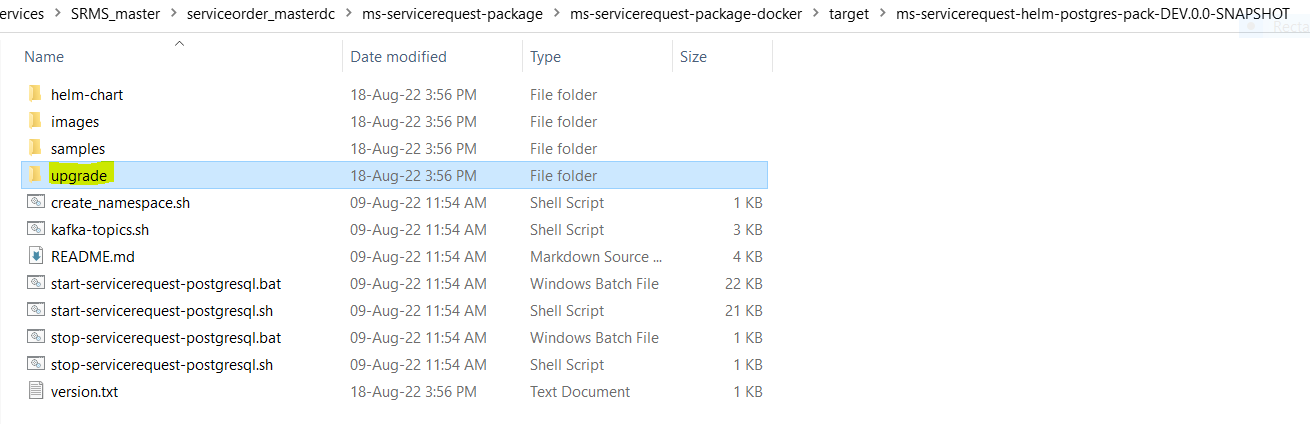
- To upgrade an existing helm chart, navigate to the upgrade folder in the root helm package.
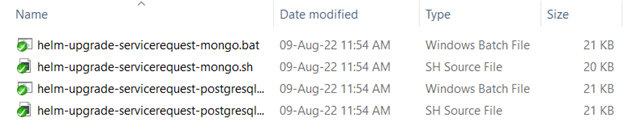
- Select the batch and the shell scripts containing the upgrade commands to release a new version.
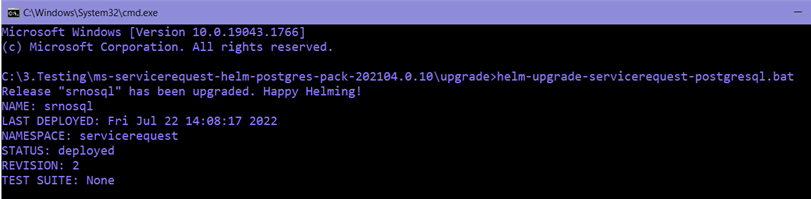
- On executing the script, the following response appears in the command window.
In this topic