Authorization
For version R2020.07 and earlier versions, JWT Authorization for the Service Request Microservice uses the JWT Authorization in the IRIS layer. Therefore, to configure the deployment artefacts (web artefacts), refer to JWT Authentication using IRIS.
From version R2020.10 onwards, the JWT Authorization occurs in the Microservice layer by using the environment variable configuration. The validation occurs internally and reduces the HTTP hop between IRF and Microservices. For more information, refer to JWT Authentication using MSF.
XACML (Extensible Access Control Markup Language) is an open standard XML-based language designed to configure security policies and access rights to information for web services. XACML supports fine-grained and attributes based access control definitions. It also supports composing of policies by re-using the low-level definitions.
The following image depicts a simplified XACML policy model.
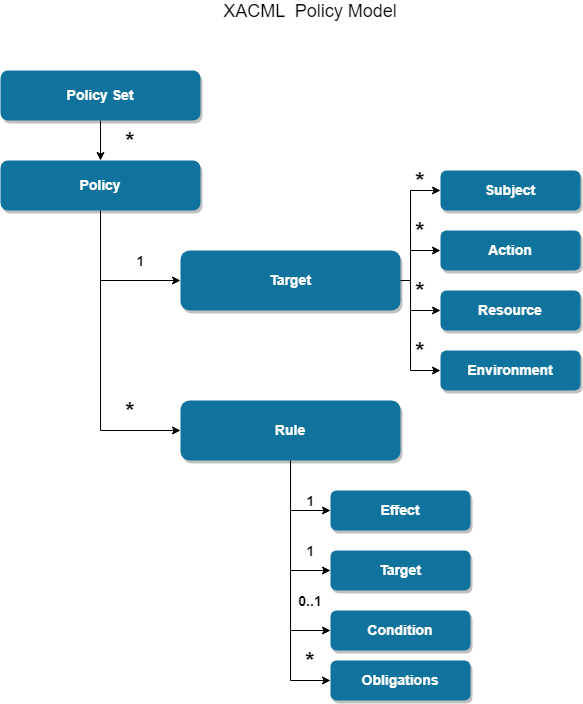
Target: Set of simplified conditions for the subject, resource, and action that must be met for a policy set, policy, or rule to apply to a given request.
Obligation: An obligation is a directive from the policy decision point (PDP) to the policy enforcement point (PEP) on what must be carried out before or after access is approved
Temenos Microservices adopted XACML implementation to provide provision for the client to define authorization policies for intended Microservices. The client will use Policy Editor Design time to author XAML policies for Microservices and deploy them on the policy store.
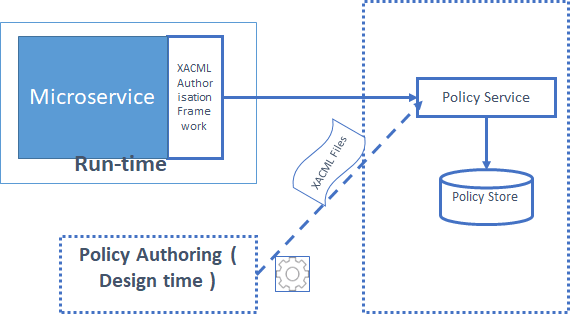
Policy Authoring will be carried out using Policy Editor and final reviewed policies and will be uploaded into a centralized policy store.
XACML – Policy Attributes
The following attributes can be used for the authorization policy.
| S.No | XACML Attribute Type | Information Data available for policy enforcement |
|---|---|---|
| 1 | RESOURCE | The resource element is a data, service or system component |
| Data parameters available in HTTP Request Headers & Payload and | ||
| “Data Entity”. Example “Balance”, “Transaction” | ||
| 2 | SUBJECT | A subject element is an entity requesting access. |
| User attributes available in HTTP Header | ||
| 3 | ACTION | Action ID of the API |
| 4 | ENVIRONMENT | Environmental parameters existing in the Business Function context. |
| AWS – Lambda, AZURE – Function, Docker – Web container Context(Tomcat) |
Adding RoleID : ADMIN to the header works currently for SRMS, as it is a default config.
Adding companyid : <value> in the header to GET request to get the response based on companyid provided.
Adding companyid : <value> in the header to POST request to the store the companyid along with payload in database and later used to filter in GET request.
XACML Editors
- Temenos XACML Policy Editor
- PAP-UI
- Third-Party Editors
- The good and easy to use open-source editors for XACML policy files are,
- Eclipse ALFA Plugin
- UMU-XACML-Editor
- WSO2 Identity Server
- The good and easy to use open-source editors for XACML policy files are,
Docker
For Docker deployment, set the below mentioned XACML PDP configuration properties as environment variables in API container of ms-servicerequest-mongo.yml / ms-servicerequest-postgresql.yml.
ms-servicerequest-mongo/ms-servicerequest-postgresql.yml
# ---XACML PDP Configuration ---
temn.msf.security.authz.enabled="true"
PDP_CONFIG="classpath:xacml/pdp-config.xml"
temn.msf.pdp.resource.type="API"
temn.msf.pdp.resource.manager="SERVICEREQUEST"
Azure
For Azure deployment, set the below mentioned JWTconfiguration properties in install-mongo.sh/install-postgres.sh/ install-mongo.bat/install-postgres.bat
install-mongo.sh/install-postgres.sh and install-mongo.bat/install-postgres.bat#--- JWT Configuration ---# ---XACML PDP Configuration ---
temn_msf_security_authz_enabled="true"
PDP_CONFIG="classpath:xacml/pdp-config.xml"
temn_msf_pdp_resource_type="API"
temn_msf_pdp_resource_manager="SERVICEREQUEST"
AWS
In AWS deployment, set the below mentioned JWT configuration properties in install-aws.sh and install-aws-postgresql.sh
install-aws.sh/install-aws-postgresql.sh.
# ---XACML PDP Configuration ---
temn_msf_security_authz_enabled="true"
PDP_CONFIG="classpath:xacml/pdp-config.xml"
temn_msf_pdp_resource_type="API"
temn_msf_pdp_resource_manager="SERVICEREQUEST"
K8
For K8, configure the JWT configurations in servicerequest-api-configmap.yaml.
servicerequest-api-configmap.yaml   # ---XACML PDP Configuration ---
temn.msf.security.authz.enabled="true"
PDP_CONFIG="classpath:xacml/pdp-config.xml"
temn.msf.pdp.resource.type="API"
temn.msf.pdp.resource.manager="SERVICEREQUEST"
In this topic