Deploying Savings Pot Microservices on AWS
This section explains how to deploy the Savings Pot Microservice on the AWS. To do so, you need to perform the following tasks:
Deployment of Savings Pot Microservice in AWS
MongoDB
To deploy the Savings Pot Microservice on AWS, following are steps:
- Obtain the generated zip file (from target folder) in the installation directory and unzip it.
- In AWS command line, navigate to the installation directory.
- Modify the region information in the
install-aws-mongo.shscript specific to your installationExamples,
- --region us-west-2
- --event-source-arn arn:aws:kinesis:us-west-2
- --uri arn:aws:apigateway:us-west-2:lambda:path/2015-03-31/functions/arn:aws:lambda:us-west-2
- Similarly, modify the following parameters in install-aws-mongo.sh and destroy-aws-mongo.sh accordingly:
- MONGODB_CONNECTIONSTR
- MONGOSHELL_CONNECTIONSTR
- MONGODB_DBNAME
- For processing multiple deployment, provide unique value to DEPLOYMENT_ENVIRONMENT in
install-aws-mongo.shthat creates unique S3 Bucket, Lamda functions, API Gateway, and database name. - If DEPLOYMENT_ENVIRONMENT is not provided with any value then the default value of S3 Bucket, Lamda functions, API Gateway, and database name are considered.
- To enable the in-house authentication in addition to the default option (using x-api-key parameter) in aws, perform the JWT Authentication in the installation scripts.
- Perform the XACML configurations in the installation scripts to enable security policies and access rights based authorization check for accessing the APIs,
- To deploy the Microservice, execute
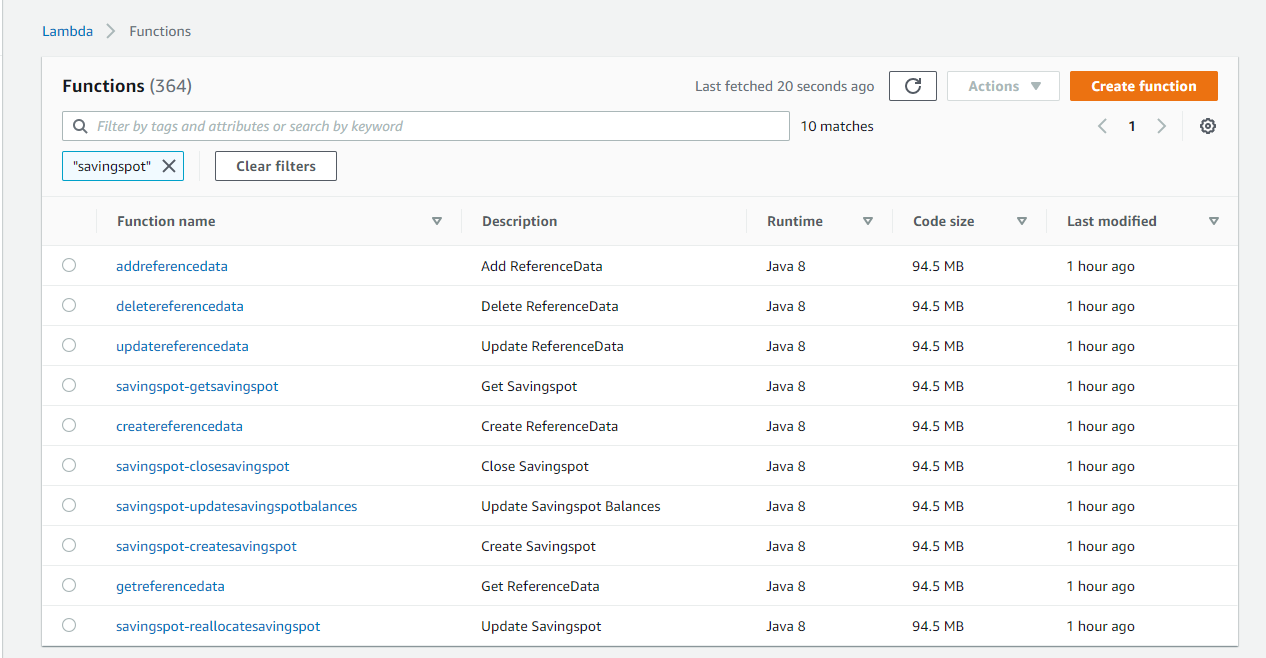
install-aws-mongo.shshell script to create the resources. - Post-deployment sign into AWS portal and verify the lambda and API gateways.
- To obtain the API key for all the endpoints in AWS, navigate to API key section under the Amazon API gateway, select the corresponding API key, and click show. The API key has to be a part of header (x-api-key) in all the requests.
- Following is APIs URL base path structure
- Base URL. https://<REST-API-ID>.execute-api.<LOCATION>.amazonaws.com/<DEPLOYMENT_ID>
For example, https://0mnkccy9mh.execute-api.eu-west-2.amazonaws.com/ms-savingspot-api
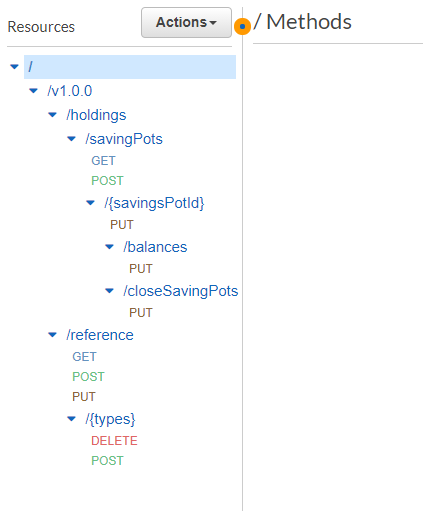
- The Resource path of the endpoint can be found in the APIs.
- A sample endpoint of savings pot can be https://0mnkccy9mh.execute-api.eu-west-2.amazonaws.com/ms-savingspot-api/api/v1.0.0/holdings/savingPots.
Lambda functions
API Gateway
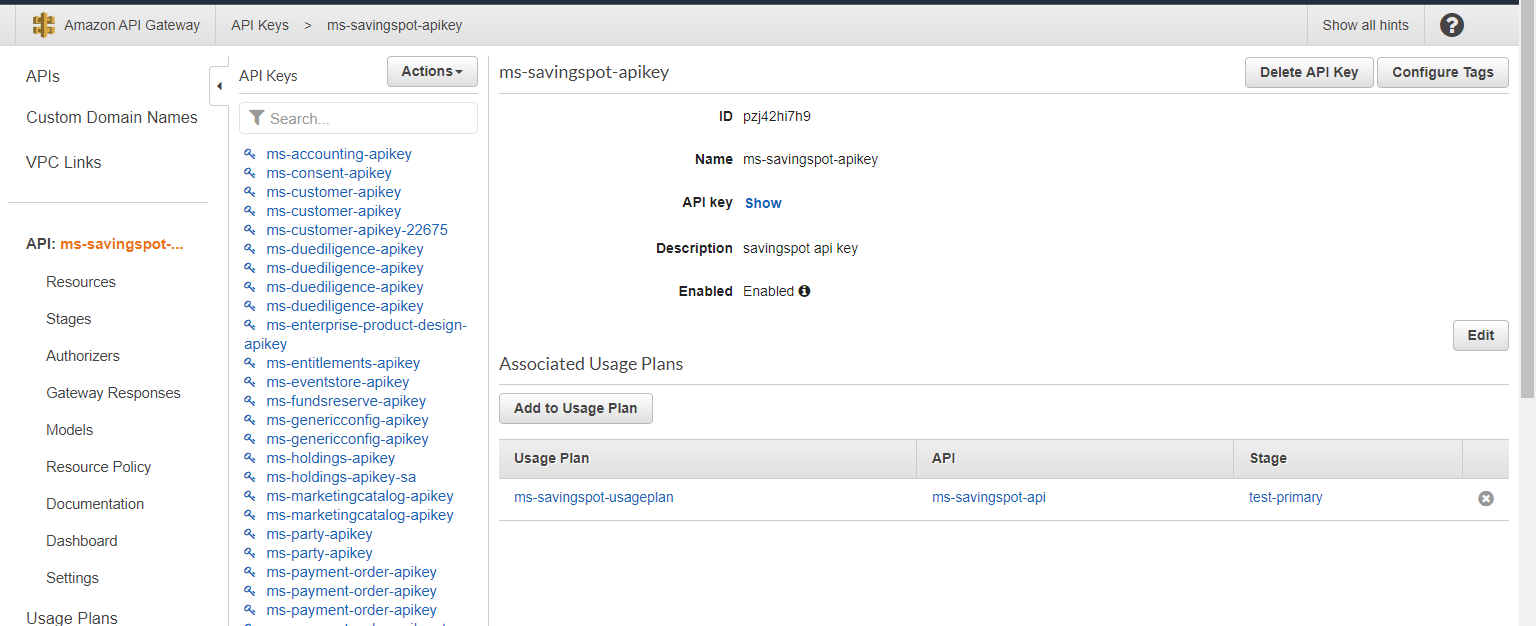
Rest API ID can be obtained from Amazon API Gateway.

Location and deployment ID must be replaced with the appropriate values provided in the script during deployment.
PostgreSQL
To deploy the Savings Pot Microservice on AWS, following steps:
- Obtain the generated zip file (from target folder) in the installation directory. Unzip it.
- In command prompt, navigate to the installation directory
- Modify the region information in the
install-aws-postgresql.shscript specific to your installation.For Example:
- --region us-west-2
- --event-source-arn arn:aws:kinesis:us-west-2
- --uri arn:aws:apigateway:us-west-2:lambda:path/2015-03-31/functions/arn:aws:lambda:us-west-2
- For processing multiple deployment, provide unique value to DEPLOYMENT_ENVIRONMENT in install-aws-postgresql.sh which creates unique S3 Bucket, Lamda functions, API Gateway and database name.
- If DEPLOYMENT_ENVIRONMENT is not provided with any value then default value of S3 Bucket, Lamda functions, API Gateway and database name will be considered.
- To enable the in-house authentication in addition to the default option (using x-api-key parameter) in aws, perform the JWT Authentication in the installation scripts.
- Perform the XACML configurations in the installation scripts to enable security policies and access rights based authorization check for accessing the APIs,
- To deploy the Microservice, execute
install-aws-postgresql.shshell script to create the resources. - Post-deployment sign into AWS portal and verify the lambda and API gateways.
- To obtain the API key for all the endpoints in AWS, navigate to API Key section under the Amazon API gateway and select the corresponding API key, then click on show. The API key has to be a part of header (x-api-key) in all the requests.
- Following is API's URL structure.
https://<REST-API-ID>.execute-api.<LOCATION>.amazonaws.com/<DEPLOYMENT_ID>
Rest API Id can be obtained from Amazon API Gateway.
Location and deployment Id should be replaced with the appropriate values provided in the script during deployment.
Undeployment
To undeploy the Savings Pot Microservice from the AWS cloud, follow these steps:
MongoDB
- Modify the parameter named MONGOSHELL_CONNECTIONSTR in the destroy-aws-mongo.sh file as indicated earlier in the deployment steps.
- Provide value for DEPLOYMENT_ENVIRONMENT in
destroy-aws-mongo.shas mentioned during deployment steps for undeployment. - If DEPLOYMENT_ENVIRONMENT is not provided with any value during deployment process then no need to provide any value during undeployment as well.
- Execute the destroy-aws-mongo.sh file.
PostgreSQL
- Provide value for DEPLOYMENT_ENVIRONMENT in
destroy-aws-postgresql.shas mentioned during deployment steps for undeployment. - If DEPLOYMENT_ENVIRONMENT is not provided with any value during deployment process then no need to provide any value during undeployment as well.
- Execute the
destroy-aws-postgresql.shaccordingly to release the resources created in AWS environment.
The database user credentials must have the admin access.
In this topic