Deploy Originations Data Storage Microservice in Docker Container
The Originations Data Storage microservice is provisioned for deployment in the Docker container.
Artifacts
The Originations Data Storage microservice deployment for a Docker container is available as a single release bundle file ms-storage-package-docker-<release_number>.zip.
Before you deploy the package, you should:
- Install Docker Engine in the deployment environment. For more information, see https://docs.docker.com/install/overview/
- Turn on Linux containers in your docker container.
Deploy
Java 11 is required and the path to JDK and JRE bin folders have to be set in the PATH variable in Environment variable like below.
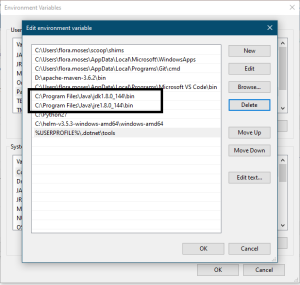
To deploy the Originations Data Storage microservice:
- Unzip the
ms-storage-package-docker-<release_number>.zip - Check the extracted package contains the configuration files for the docker and the respective bat and sh files
- Enable JWT Authentication for:
- Navigate from the command prompt to the directory where the .bat and .sh files are available.
- Execute the below command which creates an image and docker container for the image:
- Once the microservice is up and running in docker, check the APIs of the package. The API URL follows this pattern:
Base Path: http://<IP_ADDRESS>:<PORT>/<context-root>/api/<version>/ For Example: http://localhost:8010/ms-storage-api/api/v0.9.0/
Resource path of the endpoint can be found in the Swagger JSON file.
A sample endpoint of the data storage microservice can be http://localhost:8010/ms-storage-api/api/v0.9.0/origination/storage/entityItems/
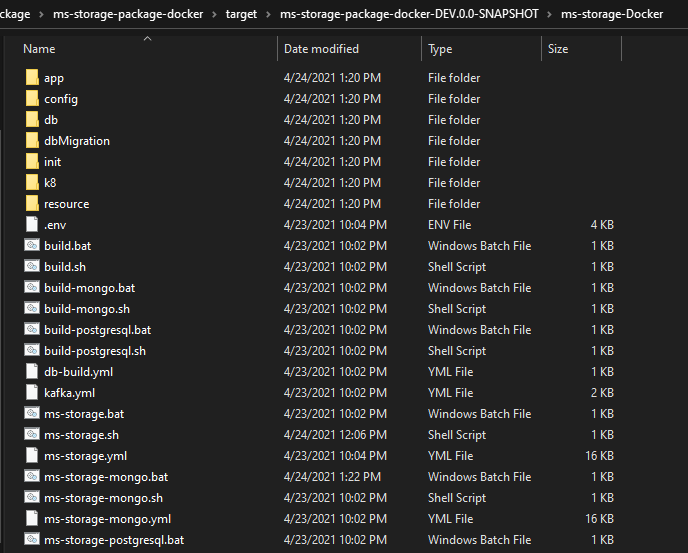
Navigate from the command prompt to the directory where the .bat and .sh files are available and execute the below command which creates an image and docker container for the image.
MondoDB - in ms-storage-mongo.yml
Postgresql - in both ms-storage-postgresql.yml
MondoDB
For Windows : ms-storage-mongo.bat up --build -d
For Linux : /ms-storage-mongo.sh up --build -d
After the successful deployment, database, collections and the reference data (master data) are loaded into the mongo database for storage microservice.
PostgreSQL
For Windows : ms-storage-postgresql.bat up --build -d
For Linux : /ms-storage-postgresql.sh up --build -d
After the successful deployment, database, collections and the reference data(master data) are loaded into the mongo database for storage microservice.
Undeploy
To undeploy the Originations Data Storage microservice:
- Execute the below command from the location, where the Origination Data Storage docker is started, to stop and remove the existing container.
MondoDB
For Windows : ms-storage-monogo.bat down
For Linux : ms-storage-monogo.sh down
PostgreSQL
For Windows : ms-storage-postgresql.bat down
For Linux : ms-storage-postgresql.sh down
In this topic