Installing Due Diligence Microservice on Docker
This section helps you to install the Due Diligence Microservice on Docker.
Procedure:
- Unzip the ms-duediligence-package-docker-<release_number>.zip.

- Extracted package contains the configuration files for the docker and the respective bat and sh files.
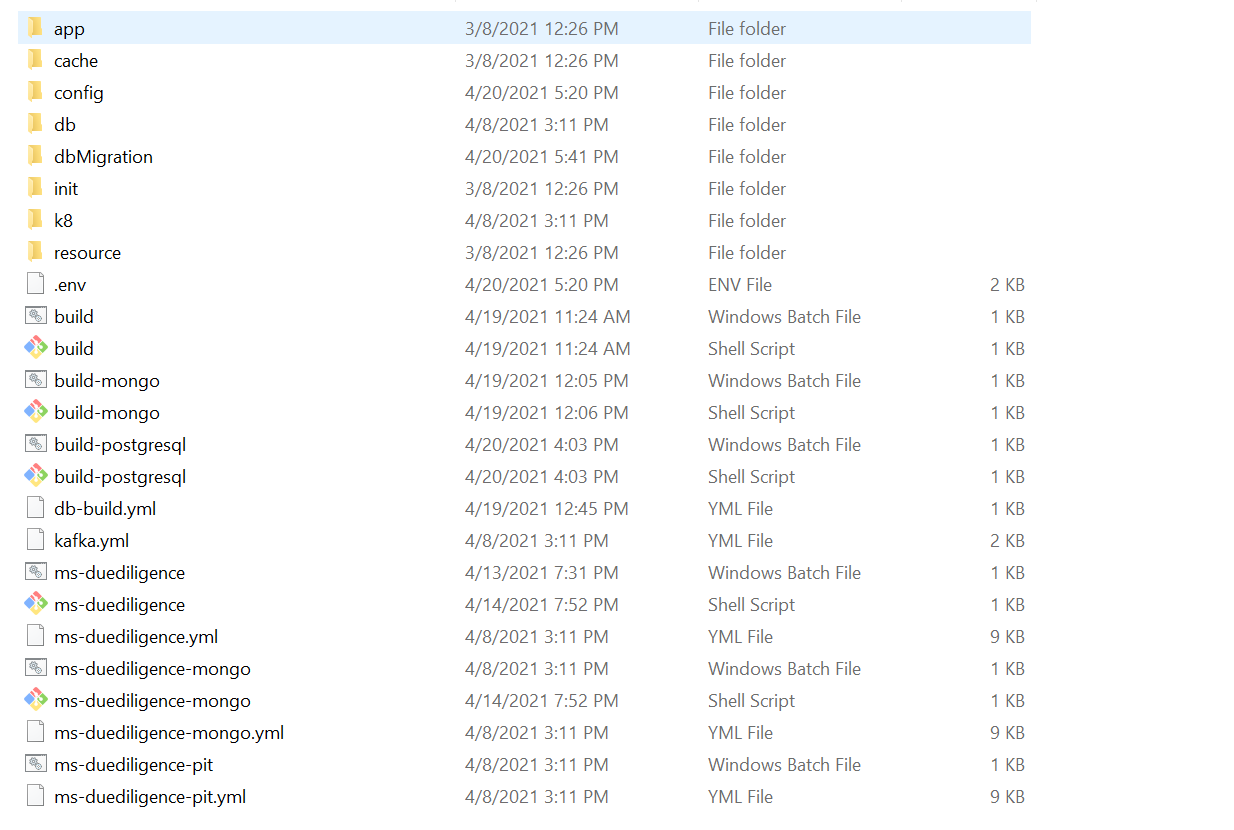
For MongoDB
- To enable authorization and authentication, follow these steps:
- In addition to the API key, enable JWT Authentication in ms-duediligence-mongo.yml/ms-duediligence-mongo-pit.yml.
- To enable security policies and access rights to the APIs, enable XACML configurations in ms-duediligence-mongo.yml/ms-duediligence-mongo-pit.yml.
Memory Limit
Below are the List of containers with its Memory limit:
Containers Memory Limit API 812M
- From the command prompt, go to the directory where the .bat and .sh files are available and run the following commands that creates an image and docker container for that image.
Script Description ms-duediligence-mongo.bat / ms-duediligence-mongo.sh This deploys all the necessary components for a microservice to run the microservice independently.
- Use the following commands for the respective platforms.
- For Windows:
ms-duediligence-mongo.bat/ms-duediligence-mongo-pit.bat up --build -d - For Linux:
ms-duediligence-mongo.sh/ms-duediligence-mongo-pit.sh up --build -d
- For Windows:
- After the successful deployment load the database, collections and the reference data (master data) into the Mongo database for Due Diligence microservice.
- After the Due Diligence microservice is up and running in docker, check the APIs in the package.
Alternatively, you can use Health Check API to obtain the microservice status.
The format of API's URL is given below:
- Base Path
http://<IP_ADDRESS>:<PORT>/<context-root>/api/<version>/
For Example: http://localhost:8004/ms-duediligence-api/api/v1.0.0
- Resource path of the endpoint can be found in the Enterprise APIs document. A sample endpoint of Due Diligence is http://localhost:8004/ms-duediligence-api/api/v1.0.0/party/parties/{partyId}/assessmentEvents.
For Postgresql
- To enable authorization and authentication, follow these steps:
- In addition to the API key, enable JWT Authentication in ms-duediligence-postgresql.yml/ms-duediligence-postgresql-pit.yml.
- To enable security policies and access rights to the APIs, enable XACML configurations in ms-duediligence-postgresql.yml/ms-duediligence-postgresql-pit.yml.
- From the command prompt, go to the directory where the .bat and .sh files are available and run the following commands that creates an image and docker container for that image.
Script Description ms-duediligence-postgresql.bat / ms-duediligence-postgresql.sh This deploys all the necessary components for a microservice to run the microservice independently.
- Use the following commands for the respective platforms.
- For Windows
:ms-duediligence-postgresql.bat/ms-duediligence-postgresql-pit.bat up --build -d - For Linux:
ms-duediligence-postgresql.sh/ms-duediligence-postgresql-pit.sh up --build -d
- For Windows
- After the successful deployment load the database, collections and the reference data(master data) into the Postgresql database for Due Diligence microservice.
- After the Due Diligence microservice is up and running in docker, check the APIs in the package.
Alternatively, you can use Health Check API to obtain the microservice status.
The format of API's URL is given below:
- Base Path
http://<IP_ADDRESS>:<PORT>/<context-root>/api/<version>/
For Example: http://localhost:8004/ms-duediligence-api/api/v1.0.0
- Resource path of the endpoint can be found in the Enterprise APIs document. A sample endpoint of Due Diligence is http://localhost:8004/ms-duediligence-api/api/v1.0.0/party/parties/{partyId}/assessmentEvents.
In this topic