Deploying Campaign Microservice on Docker
This section explains how to deploy the Campaign Microservice on the Docker. To do so, you must perform the following tasks:
Deployment Artefacts
This section provides an insight on the folder structure of Campaign Docker package and the deployment artefacts.
For the Docker deployment, the Campaign Microservice is available as single release bundle, which is ms-campaign-package-docker-<release_number>.zip.
Installing Campaign Microservice on Docker
Prerequisites:
Ensure to meet the following prerequisites before deploying Campaign Microservice on Docker.
- Install the Docker engine on your deployment environment. For more information about the installation, click here.
- Turn on the Linux containers in Docker.
For MySQL
To deploy Campaign Microservice on Docker, follow these steps.
- Extract the ms-campaign-docker-<release_number>.zip file.

The extracted package contains the configuration files of Docker and the respective bat and sh files.
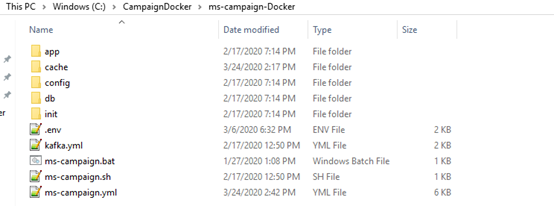
- Enable JWT Authentication in ms-campaign.yml.
- From the Command Prompt, go to the directory where the .bat and .sh files are available. Run the following command that creates an image and a docker container for the image.
- For Windows: ms-campaign.bat up --build -d
- For Linux: ms-campaign.sh up --build -d
- After the successful deployment, the database, collections, and reference data(master data) are loaded into the database for the Campaign Microservice.
- After the Campaign Microservice is up and running on Docker, run the following URL to receive the response.
The structure of the URL of APIs is as follows.
Base Path: http://<IP_ADDRESS>:<PORT>/<context-root>/api/<version>/
For example, http://localhost:8900/ms-campaign-api/api/v1.0.0/
The resource path of the endpoint is available in the swagger document of the respective APIs.
A sample endpoint of the Campaign Microservicecould be http://localhost:8900/ms-campaign-api/api/v1.0.0/origination/campaigns.
Alternatively, the Microservice status is obtained through the Health Check API.
For MSSQL
To deploy Campaign Microservice on Docker, follow these steps.
- Extract the ms-campaign-docker-<release_number>.zip file.
The extracted package contains the configuration files of Docker and the respective bat and sh files.
- Enable JWT Authentication in ms-campaigndbservice-mssql.yml.
- From the Command Prompt, go to the directory where the .bat and .sh files are available. Run the following command that creates an image and a docker container for the image.
- For Windows: ms-campaign-mssql.bat up --build -d
- For Linux: ms-campaign-mssql.sh up --build -d
- After the successful deployment, the database, collections, and reference data(master data) are loaded into the database for the Campaign Microservice.
- After the Campaign Microservice is up and running on Docker, run the following URL to receive the response.
The structure of the URL of APIs is as follows.
Base Path: http://<IP_ADDRESS>:<PORT>/<context-root>/api/<version>/
For example, http://localhost:8900/ms-campaign-api/api/v1.0.0/
The resource path of the endpoint is available in the swagger document of the respective APIs.
A sample endpoint of the Campaign Microservice could be http://localhost:8900/ms-campaign-api/api/v1.0.0/origination/campaigns.
Alternatively, the Microservice status is obtained through the Health Check API.
Undeployment
To stop and delete the existing container, run the following command from the location where the campaign docker started.
- For Windows: ms-campaign.bat down /ms-campaign-mssql.bat down
- For Linux: ms-campaign.sh down/ms-campaign-mssql.sh down
In this topic