Received Guarantees and Standby LC - Amendments
The Web Channel user with access to Trade Finance has capabilities to view the Received Guarantees and Stand by LC Amendments dashboard. The dashboard displays the list of Amendments available. If no Amendments are available, the system throws an appropriate message to the user. Do any of the following in the Received Guarantees and Standby LC Amendments:
- View all the available Received Amendments for the user.
- View all the Received Amendments for an LC.
- Search or filter for an Received Amendment.
- Provide self acceptance to the Received Guarantees and Standby LC - Amendments.
- Download the list of available Amendments.
- Download or print an individual Amendment.
Web Channel navigation path: Side Menu > Trade Finance > Received Guarantees and Standby LC > Amendments.
UX Overview
Received Guarantees and Standby LC - Amendments
This section displays all the Amendments details available for the user.
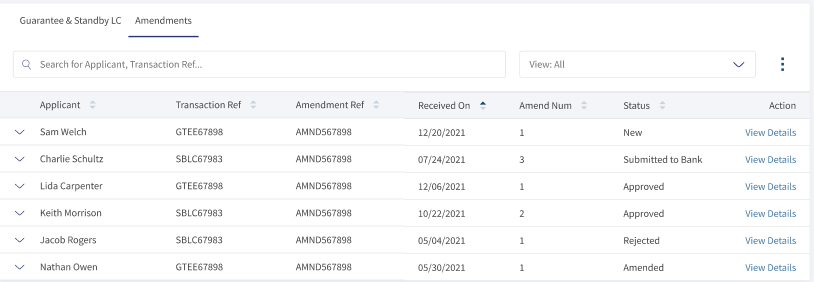
- Search: Helps the user find the records using the keywords like Applicant, Transaction Ref.
- View: This is a filtering option that allows the user to filter further the search based on the criteria.
 Click here to find information on all available filtering options.
- Product Type
- Guarantee
- Standby LC
- Guarantee and SBLC Type
- Performance: To secure the applicants satisfactory fulfillment of its contractual performance obligations.
- Bid: This supports the issuers bid for a contract.
- Advance: To ensure the repayment of an advance payment made earlier for the contract.
- Shipping: To ensure the damages repayment for during the products shipping.
- Status
- New: The record received from the bank.
- Submitted to Bank: The record is submitted to the bank.
- Rejected: The record is rejected by the user.
- Claim Honored: The record is not submitted to the bank, pending or incomplete stage by the user.
- Time Period
- Today: Considers the records created on the same day.
- Last One Month: Considers the records created from the last 30 days.
- Last Six Months: Considers the records created from the last 180 days.
- Last One Year: Considers the records created from the last 365 days.
- YTD: Considers the records created from start day of the calendar year.
- Product Type
- Applicant: Specifies the name of the beneficiary.
- Transaction Reference: The transaction reference number.
- Amendment Reference: The sequential amendment number made to the LC.
- Received on: Record creation date.
- Amendment Number: The sequential amendment made to the Guarantee and Standby LC.
- Status: The Amendment current status.Click here to find information on available status.
- Status
- New: The record received from the bank.
- Submitted to Bank: The record is submitted to the bank.
- Rejected: The record is rejected by the user.
- Claim Honored: The record is not submitted to the bank, pending or incomplete stage by the user.
- Status
- Actions: Available actions for the user. View Details as per the record level and Print and Download when record is expanded.
Amendments - Record Expanded
The Expanded section displays summary of Amendment LC details. The user can use this option to view the summary details or perform the quick action like download and print and Amendment LC. To see the summary, the user have click the down arrow for the desired Amendment.

- Product Type: The type of product Guarantee or Standby LC.
- GT & SBLC Type: Specifies the type of Guarantee or SBLC type.Click here to find information on GT & SBLC types.
- Performance: To secure the applicants satisfactory fulfillment of its contractual performance obligations.
- Bid: This supports the issuers bid for a contract.
- Advance: To ensure the repayment of an advance payment made earlier for the contract.
- Shipping: To ensure the damages repayment during the products shipping.
- Amount: Specifies the total amount for the LC.
- Expiry Type: The type of expiry open ended, date, and conditions.
- The additional actions like View Details, Download and Print LC details.
Received Guarantees and Standby LC - Amendments Details
The page summarizes the Received Guarantee and Standby LC Amendment details. The user can perform any of the following actions:
- View the Received Guarantee and Standby LC.
- Print and Download the Current LC.
- Go back to the Received Guarantees and Standby LC Dashboard.
-
Guarantee and Standby LC Summary

- Applicant Details: Specifies the name of the beneficiary.
- Transaction Reference: The reference number for this transaction.
- Product Type: The type of product Guarantee or Standby LC.
- GT & SBLC Type: Specifies the type of Guarantee or SBLC type.Click here to find information on GT & SBLC types.
- Performance: To secure the applicants satisfactory fulfillment of its contractual performance obligations.
- Bid: This supports the issuers bid for a contract.
- Advance: To ensure the repayment of an advance payment made earlier for the contract.
- Shipping: To ensure the damages repayment during the products shipping.
- Amount: Specifies the total amount for the LC.
- Issue Date: The record creating date.
- Expiry Type: The type of the expiry Open Ended, Date, and Conditions. Based on the selection additional fields new fields are also visible. All these fields are optional.
- Open Ended: No New Fields
- Date: Expiry Date is visible.
- Conditions: Expiry Date and Expiry Condition field is visible.
- Expiry Date: The date of LC expiry date.
- Applicant Party: The beneficiary company details.
-
Amendment Details
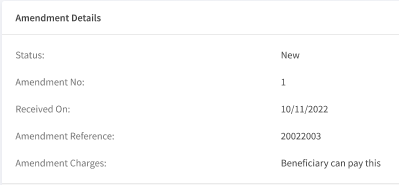
- Status: The status of current amendment.
- Amendment Number: The sequential amendment made to the Guarantee and Standby LC.
- Received on: The Received amendment date.
- Amendment Reference: The sequential amendment number made to the LC.
- Amendment Charges: The party paying amendment charges for the current request.
-
Amendment Requested
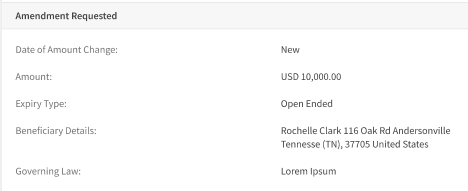
- Amount: The updated value of the current LC.
- Expiry Type: The type of the expiry Open Ended, Date, and Conditions. Based on the selection additional fields new fields are also visible. All these fields are optional.
- Open Ended: No New Fields
- Date: Expiry Date is visible.
- Conditions: Expiry Date and Expiry Condition field is visible.
- Beneficiary Details: The details of the beneficiary.
- Governing Law: The processing country governing law. This is an optional field.
-
Additional Instructions and Documents
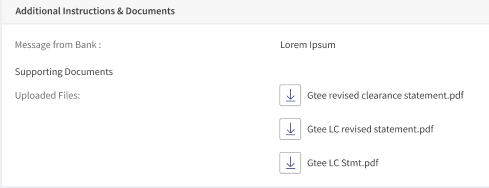
- Message from Bank: The message from the issuing bank.
- Supporting Documents:
- Uploaded Documents: List of Documents to support for current Amendment.
Self Acceptance for Received Guarantee or Standby LC - Amendment
Self acceptance is the process of reviewing the data and accept/reject the Amendment of Received Guarantee or Standby LC. Following are the steps to provide self acceptance.
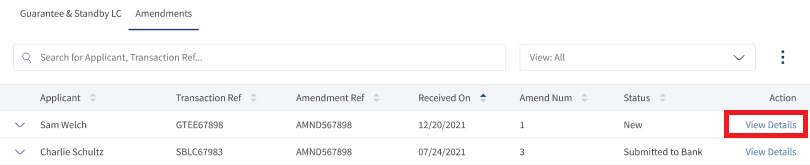
- In Received Guarantee and Standby LC - Amendments dashboard page, Click View details for the record to provide self acceptance. This Navigates to Received Guarantee and Standby LC - Amendment Details page.
- Verify the details, Guarantee and Standby LC Summary, Amendment Details, Amendment Requested, and Additional Instructions and Documents.
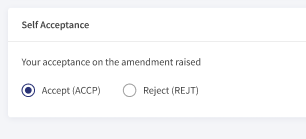
- In Self Acceptance
- Select Accept, to provide the self acceptance.
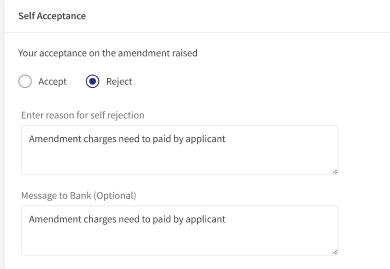
- Select Reject, to disagree with the details. When selected reject:
- Enter reason for self rejection. This is a mandatory field.
- Message to Bank. This is an optional field.
- Click Submit. This submits the self acceptance. A success message is displayed at the top of the page.
View Amendments
The bank users can see the details of the individual Amendment from the list of the Amendments available in the Amendments dashboard. The users can narrow down their desired Amendment by using the filter or search options. In the detailed Amendments page, the user can do any of the following:
- Download and Print the Amendment LC.
- View Received Guarantee and Standby LC - Amendment details.
View Detailed Amendment LC
Following are the steps to see the detailed view of Amendment LCs.
- In the Search bar use Applicant, Transaction Reference and for further filter options to narrow the Amendments.
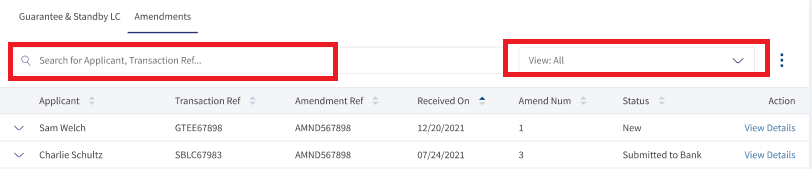
- On the desired Amendment record, click View Details. This will navigate to Amendments records page viewing the details.

Download or Print Amendment LC
The user has two options to download Amendment LC records. Either they can download the complete list displayed on the Amendment LC dashboard page and download or print individual LCs.
Download Amendment LC list
Following are the steps to download Amendment list into excel (.xlsx).
- Click the Ellipses.
- Select the option List. This downloads the list of Amendments records into an excel file.
Download or Print individual Amendments
The following are the steps to download or print individual LCs.
- Click the arrow to see the summary of the Amendments record.

- Click Download or Print to download or print LC.
The download options downloads LC in a PDF format. The print option opens a print dialogue box for printing the Amendment Details.
SWIFT MT 700
SWIFT is an acronym for Society for Worldwide Interbank Financial Telecommunication. SWIFT provides a secure, highly encrypted, and reliable messaging service to all financial institutions.
This is an additional feature provided to the Trade Finance Micro App to implement the SWIFT MT700 codes to the fields available in LCs. If there is no SWIFT code, then NA will display adjacent to the field. The same SWIFT MT700 codes will also display in the download and print LCs.
Enable the Spotlight configurations to display the SWIFT tags. Individual configurations are available for Web Channel, download, and print LCs.
Web Channel SWIFT MT700 codes: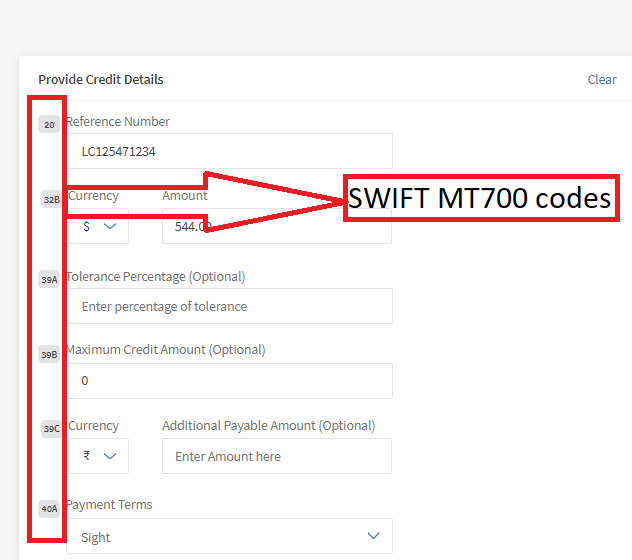
Download and Print SWIFT MT700 codes: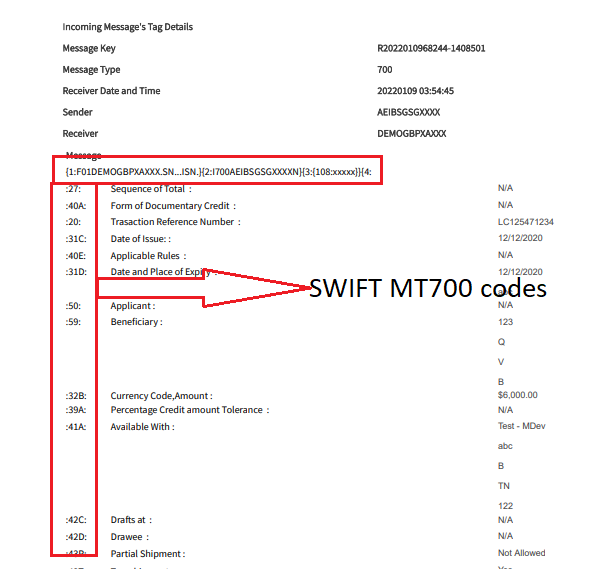
Swift and Advices
The bank user with required permissions can see the Swift MT messages and Payment Advices for a particular record. The following is the procedure to view Swift and Advices for a particular record.
- In the dashboard, search or filter for the record.
- Click View Details on the record to view Swift and Advices. The navigates to the detailed page view.
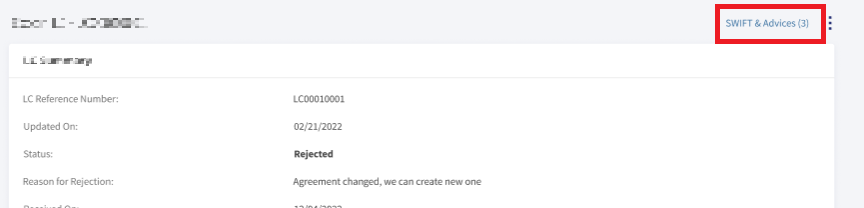
- Click SWIFT & Advices.
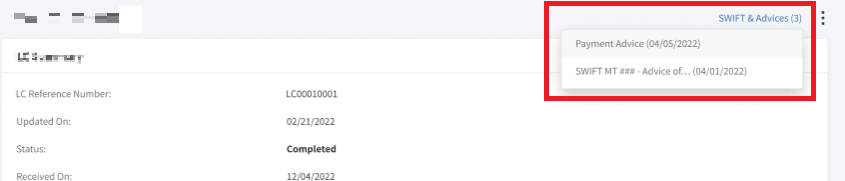
- In the pop-up,
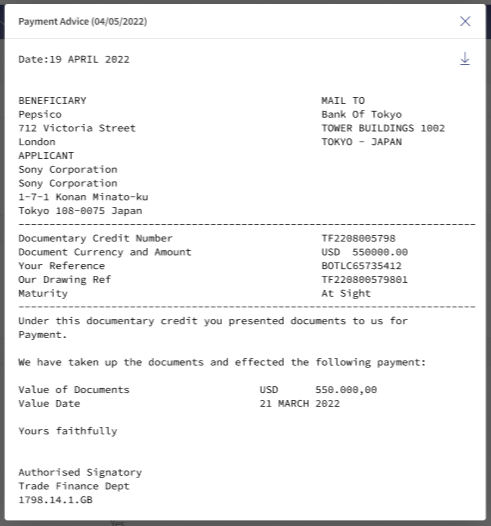
- Select Payment Advices to view payment advices for a particular record.
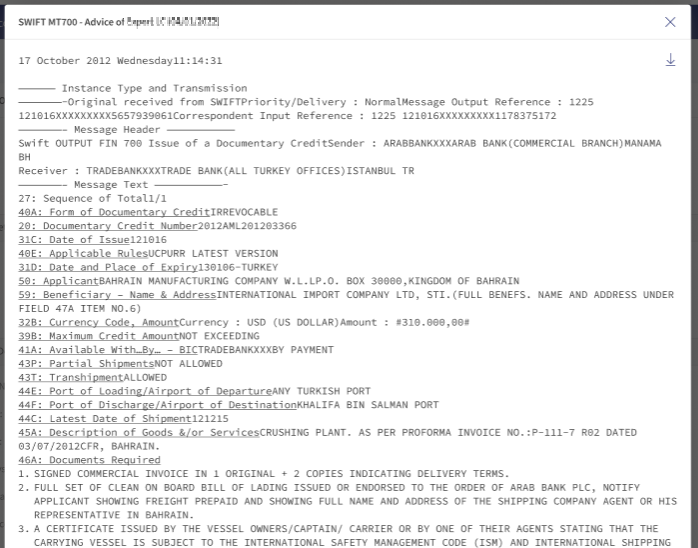
- Select SWIFT MT to view in advices in SWIFT MT mode.
- Select Payment Advices to view payment advices for a particular record.
SRMS Configuration
The SRMS configurations are shipped as a part of this feature. For more information, see SRMS Configurations.
Experience APIs
Following are the experience APIs for Received Guarantees and Standby LC - Amendment.
| Name | Description | Introduced In |
|---|---|---|
| createAmendment | This API creates the received guarantee amendments. | 2022.10 |
| getAmendments | This API retrieves the list of received guarantee amendments for the customer. | 2022.10 |
| getAmendmentById | This API retrieves the list of received guarantee amendments by ID. | 2022.10 |
| updateAmendment | This API updates a received guarantee amendment record. | 2022.10 |
| generateAmendmentReport | This API downloads the report for received guarantee amendments records. | 2022.10 |
| generateAmendmentsList | This API exports the list of received guarantee amendment records. | 2022.10 |
| Object Data Model | This Object Data Model describes the parameter name and other attribute details for Trade Finance. |
In this topic