Import - Amendments
An Amendments to the LC signifies the changes made to the terms of LC after it is approved. Amendments to the LC can happen till the expiry of the LC.
This section displays all the details and statuses of Import Amendments records. The bank user creates the Import Amendments records, which are visible to the corporate user. If the user creates Amendments to the current LC, all the Drawings and Transactions to the current LC will be on hold until the bank approves the Amendments.
If there are no records to display, then the system shows the message "There are no records to display" and if there is an error while fetching the records, then an error message shows "Failed to fetch Drawing" on the page.
UX Overview

Import Drawings displays the following details:
- Search for Key Words: Helps the user find the Import Amendments records using the keywords like Beneficiary, Drawing, Reference Number, and LC Reference.
- View: This is a filtering option that allows the user to filter further the search based on the criteria. The search default shows all the Import Amendments created in the last six months..
 Click here to find information on all available filtering options.
- LC Type
- Sight: LC is payable immediately.
- Deferred: LC in which the bank takes a conditional undertaking to pay the seller on behalf of the buyer on a specified future date after completion of the transaction.
- Acceptance: LC that is paid by a time draft authorizing payment on or after a specific date, if the terms of the letter of credit have been complied with.
- Negotiation Sight: Negotiation means the purchase by the nominated bank of drafts (drawn on a bank other than the nominated bank) and or documents under a complying presentation, by advancing or agreeing to advance funds to the beneficiary on or before the banking day on which reimbursement is due to the nominated bank.
- Negotiation Acceptance: Regarding LC, when the documents are presented and reviewed by the bank, the process is referred to as negotiation of the documents. In accordance with UCP 600, a bank authorized to negotiate documents or drafts is authorized to give value for the draft(s) and or document(s), which means the LC can stipulate that payment be made by the advising, issuing or confirming bank.
- Status
- Rejected: The Amendments that the bank refuses.
- Processing by Bank: The Amendments are processing by bank for approval.
- Submitted to Bank: The Amendments that are submitted to bank for approval.
- Approved: The Amendments that the bank approves.
- Time Period
- Last six months: Considers the record created in the previous 180 days.
- Today: Considers only the record created on the same day.
- Last one Month: Considers the record created in the previous 30 days.
- Last one Year: Considers the record created in the previous 365 days.
- LC Type
- Beneficiary: Name of the Import Amendment beneficiary.
- Amendment Reference: Unique Import Amendment Reference ID.
- Amended on: Amendment request created date.
- LC Ref No: Import LC Reference Number.
- Status: Current Status of Import Amendment.
- Actions: On clicking View Details, the user can see the complete details of the Import Amendment and submit the Import Amendment.
Import Amendments - Records Expanded

The Import Amendments - Records Expanded displays the following details:
- LC Type: Type of LC
- LC Type
- Sight: LC is payable immediately.
- Deferred: LC in which a conditional undertaking is taken by the bank to pay the seller on behalf of the buyer on a specified future date after completion of the transaction.
- Acceptance: LC that is paid by a time draft authorizing payment on or after a specific date, if the terms of the letter of credit have been complied with.
- Negotiation Sight: Negotiation means the purchase by the nominated bank of drafts (drawn on a bank other than the nominated bank) and or documents under a complying presentation, by advancing or agreeing to advance funds to the beneficiary on or before the banking day on which reimbursement is due to the nominated bank.
- Negotiation Acceptance: Regarding LC, when the documents are presented and reviewed by the bank, the process is referred to as negotiation of the documents. In accordance with UCP 600, a bank authorized to negotiate documents or drafts is authorized to give value for the draft(s) and or document(s), which means the LC can stipulate that payment be made by advising, issuing or confirming bank.
- Approved / Rejected On: Specifies the date on which the Amendment is Approved or Rejected.
- Charges Paid by: Specifies the party(Beneficiary or Applicant) paying costs for the Amendment.
- Charges Paid: Specifies the total charges paid for the current amendments.
Click here to find information about different LC Types.
View Import LC - Amendment Details
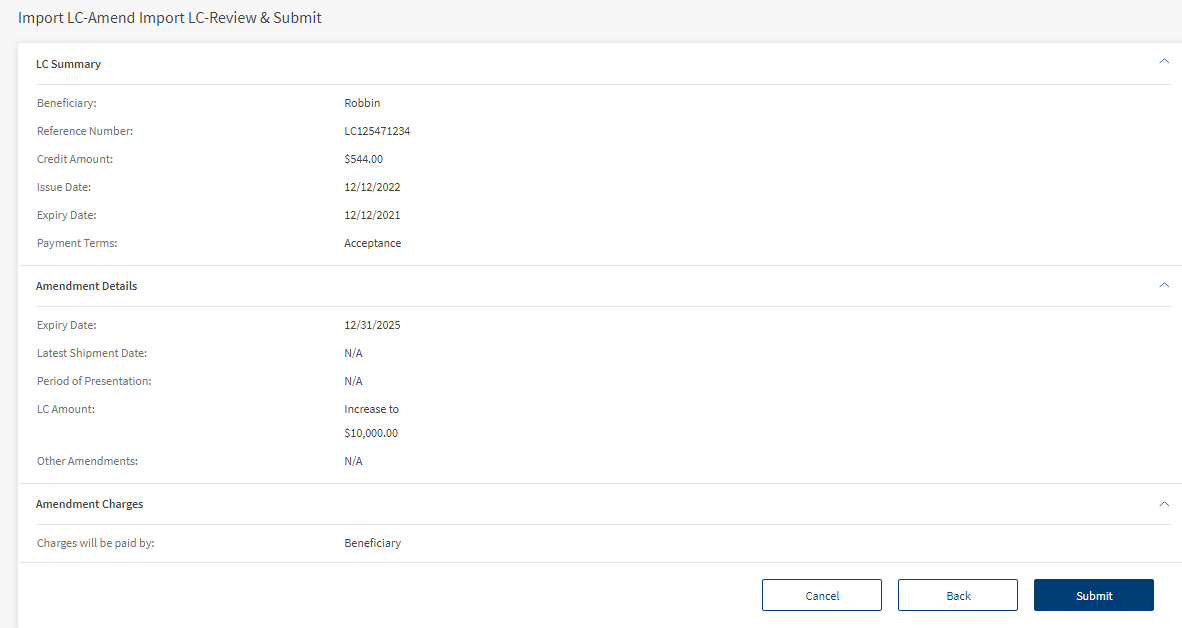
The bank user can see the Amendment Details by clicking the View Details on the Amendments summary page. View Details navigates to a page to see the Amendment Details. This Import LC- Amendment Details page has the following sections.

- Beneficiary: Name of the Beneficiary.
- LC Ref No: Specifies the unique LC Ref No.
- LC Type: Specifies the type of LC.
- LC Amount: Specifies the total amount in Import LC.
- Issue Date: Specifies the issuance date of LC.
- Expiry Date: Specifies the expiry date of LC.
- Payment Terms: Specifies the type of payment.

- Amendment Reference: Specifies the Amendment Reference number for Import LC.
- Amendment On: Specifies the date of Amendment created for the Import LC.
- Amendment Status: Specifies the current Amendment status.
- Approved on: Specifies the date of approval taken for the current Amendment.

- Expiry Date: Specifies the date of expiry for the current Amendment.
- Latest Shipment Date: Specifies the last shipment delivered for the current import LC.
- Period of Presentation: Documents presentation time by the beneficiary after the date of shipment.
- LC Amount: Specifies the change in LC amount.
- Other Amendment: Specifies the other amendments made for this LC

- Charges will be paid by: Specifies the party paying (Applicant or Beneficiary) the charges.
- Charges Debit Account: Specifies the account number from which charges are debited.
Create a New Amendment for Import LC
The following are the steps to create a new Amendment.
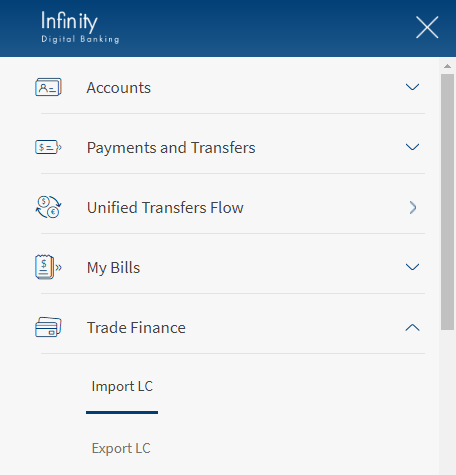
- Navigate Web Channel > Trade Finance > Import LC. This will navigate to Import Dashboard.
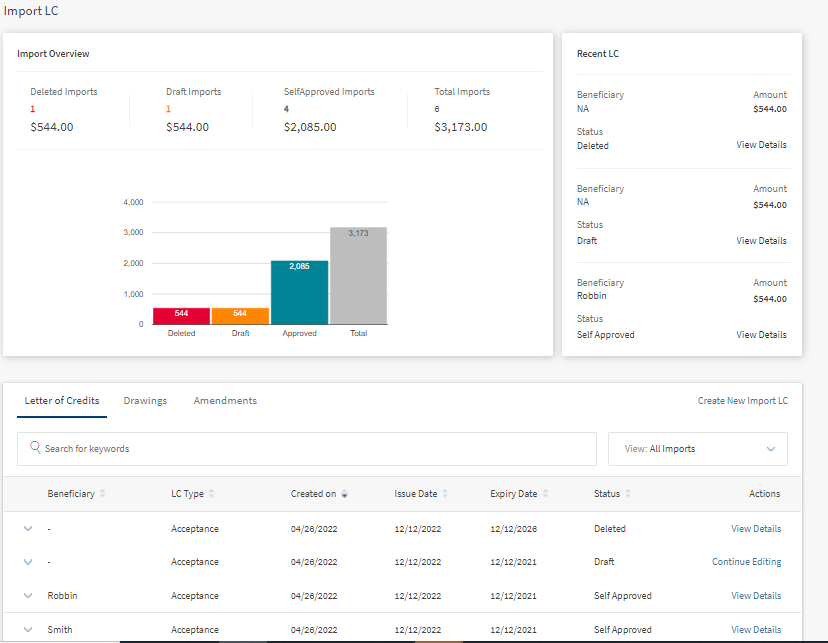
- Click on View Details. This opens the Import LC Details.
- Click on Amend LC.

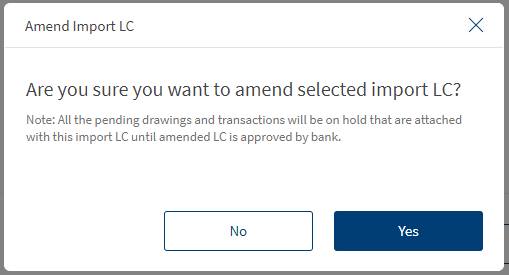
- On the Confirmation box, click Yes to Amend LC. This navigates to a page to amend import LC.
- In the Select & Provide Amendments Details section, the user must select the check box and update the details.
The user can amend only the five categories mentioned on the page.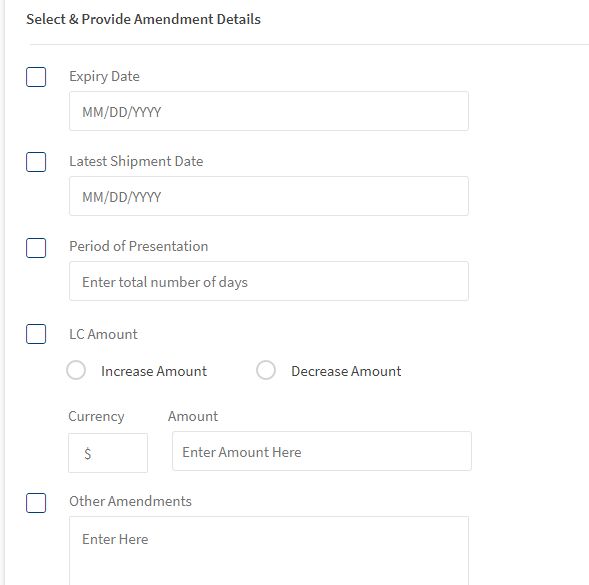
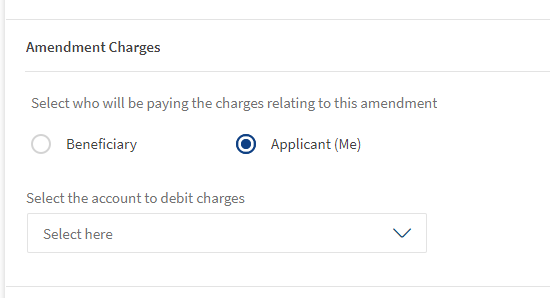
- 6. In the Amendment Charges section, the user can select Beneficiary or Applicant to bear the charges.
If the user selects the Applicant (Me) option, he should also choose the account to debit charges.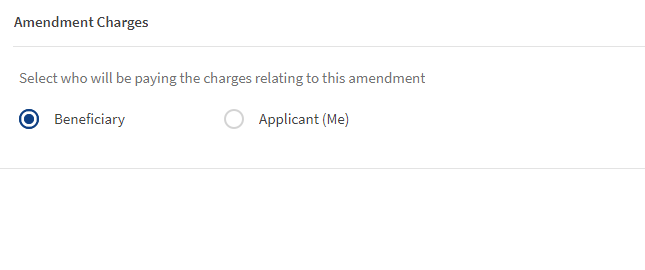
- Click Continue, This navigates to the Review and Submit page.
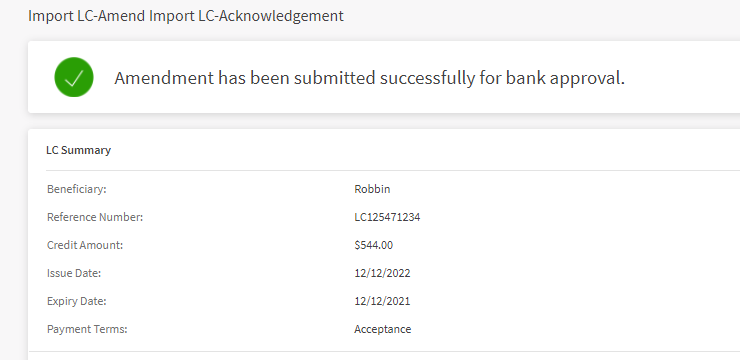
- After reviewing the changes, click Submit.
Download or Print Amendments LC
The user has two options to download Amendments LC records. Either they can download the complete list displayed on the Amendment LC dashboard page and download or print individual Amendments.
Download Amendments LC list
The following are thesteps to download Amendments LC list into excel (.xlsx).
- Click the Ellipses.
- Select the option Export List. This downloads the list of Import LC records into an excel file.

Download or Print individual Amendments LC
The following are thesteps to download or print individual Amendments.
- Click the arrow to see the summary of the Amendments record.

- Click Download or Print to download or print LC.
The download options downloads LC in a PDF format. The print option opens a print dialogue box for printing the Import Drawing Details.
SWIFT MT 700
SWIFT is an acronym for Society for Worldwide Interbank Financial Telecommunication. SWIFT provides a secure, highly encrypted, and reliable messaging service to all financial institutions.
This is an additional feature provided to the Trade Finance Micro App to implement the SWIFT MT700 codes to the fields available in LCs. If there is no SWIFT code, then NA will display adjacent to the field. The same SWIFT MT700 codes will also display in the download and print LCs.
Enable the Spotlight configurations to display the SWIFT tags. Individual configurations are available for Web Channel, download, and print LCs.
Web Channel SWIFT MT700 codes: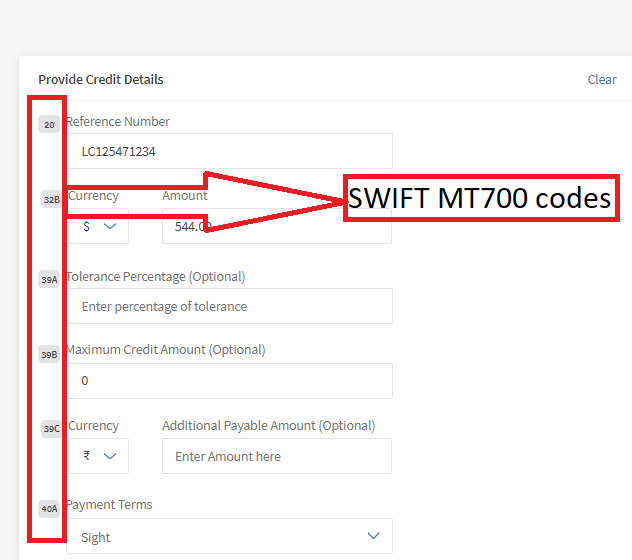
Download and Print SWIFT MT700 codes: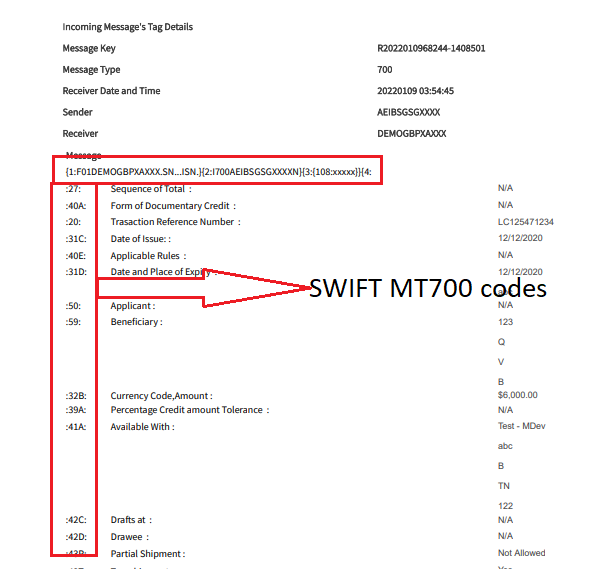
Swift and Advices
The bank user with required permissions can see the Swift MT messages and Payment Advices for a particular record. The following is the procedure to view Swift and Advices for a particular record.
- In the dashboard, search or filter for the record.
- Click View Details on the record to view Swift and Advices. The navigates to the detailed page view.
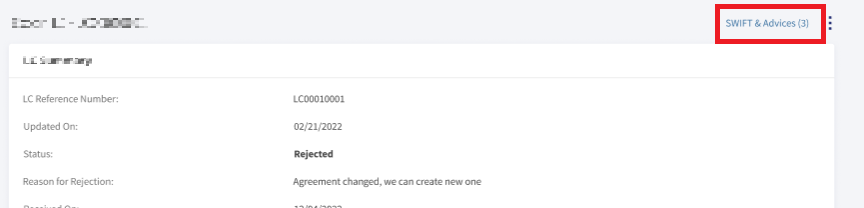
- Click SWIFT & Advices.
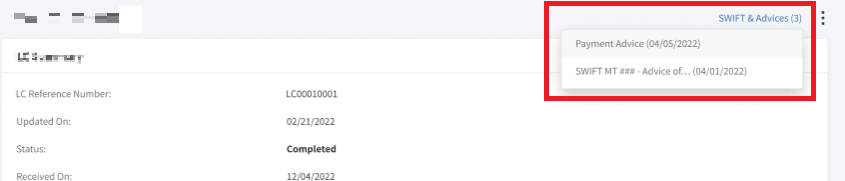
- In the pop-up,
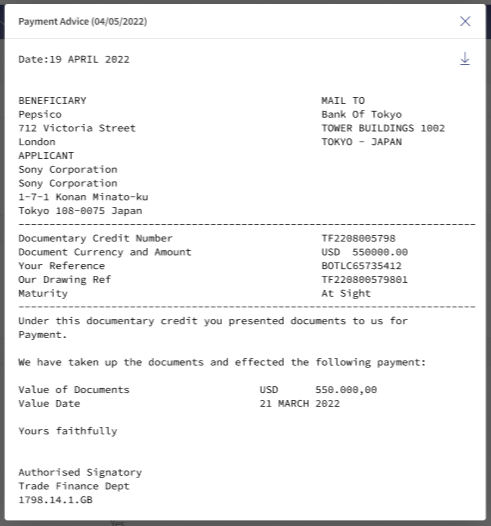
- Select Payment Advices to view payment advices for a particular record.
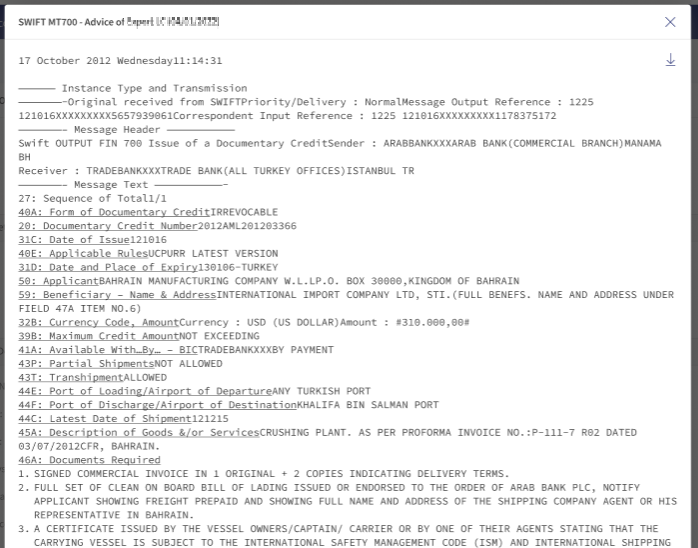
- Select SWIFT MT to view in advices in SWIFT MT mode.
- Select Payment Advices to view payment advices for a particular record.
SRMS Configuration
The SRMS configurations are shipped as a part of this feature. For more information, see SRMS Configurations.
Experience APIs
The following are theExperience API related to Amendments Import LC.
| Name | Description | Introduced In |
|---|---|---|
| createImportLetterOfCreditAmendment | This API creates the LC Amendment for Imports. | 2022.04 |
| getImportLetterOfCreditAmendments | This API retrieves the list of Import LC Amendments. | 2022.04 |
| getImportLetterOfCreditAmendmentsById | This API retrieves the list of Import LC Amendments by ID. | 2022.04 |
| generateImportLCAmendment | This API downloads the Import LC Amendment. | 2022.04 |
In this topic