Product Selection
The Product Selection module enables you to confirm the products that you selected in the Origination dashboard. You can also change the selected products if required. Furthermore, you can choose additional features that you want to avail with the selected products.
The information about all the products displayed in this module is retrieved from the Marketing Catalog Microservice. Any change in data in the Marketing Catalog Microservice gets dynamically reflected in the Infinity Origination app. Therefore, you can configure the Marketing Catalog Microservice if you want to modify the data in this module.
UX Overview
This section provides an overview of the Product Selection screen.
Product Selection
The Product Selection screen displays the product groups and products offered by Infinity Origination. Alongside each product, the app displays a description of the product. Primarily, the Product Selection section contains two segments.
- Products from the Landing page: This segment displays the products you have selected in the dashboard.
- Additional products you might like: This segment displays the other products from the product group that you selected in the dashboard.
For more information about the types of products offered, refer to Dashboard documentation.
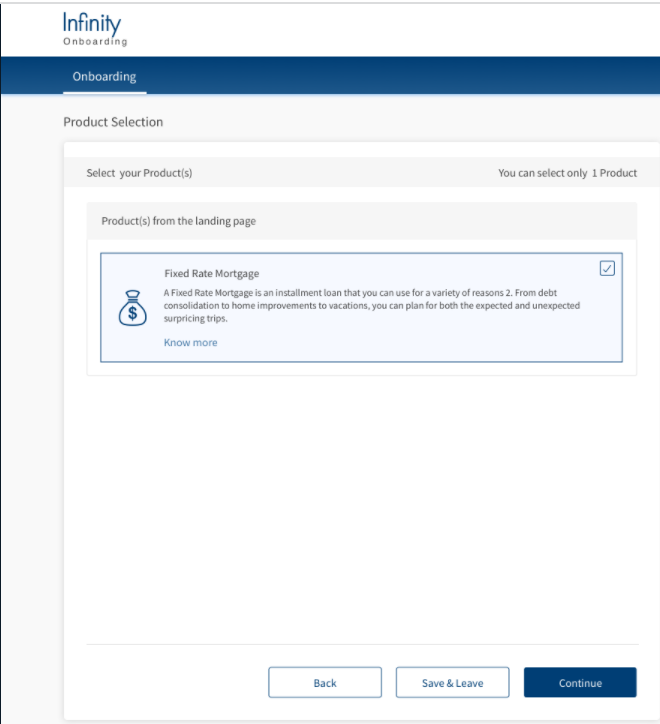
Along with each product name, the app displays a description, a Know More option, and a checkbox. You can choose to select or de-select desired products from the list. To learn more about a product, click Know More. This directs you to a Product Details dashboard in a new window. After selecting the desired products, click Continue.
Depending on the type of the product selected, the Choose Your Plan or the Product Details section appears.
- If a product such as Overdraft is selected, the Product Details section appears.
- If a product such as Business Growth Loan is selected, Choose Your Plan (Simulation) section appears. On confirming the loan plan by clicking Continue, the Product Details section appears.
Product Details
The Product Details section contains a summary of information related to the specific product that is selected. The Product details majorly include Amount, Interest Rate, Charges and Purpose. In case of loan accounts, the Product details further include Term, Installment amount, Repayment Frequency, Monthly Payment Start date, and Monthly Payment End date.
Overdraft
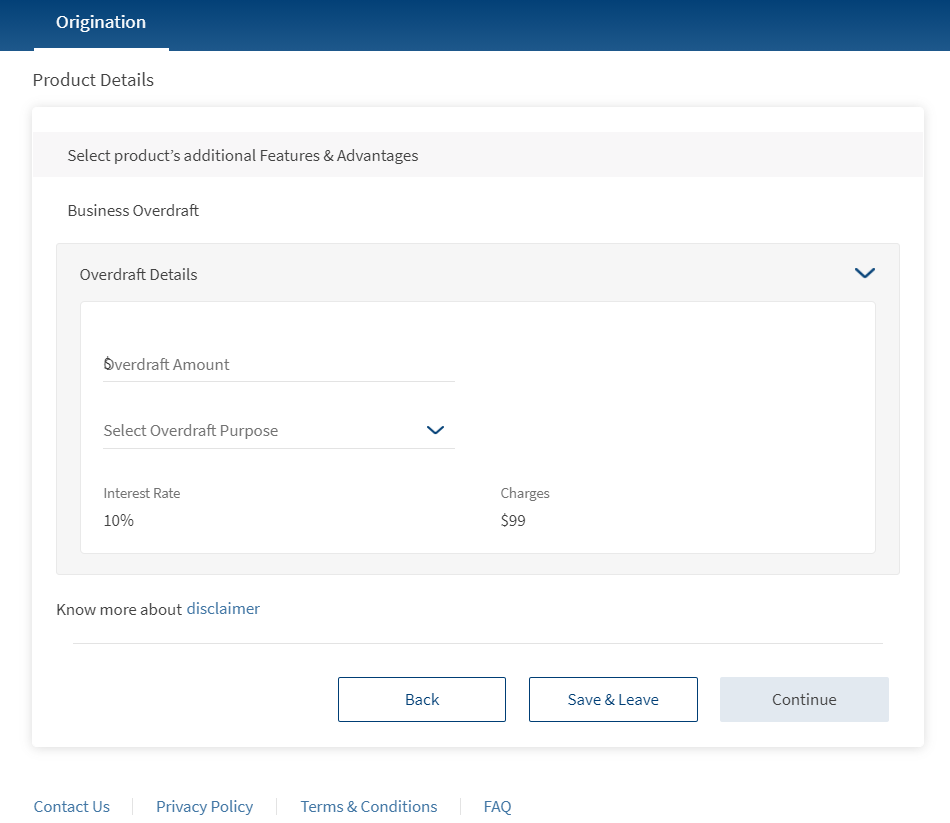
Provide the following details:
- Overdraft Amount: Enter the amount limit which can be withdrawn additional to the credit balance.
- Overdraft Purpose: Select the reason for applying for a Business Overdraft. You can choose the applicable purpose from the drop-down list:
- Funding working capital
- Cover for unforeseen expenses
- Buying Stock
- Settling Invoices
- Salary Payment
- Others
The Overdraft purpose values are configurable from Spotlight.
- Description: This option appears if you choose Others as purpose. You can provide the purpose of choosing the Overdraft here.
The Interest rate and Charges are estimated based on the requested loan amount and fetched from the Overdraft product in the Marketing Catalog Microservice. Click on the disclaimer option for more details on the loan.
Loan Accounts
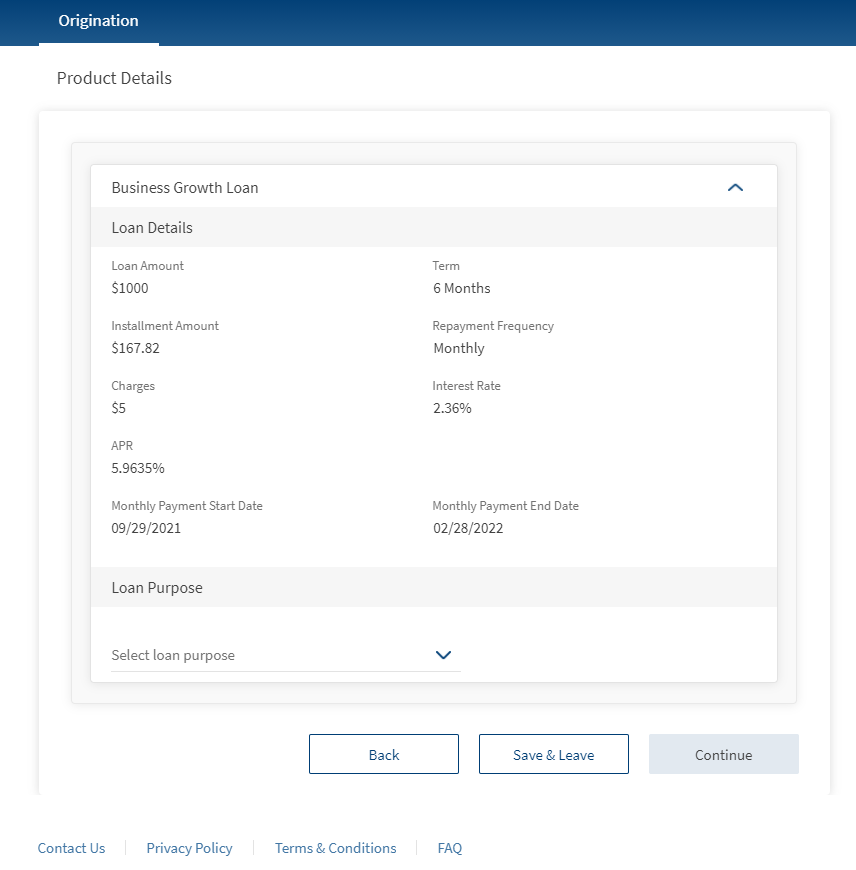
The Loan details such as Installment Amount, Charges, Interest Rate, APR, Monthly Payment Start Date, and Monthly Payment End Date are estimated based on the details (Loan Amount, Term, Installment amount) provided by the user. The loan details are retrieved from the Marketing Catalog Microservice.
Provide the following details:
- Loan Purpose: Select the reason for applying for a Business Growth Loan. You can choose the applicable purpose from the drop-down list:
- Working Capital Finance
- Capital Expenditure
- Technology up-gradation
- Expansion
- Others
- Description: This option appears if you choose Other as purpose. You can provide the purpose of applying for a business growth loan here.
Choose Your Plan
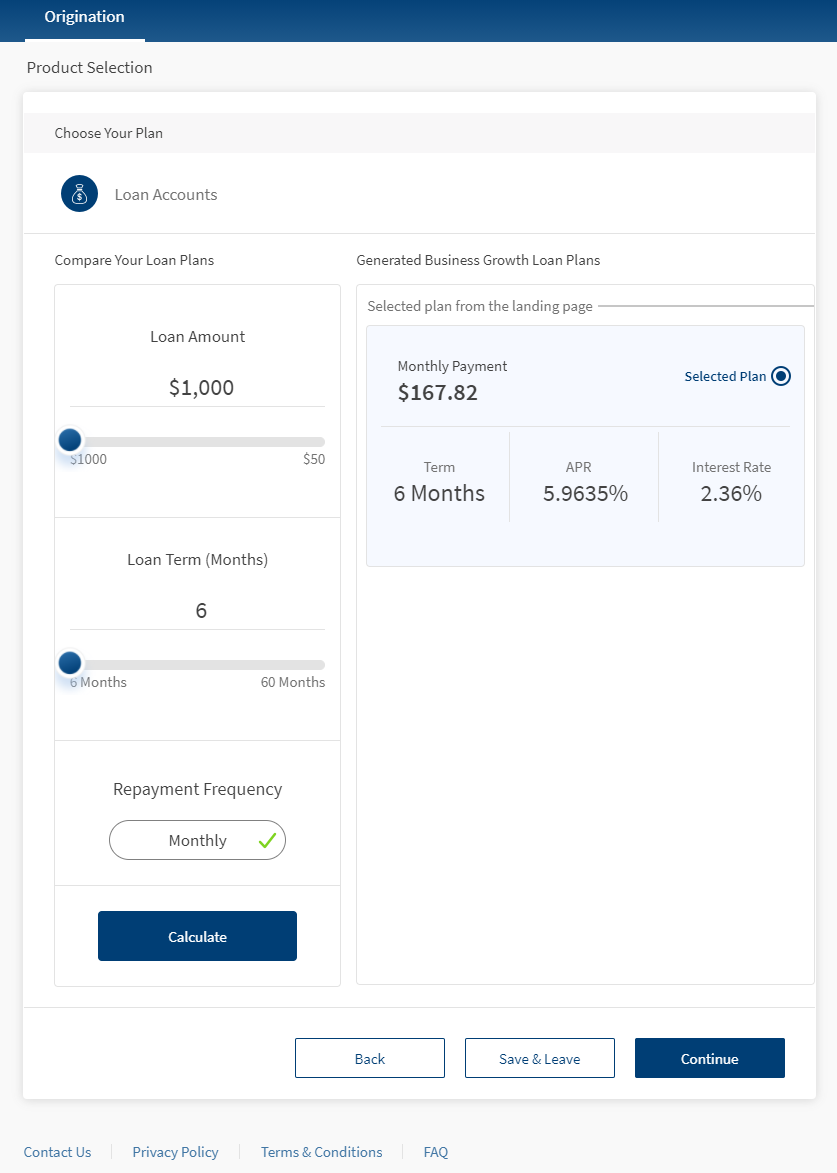
This section displays the loan amount and loan term ranges selected previously, along with the chosen loan plan. For more information on this section, click here.
To modify the loan plan, change the loan amount/ loan term accordingly, and click Calculate. Then select the required plan from the Generated Business Growth Loan plans section.
After clicking Continue in the Product Selection module, the Related Parties section is displayed. However, if a Credit Cards product is selected in the Product Dashboard, then after clicking Continue on the Feature Selection section, the Card Holder Information section appears. This section consists of Personal Information and Address & Identification Details of the card holder. For more information on the Card Holder Information, refer to Personal Information and Address & Identification Details.
Components
The Product Selection section contains the following components:
| Component Name | Instance Name |
|---|---|
| com.dbx.selectProductsV2 | LandingPageProducts |
| com.nuo.Roadmap | Roadmap |
| com.dbx.bannerError | bannerError |
| com.dbx.popup | closePopUp |
| com.dbx.customheaderNUOV2 | customheaderNUOV2 |
| com.dbx.customfooter | customfooterNUO |
| com.nuo.loading | loading |
| com.dbx.navButtons | navButtons |
| com.dbx.popup | popup |
| com.nuo.procedureForNUO | procedureForNUO |
The Feature Selection section contains the following components:
| Component Name | Instance Name |
|---|---|
| com.nuo.Roadmap | Roadmap |
| com.dbx.popup | backConfirmationPopup |
| com.dbx.bannerError | bannerError |
| com.dbx.popup | closePopUp |
| com.dbx.customheaderNUOV2 | customheaderNUOV2 |
| com.dbx.customfooter | customfooterNUO |
| com.dbx.featureSelection | featureSelection |
| com.nuo.loading | loading |
| com.dbx.navButtons | navButtons |
| com.dbx.popup | popup |
| com.nuo.procedureForNUO | procedureForNUO |
Experience APIs
The following APIs are shipped as part of this feature:
| API | Description |
|---|---|
| getProductSelection | This API retrieves selected products from the Origination Data Microservice (ODMS). |
| updateProductSelection | This API updates selected products to the Origination Data Microservice (ODMS); and product IDs in the DBX DB. |
| getProductsForPurpose | This API fetches the list of products for the given purpose from the Marketing Catalog Microservice. |
Configurations
The data displayed in the Product Selection and the Feature Selection screens is based on the information in the Marketing Catalog Microservice. Therefore, you can make some configurations to the Marketing Catalog Microservice to enhance or modify the data in the Product Selection module. For more information on Marketing Catalog Configurations, click here.
Extensibility
By using the Extensibility feature, you can customize the modules based on your requirements. For more information, refer to Extensibility.
In this topic